S

Sarry

2
Workflows

Workflows by Sarry

Workflow preview: Daily digest generator for Telegram groups with Gemini 2.5 Flash
Free intermediate

Daily digest generator for Telegram groups with Gemini 2.5 Flash

This workflow acts as an AI assistant for your Telegram groups, automatically creating a "Daily Digest" of all conversations so you can catch up without scrolling through hundreds of messages. It's perfect for **community managers, project teams, or groups of friends** who want to stay updated without the noise. ## How it works This workflow runs on a simple, high-level process: 1. **Fetches Messages:** Once every 24 hours, it automatically fetches all new messages from any group your bot is a member of. 2. **Generates AI Summary:** It sends the chat transcript to Google's Gemini 1.5 Flash AI, which intelligently creates a structured summary including key topics, shared links, and unanswered questions. 3. **Posts the Digest:** The clean, formatted summary is posted back into the correct Telegram group for everyone to see. *For more detailed explanations of each specific node, please refer to the sticky notes included on the workflow canvas.* ## Set up steps Setup should take about **5-10 minutes**. ### **Prerequisites** * **Telegram Bot Token:** You can get this by talking to the `@BotFather` on Telegram. * **Google Gemini API Key:** You can get a free API key from the [Google AI Studio](https://ai.google.dev/). ### **Configuration** 1. **Add Credentials & Token** * In the `Get Telegram Updates` node, paste your Telegram bot token into the URL. * In the `Generate Summary with Gemini` and `Post Digest to Telegram` nodes, select your Google Gemini and Telegram credentials from the dropdown menus. 2. **Configure Your Telegram Bot** * Using `@BotFather` in Telegram, make sure **Group Privacy Mode is turned OFF** for your bot. This is required for the bot to read messages. * Add your bot as a member to any group you want it to summarize. 3. **Activate the Workflow** * In the n8n editor, click the "Inactive" toggle at the top of the screen to set the workflow to **Active**.

S
Sarry
AI Summarization
5 Aug 2025
565
0
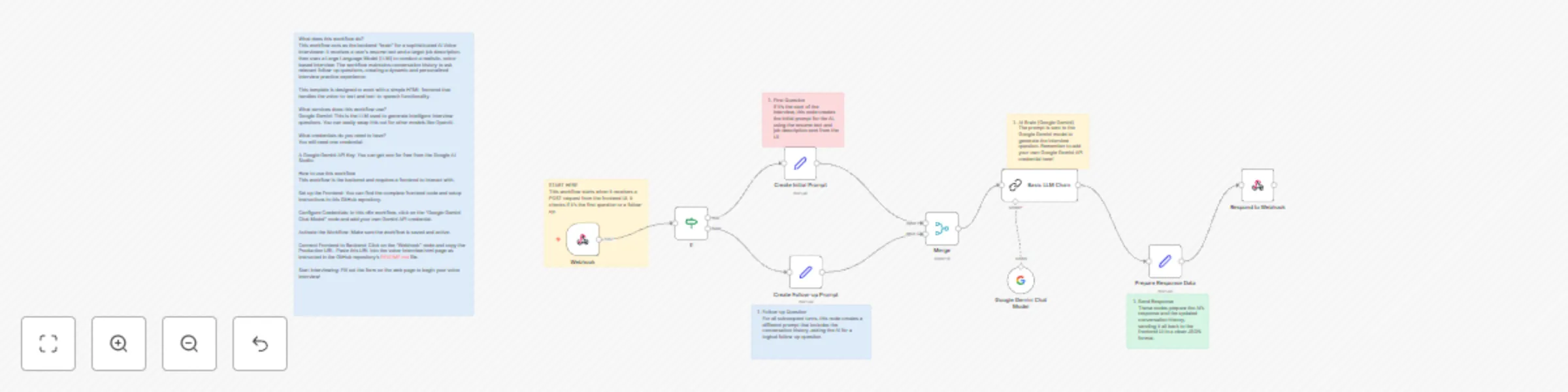
Workflow preview: Practice job interviews with voice-based Google Gemini AI interviewer
Free advanced

Practice job interviews with voice-based Google Gemini AI interviewer

## What does this workflow do? This workflow acts as the backend "brain" for a sophisticated AI Voice Interviewer. It receives a user's resume text and a target job description, then uses a Large Language Model (LLM) to conduct a realistic, voice-based interview. The workflow maintains conversation history to ask relevant follow-up questions, creating a dynamic and personalized interview practice experience. This template is designed to work with a simple HTML frontend that handles the voice-to-text and text-to-speech functionality. ## What services does this workflow use? - **Google Gemini:** This is the LLM used to generate intelligent interview questions. You can easily swap this out for other models like OpenAI. ## What credentials do you need to have? You will need one credential: - A **Google Gemini API Key**. You can get one for free from the [Google AI Studio](https://aistudio.google.com/app/apikey). ## How to use this workflow This workflow is the backend and requires a frontend to interact with. 1. **Set up the Frontend:** You can find the complete frontend code and setup instructions in this [GitHub repository](https://github.com/Sarry000/ai-voice-interviewer). 2. **Configure Credentials:** In this n8n workflow, click on the "Google Gemini Chat Model" node and add your own Gemini API credential. 3. **Activate the Workflow:** Make sure the workflow is saved and active. 4. **Connect Frontend to Backend:** Click on the "Webhook" node and copy the **Production URL**. Paste this URL into the `voice-interview.html` page as instructed in the GitHub repository's `README.md` file. 5. **Start Interviewing:** Fill out the form on the web page to begin your voice interview!

S
Sarry
Personal Productivity
29 Jul 2025
1377
0