SamirLiu
Workflows by SamirLiu
Analyze competitor Facebook ads with AI (GPT-4 & Gemini) & email reports
# Facebook Ads Competitor Creative Analysis & Automated Email Report ### 📝 What this workflow does This workflow automates the process of competitor creative analysis for Facebook Pages. When a user submits their email and a target Facebook Page URL via a web form, the workflow: - Scrapes the latest image and video Facebook ads from the submitted Page using Apify. - Deduplicates and selects the top 5 image and top 5 video ads for further analysis. - Applies advanced AI analysis: - Uses OpenAI Vision (GPT-4) to analyze image ads. - Uses Google Gemini to analyze video ads. - Aggregates all ad insights and generates a structured, visually engaging creative analytics report. - Sends the report directly to the user’s email with ad previews and detailed creative evaluation. ### 👥 Who is this for? - **Marketers** and agencies conducting competitor research on Facebook. - **Brand managers** who want quick, actionable insights into rival ad creative. - **Growth hackers** and performance advertisers analyzing top-performing creative trends. - **Anyone** in need of an automated, AI-based Facebook ad evaluation and reporting tool using n8n. ### 🎯 What problem does this workflow solve? - **Manual ad analysis is time-consuming:** Scraping, filtering, and reviewing Facebook competitor ads by hand is labor-intensive. - **Creative insight requires expertise:** Understanding the message, visuals, and targeting of competitor ads needs marketing/creative skill. - **Lack of automated reporting:** Easily and visually summarize findings for yourself or stakeholders—without manual collation or formatting. This workflow provides a **turnkey, end-to-end solution for competitor creative analysis**, combining real ad data with unbiased, AI-driven creative insights in a shareable email format. ### ⚙️ Setup instructions (About 10-15 minutes) **Before using this AI marketing automation tool, you'll need:** 1. **Add api key to environment variable** 2. **Add required credentials** ### 🔧 How to Customize This Workflow - **Adapt Image/Video Analysis Goals:** Modify the prompts or parameters sent to OpenAI Vision and Gemini to suit your specific analysis objectives—e.g., evaluate branding consistency, detect call-to-action effectiveness, or extract emotional tone. - **Revise Email Report Design:** Customize the formatting, insights, and visuals in the delivered report to match your organization’s standards or stakeholder preferences. - **Expand Input Fields:** Add more fields to the user-facing form, such as a competitor list, campaign dates, or target audience details, for more granular analysis.
🎥 Gemini AI video analysis
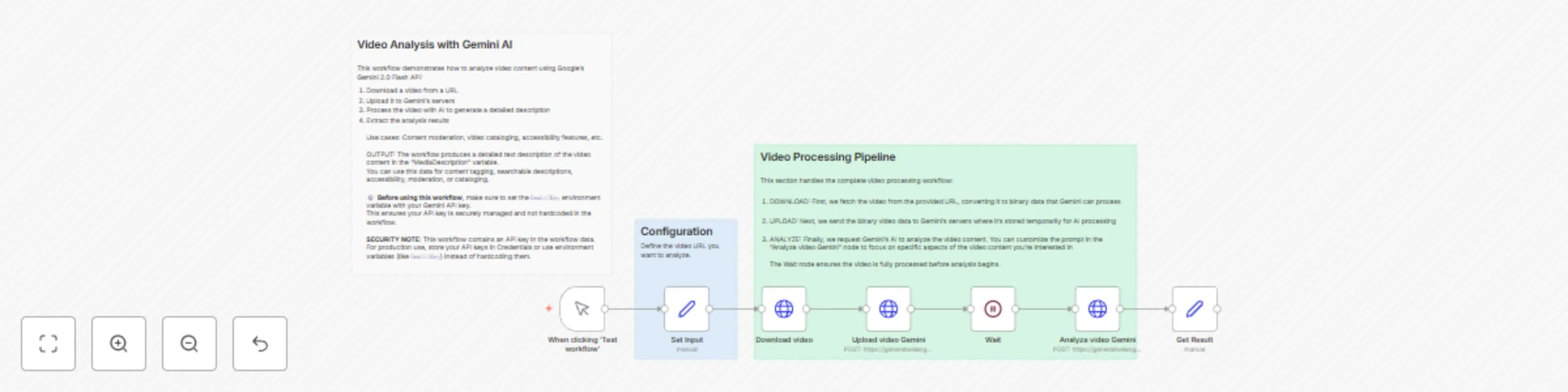
### 📝 Overview This workflow leverages Google Gemini 2.0 Flash multimodal AI to automatically generate detailed descriptions of video content from any public URL. It streamlines video understanding, making it ideal for content cataloging, accessibility, and content moderation. ### 💡 Use Cases - ♿ **Accessibility**: Automatically generate detailed video descriptions for visually impaired users. - 🛡️ **Content Moderation**: Detect inappropriate or off-brand material without manual watching. - 🗂️ **Media Cataloging**: Enrich your media library with automatically extracted metadata. - 📈 **Marketing & Branding**: Gain fast insights into key elements, tone, and branding in video content. ### ⚙️ Setup Instructions 1. **🔑 Get a Gemini API Key** - Register at [ai.google.dev](https://ai.google.dev/) and create an API key. - **Before running the workflow, set your Gemini API key as an environment variable named `GeminiKey`** for secure access within the workflow. - In the `Set Input` node, reference this environment variable instead of hardcoding the key. 2. **🌐 Configure Video URL** - Replace the sample URL in the `Set Input` node with your desired public video URL. - Ensure the video is directly accessible (no login or special permissions required). 3. **📝 Optional: Customize the Analysis** - Edit the prompt in the `Analyze video Gemini` node to focus on the most relevant video details for your use case (e.g., branding, key actions, visual elements). 4. **🔒 Security Tip** - Use n8n's credentials manager or environment variables (like `GeminiKey`) to store your API key securely. - Avoid hardcoding API keys directly in workflow nodes, especially in production environments. ### 🔄 How It Works 1. 📥 **Download** the video from the provided URL. 2. ☁️ **Upload** the video to Gemini’s server for processing. 3. ⏳ **Wait** for Gemini to complete processing. 4. 🤖 **Analyze** the video with Gemini AI using your customized prompt. 5. 📄 **Output** a comprehensive description of the video as `videoDescription`. ### ⚡ Technical Details - Uses HTTP Request nodes to interact with Gemini API endpoints. - Handles file download, upload, status checking, and result retrieval. - Customizable Gemini AI parameters for fine-tuned response. - Main output: `videoDescription` (detailed text describing video content). ### 🚀 Quickstart 1. Set your Gemini API key as the `GeminiKey` environment variable and configure your video URL in the workflow. 2. Execute the workflow. 3. Retrieve your rich, AI-generated video description for downstream use such as automation, tagging, or reporting.
Daily AI news translation & summary with GPT-4 and Telegram delivery
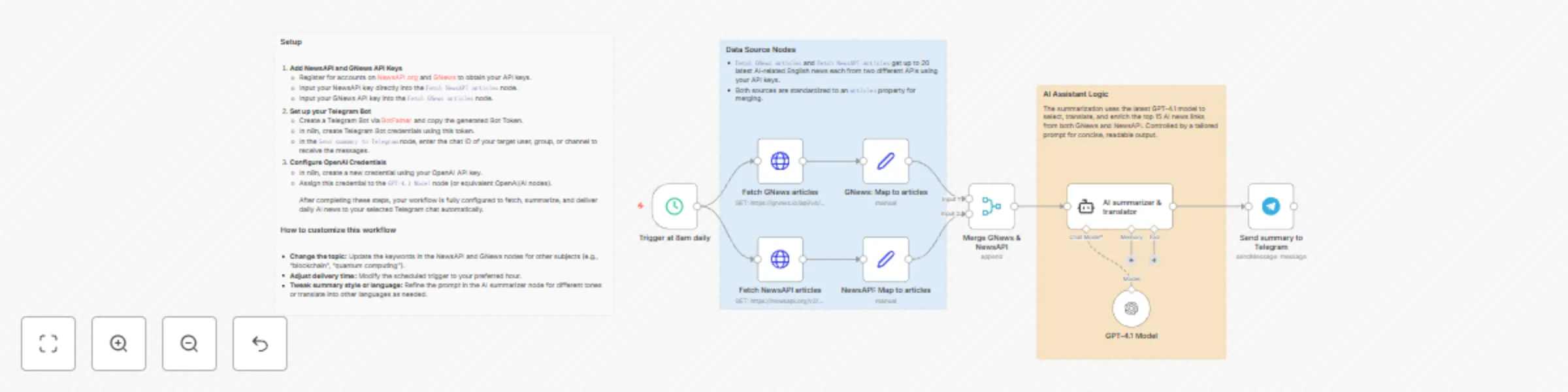
### 📝 What this workflow does Every morning at 8 a.m., this workflow fetches the latest AI-related articles from both GNews and NewsAPI. It merges up to 40 new articles daily, selects the 15 most relevant ones on AI technology and applications, and uses GPT-4.1 to generate concise summaries in accurate Traditional Chinese (while preserving essential English technical terms). Each summary also includes the article link for easy referral. The compiled digest is then posted to your designated Telegram account or group. ### 👥 Who is this for? - AI enthusiasts, professionals, and anyone interested in artificial intelligence news - Individuals and teams wanting a concise daily digest of AI developments in Traditional Chinese - Telegram users who prefer automated information delivery ### 🎯 What problem does this workflow solve? With the rapid evolution of AI technology, it can be overwhelming to keep up with new developments. This workflow addresses information overload by automatically collecting, summarizing, and translating the most important AI news each morning — all delivered conveniently to your chosen Telegram channel or group. ### ⚙️ Setup 1. **🔑 Add NewsAPI and GNews API Keys** - Register for accounts on [NewsAPI.org](https://newsapi.org/) and [GNews](https://gnews.io/) to obtain your API keys. - Input your NewsAPI key directly into the `Fetch NewsAPI articles` node. - Input your GNews API key into the `Fetch GNews articles` node. 2. **🤖 Set up your Telegram Bot** - Create a Telegram Bot via [BotFather](https://core.telegram.org/bots#6-botfather) and copy the generated Bot Token. - In n8n, create Telegram Bot credentials using this token. - In the `Send summary to Telegram` node, enter the chat ID of your target user, group, or channel to receive the messages. 3. **🧠 Configure OpenAI Credentials** - In n8n, create a new credential using your OpenAI API key. - Assign this credential to the `GPT-4.1 Model` node (or equivalent OpenAI/AI nodes). After completing these steps, your workflow is fully configured to fetch, summarize, and deliver daily AI news to your selected Telegram chat automatically. ### 🛠️ How to customize this workflow - **🔍 Change the topic:** Update the keywords in the NewsAPI and GNews nodes for other subjects (e.g., "blockchain", "quantum computing"). - **⏰ Adjust delivery time:** Modify the scheduled trigger to your preferred hour. - **✍️ Tweak summary style or language:** Refine the prompt in the AI summarizer node for different tones or translate into other languages as needed. ### 📦 Dependencies - NewsAPI account - GNews account - Telegram Bot - OpenAI API access (for GPT-4.1) or compatible AI model for Langchain agent