S

Sabrina Ramonov 🍄

6
Workflows

Workflows by Sabrina Ramonov 🍄
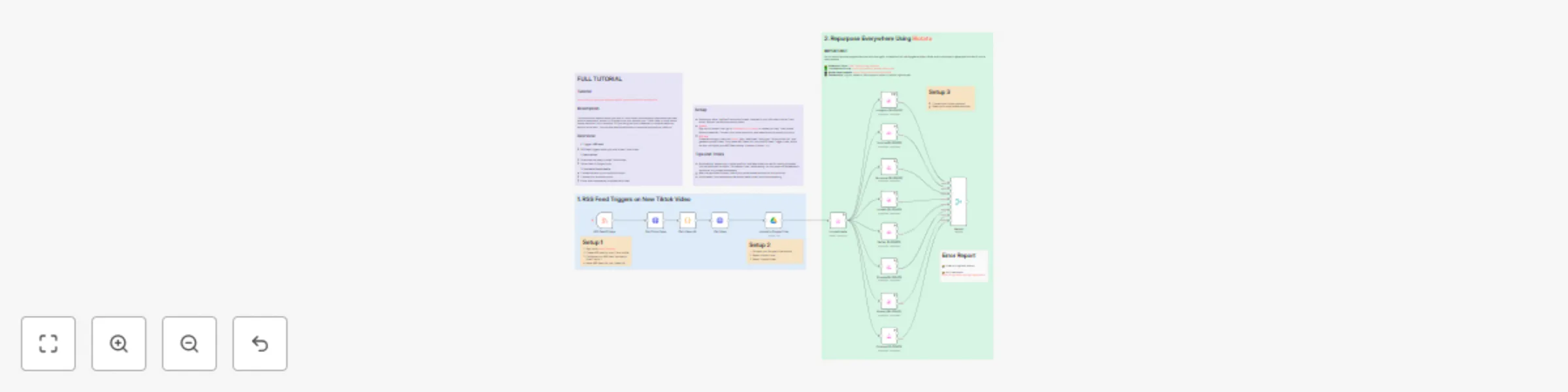
Workflow preview: Cross-post Tiktok videos to multiple social media platforms with RSS & Blotato
Free advanced

Cross-post Tiktok videos to multiple social media platforms with RSS & Blotato

## Description This automation detects when you post a Tiktok video, automatically downloads the video without watermark, stores it in Google Drive, and reposts your Tiktok video to other social media platforms. All on autopilot. So you can grow your presence on multiple platforms, without more work. You can also easily add steps to customize captions per platform. ## Youtube Tutorial https://www.youtube.com/watch?v=yHbyEb-fBGY ## 📄 Documentation [Full Step-by-Step Documentation](https://help.blotato.com/api/templates/8-repurpose-tiktoks-on-autopilot) ## How It Works **1. Trigger** - RSS feed triggers when you post a new Tiktok video **2. Fetch Video** - Download the newly posted Tiktok video (without watermark) - Store video in Google Drive **3. Publish to Social Media** - Connect Blotato to your social accounts - Choose your social accounts - Post immediately or schedule for later ## Setup & Required Accounts - Enable "Verified Community Nodes" in your n8n Admin Panel - Install "Blotato" verified community node - Sign up for [Blotato](https://blotato.com): create API key at Dashboard → [API Keys](https://my.blotato.com/settings/api), then create your Blotato credential and connect your social accounts - Sign up for [RSS.app](https://rss.app): create feed from your TikTok profile, copy RSS URL into the RSS Feed Trigger node, and set "Number of Posts" to 1 - Google Drive account to store downloaded Tiktok videos ## Tips & Tricks - Ensure your RSS feed outputs only 1 item at a time - For multiple posts within an hour, set RSS.app refresh to 15 minutes (paid plan) - While testing: enable only 1 social platform, deactivate others, and consider scheduling posts in the future - After the workflow finishes, check your social account for the final post; if successful, enable another social media node and continue testing ## Troubleshooting Check your [Blotato API Dashboard](https://my.blotato.com/api-dashboard) to see every request, response, and error. Click on a request to see the details. ## Need Help? In the Blotato web app, click the orange button on the bottom right corner. This opens the Support messenger where I help answer technical questions. Connect with me: [Linkedin](https://www.linkedin.com/in/sabrinaramonov) | [Youtube](https://www.youtube.com/@sabrina_ramonov)

S
Sabrina Ramonov 🍄
Social Media
16 Oct 2025
527
0

Workflow preview: Create & post social media carousels across 5 platforms with AI & Blotato
Free advanced

Create & post social media carousels across 5 platforms with AI & Blotato

## Description This AI Agent Carousel Maker uses ChatGPT and Blotato to write, generate, and auto-post social media carousels to 5 social platforms: Instagram, Tiktok, Facebook, Twitter, and Pinterest. Simply chat with the AI agent, confirm which prebuilt viral carousel template you want to use, then the AI Agent populates the template with your personalized information and quotes, and posts to social media on autopilot. ## Who Is This For? This is perfect for entrepreneurs, small businesses, content creators, digital marketing agencies, social media marketing agencies, and influencers. ## How It Works **1. Chat: AI Agent Carousel Maker** - Chat with AI agent about your desired carousel - Confirm quotes and carousel template to use **2. Carousel Generation** - AI agent calls corresponding Blotato tool to generate carousel - Wait and fetch completed carousel **3. Publish to Social Media via Blotato** - Choose your social accounts - Either post immediately or schedule for later ## Setup - Sign up for OpenAPI API access and create credential - Sign up for Blotato.com - Generate Blotato API Key by going to Settings > API > Generate API Key (paid feature only) - Create Blotato credential - If you're using n8n, ensure you have ""Verified Community Nodes"" enabled in your n8n Admin Panel. Then, install ""Blotato"" verified community node. - Click ""Open chat"" to test workflow - Complete SETUP sticky notes in BROWN in this template ## Tips & Tricks - AFTER your first successful run, open each carousel template tool call (i.e. pink nodes attached to AI Agent Carousel Maker) and tweak the parameters, but DO NOT change the ""quotes"" parameter unless you're an n8n expert. - DO NOT edit the 'quotes' parameter unless you're an n8n expert. - When adding a new template, DO NOT duplicate an existing node. Instead, click '+ Tool' > Blotato Tool > Video > Create > select new template. This ensures template parameters are correctly loaded. - While testing: enable only 1 social platform, and deactivate the rest. Add optional parameter 'scheduledTime' so that you don't accidentally post to social media. Check your content calendar here: https://my.blotato.com/queue/schedules ## 📄 Documentation [Full Tutorial](https://help.blotato.com/api/templates/5-automate-instagram-carousels-with-ai-chat) ## Troubleshooting Check [Blotato API Dashboard](https://my.blotato.com/api-dashboard) and logs to review requests, responses, and errors. Verify template parameters and n8n node configuration if runs fail. You can also: - [View all video/carousel templates available](https://my.blotato.com/videos/new) - [Check how your carousels look](https://my.blotato.com/videos) ## Need Help? In the Blotato web app, click the orange button on the bottom right corner. This opens the Support messenger where I help answer technical questions. Connect with me: [Linkedin](https://www.linkedin.com/in/sabrinaramonov) | [Youtube](https://www.youtube.com/@sabrina_ramonov)

S
Sabrina Ramonov 🍄
Social Media
14 Sep 2025
1151
0

Workflow preview: Create & post viral news AI avatar videos to 9 platforms with Perplexity & HeyGen
Free advanced

Create & post viral news AI avatar videos to 9 platforms with Perplexity & HeyGen

## Description This fully automated AI Twin Viral News system researches the latest trending news in any niche or industry, then generates talking-head AI clone videos WITHOUT having to film or edit yourself. This can easily be tailored to any particular niche, simply by updating the Perplexity research prompty. It combines ChatGPT, Perplexity, HeyGen, and Blotato to research, create, and auto-post talking-head AI avatar videos to every social media platform, every single day. ## Who Is This For? This is perfect for digital marketing agencies, small business owners, entrepreneurs, content creators, influencers, and social media agencies. ## How It Works **1. Trigger** - Schedule: configured to run once daily at 10am **2. AI Researcher** - Call Perplexity to research the top 10 latest news in your industry - Select news story most likely to go viral - Compile detailed factual report on selected news story **3. AI Writer** - AI writes monologue script, video caption, and short title **4. Create Avatar Video** - Call HeyGen API (requires paid API plan), specifying your avatar ID and voice ID - Create avatar video; optionally pass an image/video background if you have a green screen avatar **5. Get Video** - Wait awhile, then fetch completed avatar video - Upload video to Blotato **6. Publish to Social Media via Blotato** - Connect your Blotato account - Choose your social accounts - Either post immediately or schedule for later ## Setup & Required Accounts - Sign up for Perplexity.ai and set up your API Billing - Generate your Perplexity API Key: https://www.perplexity.ai/account/api/keys - Sign up for Blotato.com - Generate Blotato API Key via Settings > API > Generate API Key (paid feature only) - Ensure "Verified Community Nodes" enabled in n8n Admin Panel - Install "Blotato" verified community node - Create Blotato credential - Sign up for HeyGen web plan and API plan - Paste your HeyGen API key, HeyGen avatar ID, and HeyGen voice ID - Complete the 2 setup steps in BROWN sticky notes in this template ## Optional: Background Image/Video Behind Avatar - Ensure you have an avatar with background removed (requires higher tier Heygen plan) - Open SETUP HEYGEN node and set parameter 'has_background_video' to `true` - Open SETUP HEYGEN node and replace video URL in parameter 'background_video_url' - Recommendation: Only enable after the basic workflow is operational, i.e. you can make avatar videos without a background ## Tips & Tricks - Perplexity API account must have billing funded - HeyGen API requires paid plan - Make sure you copied your avatar ID correctly (not the group avatar ID) - If your script is long, it takes more time for your video to finish - While testing: - Enable only 1 social platform and deactivate the rest - Update AI writer prompt to return a 5-second script instead of 30 seconds to reduce processing time - Go to HeyGen and check that your avatar video is being processed - After the workflow finishes, check your social media account for the final post - If successful, enable another social media node and continue testing ## 📄 Documentation [Full Tutorial](https://help.blotato.com/api/templates/4-viral-news-to-ai-avatar-videos) ## Troubleshooting Check your [Blotato API Dashboard](https://my.blotato.com/api-dashboard) to see every request, response, and error. Click on a request to see the details. ## Need Help? In the Blotato web app, click the orange button on the bottom right corner. This opens the Support messenger where I help answer technical questions. **Connect with me: [Linkedin](https://www.linkedin.com/in/sabrinaramonov) | [Youtube](https://www.youtube.com/@sabrina_ramonov)**

S
Sabrina Ramonov 🍄
Content Creation
13 Sep 2025
1082
0

Workflow preview: Post long-form threads to X / Twitter, Threads, and Bluesky
Free advanced

Post long-form threads to X / Twitter, Threads, and Bluesky

## Description Fully automated pipeline where you send an email to yourself with a rough idea (subject contains “thread”), n8n’s Gmail trigger picks it up, OpenAI ChatGPT rewrites/apply a viral-thread template, and Blotato posts the long-form thread to X/Twitter, Bluesky, and Meta Threads (optionally schedule or include images/videos). Template is easily extensible to other social platforms. ## Who Is This For? Digital creators, content marketers, social media managers, agencies, entrepreneurs, and influencers who want fast, automated long-form thread posting. ## 📄 Documentation [Full Step-by-Step Tutorial](https://help.blotato.com/api/templates/2-email-to-long-form-thread) ## How It Works **1. Trigger: Gmail** - Connect your Gmail account. - n8n monitors emails sent from you and filters for subjects containing the word “thread”. **2. AI Thread Writer: OpenAI ChatGPT** - Connect your OpenAI account. - Prompt ChatGPT to clean up your draft and format a long-form viral thread. **3. Publish to Social Media via Blotato** - Connect your Blotato account and choose social accounts (X/Twitter, Threads, Bluesky). - Schedule or post immediately. - Supports optional image/video URLs via a `mediaUrls` array (publicly accessible URLs). Example email to trigger the workflow: **Email Subject:** thread **Email Body:** I'm obsessed with voice AI apps. Super Whisper is my current favorite because it runs locally and keeps my voice data private. I talk to it instead of typing. Way faster. ## Setup & Required Accounts - Gmail account (used as trigger) - n8n Gmail OAuth doc: https://docs.n8n.io/integrations/builtin/credentials/google/oauth-single-service - OpenAI Platform account (access to ChatGPT) - Blotato account: https://blotato.com - Generate Blotato API Key: Settings > API > Generate API Key (paid feature only) - Sign in to Blotato and create an API Key (required for posting) - n8n: - Ensure "Verified Community Nodes" enabled in your n8n Admin Panel - Install the "Blotato" community node and create Blotato credentials ## Optional: Media & Style Tweaks - Attach images/videos: insert publicly accessible URLs into the `mediaUrls` array (advanced). - To emulate a specific tone/structure, provide ChatGPT examples of your favorite viral threads or replace the example viral-thread prompt with your preferred example. - Voice-to-text tip: record ideas (e.g., Superwhispr) and send the transcript by email — ChatGPT will clean it up. ## Tips & Tricks - During testing, use “Scheduled Time” in Blotato instead of immediate posting to preview before going live. - Start with a single social platform while testing. - If your script is long or includes media, processing may take longer. - Many users prefer speaking their ideas (voice notes) then letting AI edit — faster than typing. ## Troubleshooting Check your [Blotato API Dashboard](https://my.blotato.com/api-dashboard) to inspect each request, response, and error. Confirm API key validity, n8n node credentials, and that emails sent have subject containing “thread”. ## Need Help? In the Blotato web app, click the orange support button in the bottom right to access Blotato support.

S
Sabrina Ramonov 🍄
Social Media
13 Sep 2025
264
0

Workflow preview: Automated daily posting to 9 social platforms with Google Sheets, Drive and Blotato
Free advanced

Automated daily posting to 9 social platforms with Google Sheets, Drive and Blotato

## Description This automation publishes to 9 social platforms daily! Manage your content in a simple Google Sheet. When you set a post's status to "Ready to Post" in your Google Sheet, this workflow grabs your image/video from your Google Drive, posts your content to 9 social platforms, then updates the Google Sheet post status to "Posted". ## Overview **1. Trigger: Check Every 3 Hours** - Check Google Sheet for posts with Status ""Ready to Post"" - Return 1 post that is ready to go **2. Upload Media to Blotato** - Fetch image/video from Google Drive - Upload image/video to Blotato **3. Publish to Social Media via Blotato** - Connect your Blotato account - Choose your social accounts - Either post immediately or schedule for later - Includes support for images, videos, slideshows, carousels, and threads ## Setup - Sign up for [Blotato](https://www.blotato.com) - Generate Blotato API Key by going to Settings > API > Generate API Key (paid feature only) - Ensure you have "Verified Community Nodes" enabled in your n8n Admin Panel. Install "Blotato" community node. - Create credential for Blotato. - Connect your Google Drive to n8n: https://docs.n8n.io/integrations/builtin/credentials/google/oauth-single-service - Copy this sample Google Sheet. Do NOT change the column names, unless you know what you're doing: https://docs.google.com/spreadsheets/d/1v5S7F9p2apfWRSEHvx8Q6ZX8e-d1lZ4FLlDFyc0-ZA4/edit - Make your Google Drive folder containing images/videos PUBLIC (i.e. Anyone with the link) - Complete the 3 setup steps shown in BROWN sticky notes in this template ## Troubleshooting Checklist - your Google Drive is public - column names in your Google Sheet match the original example - file size < 60MB; for large files, Google Drive does not work, use Amazon S3 instead ## 📄 Documentation [Full Tutorial](https://help.blotato.com/api/templates/1-post-everywhere) ## Troubleshooting Check your [Blotato API Dashboard](https://my.blotato.com/api-dashboard) to see every request, response, and error. Click on a request to see the details. ## Need Help? In the Blotato web app, click the orange button on the bottom right corner. This opens the Support messenger where I help answer technical questions

S
Sabrina Ramonov 🍄
Social Media
12 Sep 2025
737
0

Workflow preview: Generate & auto-post tech news AI avatar videos to social media with Heygen and Blotato
Free advanced

Generate & auto-post tech news AI avatar videos to social media with Heygen and Blotato

*This workflow contains community nodes that are only compatible with the self-hosted version of n8n.* ## Description This fully automated AI Avatar Social Media system creates talking head AI clone videos, WITHOUT having to film or edit yourself. It combines n8n, AI agent, HeyGen, and Blotato to research, create, and distribute talking head AI clone videos to every social media platform every single day. This template is ideal for content creators, social media managers, social media agencies, small businesses, and marketers who want to to scale short-form video creation, without manually filming and editing every single video. ## Overview **1. Trigger: Schedule** - Configured to run once daily at 10am **2. AI News Research** - Research viral news from tech-focused forum, Hackernews - Fetch the selected news item, plus discussion comments **3. AI Writer** - AI writes 30-second monologue script - AI writes short video caption **4. Create Avatar Video** - Call Heygen API (requires paid API plan), specifying your avatar ID and voice ID - Create avatar video, optionally passing in an image/video background if you have a green screen avatar (matte: true) **5. Get Video** - Wait awhile, then fetch completed avatar video - Upload video to Blotato **6. Publish to Social Media via Blotato** - Connect your Blotato account - Choose your social accounts - Either post immediately or schedule for later" ## 📄 Documentation [Full Tutorial](https://help.blotato.com/api/templates/3-hackernews-to-ai-clone-videos) ## Troubleshooting Check your [Blotato API Dashboard](https://my.blotato.com/api-dashboard) to see every request, response, and error. Click on a request to see the details. ## Need Help? In the Blotato web app, click the orange button on the bottom right corner. This opens the Support messenger where I help answer technical questions.

S
Sabrina Ramonov 🍄
Content Creation
6 Sep 2025
890
0