Automate Marketing Revenue Attribution & ROI Analytics with Airtable and Slack
## This n8n is a daily analytics automation that calculates which lead sources generate actual revenue, not just leads. Provides ROI data, conversion rates, and budget allocation recommendations.
Use Case: automates marketing ROI tracking by linking closed deals to their lead sources in Airtable, calculating revenue and ROI per channel, and sending daily insights to Slack.
## **What It Does**
- Runs nightly to analyze closed deals from last 30 days
- Matches deals to their original lead sources
- Calculates total revenue per source
- Computes ROI (revenue vs. cost per lead)
- Determines conversion rates by source
- Updates Lead Sources table with metrics
- Sends weekly reports to team
## How It Works
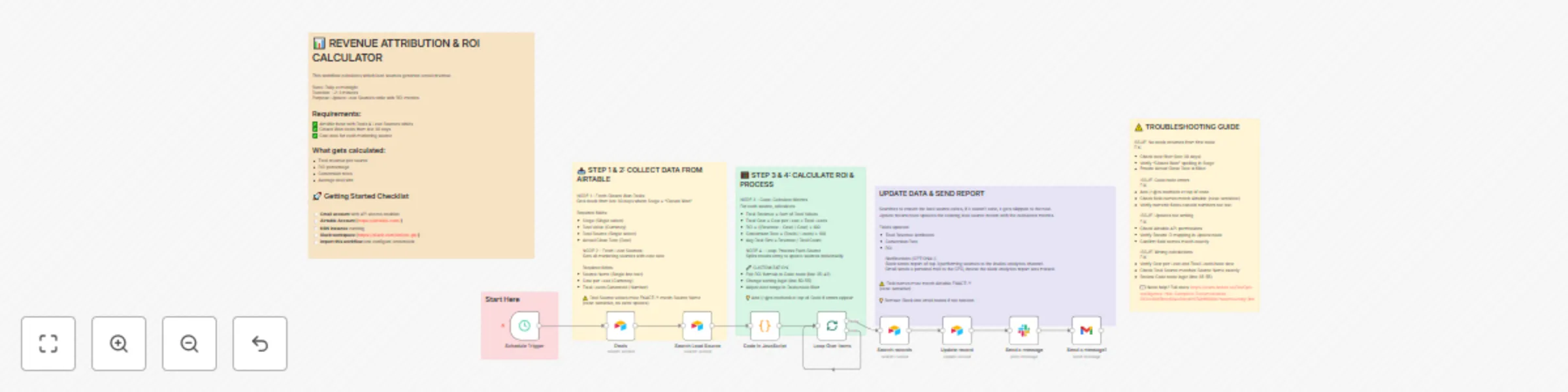
**Step 1: Schedule Trigger**
Runs daily at midnight
**Step 2: Fetch Closed Won Deals**
Gets all deals where:
- Stage = "Closed Won"
- Actual Close Date in last 30 days
**Step 3: Fetch Lead Sources**
Gets cost and lead count data from Lead Sources table
**Step 4: Calculate ROI (JavaScript)**
For each source:
- Total revenue = Sum of all deals from that source
- Total cost = Cost per lead × Total leads
- ROI = ((Revenue - Cost) / Cost) × 100
- Conversion rate = Deals closed / Total leads × 100
- Average deal size = Revenue / Deal count
**Step 5: Update Lead Sources**
Writes calculated metrics back to Airtable
**Step 6: Send Report**
Slack message with top 3 performing sources
## **Business Impact**
- **Marketing ROI:** Know exactly which channels generate revenue
- **Budget optimization:** Allocate spend to highest-ROI sources
- **Data-driven decisions:** Stop guessing, start knowing
- **Cost reduction:** Cut low-performing channels
- **Revenue growth:** Double down on what works
## **Technical Requirements**
- n8n (self-hosted or cloud)
- Airtable (uses existing tables)
- Slack (for reports)
- Gmail for reminder incase CEO missed the report in the Slack channel (optional)