sato rio
Workflows by sato rio
Automate demand forecasting & inventory ordering with AI, MySQL & optimal supplier selection
This workflow streamlines the entire inventory replenishment process by leveraging AI for demand forecasting and intelligent logic for supplier selection. It aggregates data from multiple sources—POS systems, weather forecasts, SNS trends, and historical sales—to predict future demand. Based on these predictions, it calculates shortages, requests quotes from multiple suppliers, selects the optimal vendor based on cost and lead time, and executes the order automatically. ## 🚀 Who is this for? - **Retail & E-commerce Managers** aiming to minimize stockouts and reduce overstock. - **Supply Chain Operations** looking to automate procurement and vendor selection. - **Data Analysts** wanting to integrate external factors (weather, trends) into inventory planning. ## 💡 How it works 1. **Data Aggregation**: Fetches data from POS systems, MySQL (historical sales), OpenWeatherMap (weather), and SNS trend APIs. 2. **AI Forecasting**: Formats the data and sends it to an AI prediction API to forecast demand for the next 7 days. 3. **Shortage Calculation**: Compares the forecast against current stock and safety stock to determine necessary order quantities. 4. **Supplier Optimization**: For items needing replenishment, the workflow requests quotes from multiple suppliers (A, B, C) in parallel. It selects the best supplier based on the lowest total cost within a 7-day lead time. 5. **Execution & Logging**: Places the order via API, updates the inventory system, and logs the transaction to MySQL. 6. **Anomaly Detection**: If the AI's confidence score is low, it skips the auto-order and sends an alert to **Slack** for manual review. ## ⚙️ Setup steps 1. **Configure Credentials**: Set up credentials for **MySQL** and **Slack** in n8n. 2. **API Keys**: You will need an API key for **OpenWeatherMap** (or a similar service). 3. **Update Endpoints**: The HTTP Request nodes use placeholder URLs (e.g., `pos-api.example.com`, `ai-prediction-api.example.com`). Replace these with your actual internal APIs, ERP endpoints, or AI service (like OpenAI). 4. **Database Prep**: Ensure your MySQL database has a table named `forecast_order_log` to store the order history. 5. **Schedule**: The workflow is set to run daily at 03:00. Adjust the **Schedule Trigger** node as needed. ## 📋 Requirements - **n8n** (Self-hosted or Cloud) - **MySQL** database - **Slack** workspace - External APIs for POS, Inventory, and Supplier communication (or mock endpoints for testing).
Automate job applicant screening with GPT-4, Gmail & Google Sheets
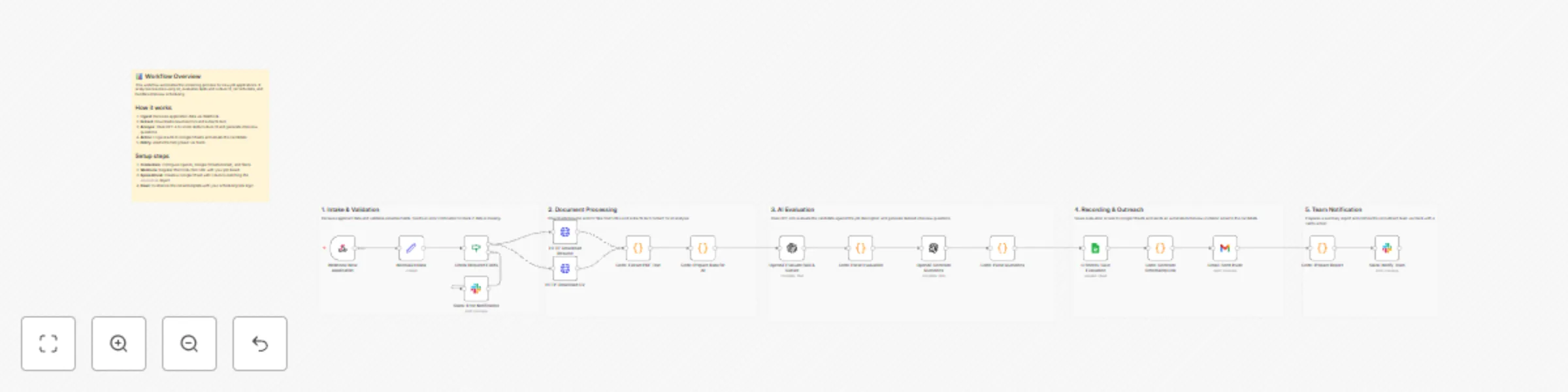
This workflow automates the initial screening process for new job applications, freeing up your recruitment team to focus on qualified candidates. It receives applications from a webhook, uses OpenAI (GPT-4) to analyze resumes for skill and culture fit, generates interview questions, logs the results to Google Sheets, sends interview invitations via Gmail, and notifies your team on Slack. ## 🚀 Who is this for? - **HR and Recruitment Teams** looking to automate repetitive screening tasks. - **Hiring Managers** who want a consistent, data-driven first pass on applicants. - **Startups and SMBs** aiming to build an efficient, scalable hiring pipeline without a large HR team. ## 💡 How it works 1. **Receive Application**: The workflow triggers when a new application is submitted via a webhook from your job board or application form. 2. **Extract & Analyze**: It downloads the resume/CV, extracts the text, and sends it to **OpenAI (GPT-4)** with a custom prompt. 3. **Score & Generate**: The AI scores the candidate on skill match and culture fit, provides a summary, and generates tailored interview questions based on their experience. 4. **Log Data**: The evaluation scores, AI summary, and candidate information are appended to a new row in a **Google Sheet** for tracking. 5. **Schedule Interview**: A personalized email is sent to the candidate via **Gmail** with a link to schedule their interview. 6. **Notify Team**: A summary card with the AI evaluation and links to the full report is posted in a **Slack** channel to keep the hiring team informed. ## ⚙️ How to set up 1. **Configure Credentials**: Set up your credentials for OpenAI, Google (for both Sheets and Gmail), and Slack in n8n. 2. **Webhook URL**: Copy the "Production URL" from the "Webhook: New Application" node and set it as the destination in your job board's webhook settings (e.g., Greenhouse, Lever, Ashby, or a web form). 3. **Google Sheet**: Create a Google Sheet to track applicants. Update the "G Sheets: Save Evaluation" node with your Spreadsheet ID and Sheet Name. Ensure the columns in your sheet match the data you want to save. 4. **Customize Prompts & Email**: - Modify the prompts in the two **OpenAI** nodes to match your company's values and the specific job requirements. - Update the **Gmail** node with your email content and the logic for your scheduling link (e.g., Calendly, SavvyCal). ## 📋 Requirements - An n8n instance (Cloud or self-hosted). - An **OpenAI API** key. - A **Google** account for Google Sheets and Gmail. - A **Slack** workspace. - A job application source capable of sending webhooks.