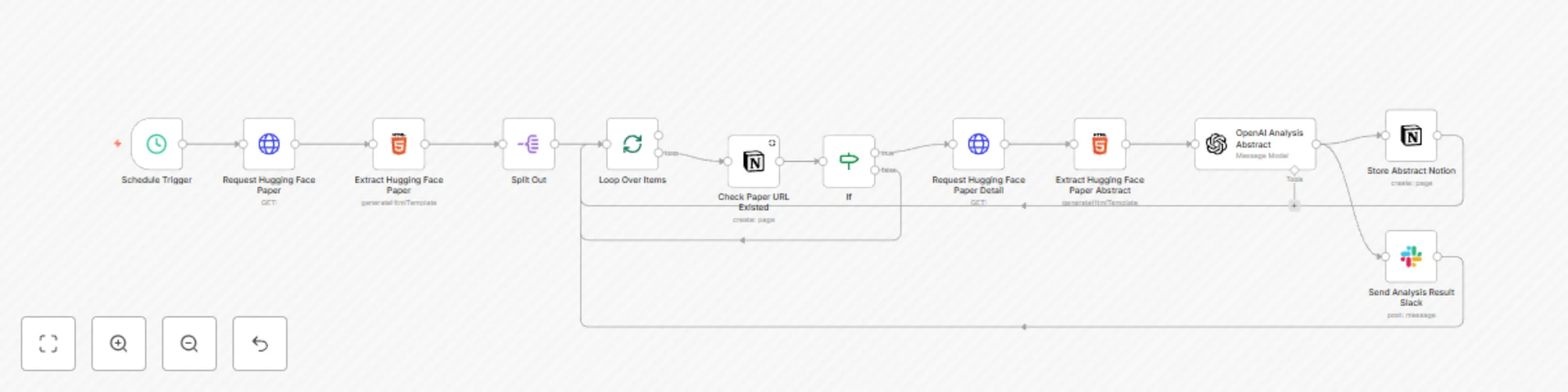
Automated Hugging Face paper summary fetching & categorization workflow
# **How the Automated Workflow Works**
## **Scheduled Fetching from Hugging Face** ⏰
The workflow triggers every weekday at 8 AM, automatically fetching the latest papers from **Hugging Face** for easy access.
## **Duplication Check to Avoid Redundant Entries** 🔍
It ensures the paper's summary is not already stored in your **Notion** workspace, preventing duplicate records and keeping your database organized.
## **Content Analysis with OpenAI** 🧠
Using **OpenAI**'s powerful capabilities, the workflow analyzes the fetched paper summary, extracts key insights, and categorizes the content for easier understanding.
## **Data Storage and Notification Integration** 📥🔔
Once the summary is processed, it's automatically stored in your **Notion** workspace, and a notification containing the paper details is sent to your designated **Slack** channel for quick reference.
---
# **Set Up Your Automated Workflow**
## **Create Your n8n Account** 📝
Start by registering for an **n8n** account and logging into the [**n8n cloud service**](https://n8n.partnerlinks.io/j7p1m1a0ln1d).
## **Connect OpenAI, Notion, and Slack** 🔗
Link your **OpenAI**, **Notion**, and **Slack** accounts by entering the appropriate tokens. This step will take approximately 10–15 minutes to complete.
## **Import the Workflow Template** 📥
Import the provided workflow template into your **n8n** instance to streamline the setup process.
## **Activate the Workflow for Daily Summaries** 🚀
After importing, simply enable the **workflow**, and you’re all set to receive daily paper summaries **automatically**.
**Setup Time** ⏳: Approximately 15–20 minutes.
---
### **Why Use This Automated Workflow?**
This automated workflow not only saves you time by fetching and categorizing the latest research papers but also helps streamline your **Notion** workspace and **Slack** notifications, allowing you to stay organized and efficient without manual intervention.
---
# Results Presentation