P

Parag Javale

3
Workflows

Workflows by Parag Javale

Workflow preview: Automated blog creation from news to publication using Gemini, Ideogram & Slack
Free advanced

Automated blog creation from news to publication using Gemini, Ideogram & Slack

The **AI Blog Creator with Gemini, Replicate Image, Supabase Publishing & Slack** is a fully automated content generation and publishing workflow designed for modern marketing and SaaS teams. It automatically fetches the latest industry trends, generates SEO-optimized blogs using AI, creates a relevant featured image, publishes the post to your CMS (e.g., Supabase or custom API), and notifies your team via Slack all on a daily schedule. This workflow connects multiple services NewsAPI, Google Gemini, Replicate, Supabase, and Slack into one intelligent content pipeline that runs hands-free once set up. --- ### **✨ Features** * 📰 **Fetch Trending Topics** — pulls the latest news or updates from your selected industry (via NewsAPI). * 🤖 **AI Topic Generation** — Gemini suggests trending blog topics relevant to AI, SaaS, and Automation. * 📝 **AI Blog Authoring** — Gemini then writes a full 1200-1500 word SEO-optimized article in Markdown. * 🧹 **Smart JSON Cleaner** — A resilient code node parses Gemini’s output and ensures clean, structured data. * 🖼️ **Auto-Generated Image** — Replicate’s Ideogram model creates a blog cover image based on the content prompt. * 🌐 **Automatic Publishing** — Posts are automatically published to your Supabase or custom backend. * 💬 **Slack Notification** — Notifies your team with blog details and live URL. * ⏰ **Fully Scheduled** — Runs automatically every day at your preferred time (default 10 AM IST). --- ### **⚙️ Workflow Structure** | Step | Node | Purpose | | ---- | ----------------------------------- | ----------------------------------------------- | | 1 | **Schedule Trigger** | Runs daily at 10 AM | | 2 | **Fetch Industry Trends (NewsAPI)** | Retrieves trending articles | | 3 | **Message a model (Gemini)** | Generates trending topic ideas | | 4 | **Message a model1 (Gemini)** | Writes full SEO blog content | | 5 | **Code in JavaScript** | Cleans, validates, and normalizes Gemini output | | 6 | **HTTP Request (Replicate)** | Generates an image using Ideogram | | 7 | **HTTP Request1** | Retrieves generated image URL | | 8 | **Wait + If** | Polls until image generation succeeds | | 9 | **Edit Fields** | Assembles blog fields into final JSON | | 10 | **Publish to Supabase** | Posts to your CMS | | 11 | **Slack Notification** | Sends message to your Slack channel | --- ### **🔧 Setup Instructions** 1. **Import the Workflow** in n8n and enable it. 2. Create the following credentials: * **NewsAPI (Query Auth)** — from [https://newsapi.org](https://newsapi.org) * **Google Gemini (PaLM API)** — use your Gemini API key * **Replicate (Bearer Auth)** — API key from [https://replicate.com/account](https://replicate.com/account) * **Supabase (Header Auth)** — endpoint to your `/functions/v1/blog-api` (set your key in header) * **Slack API** — create a Slack App token with `chat:write` permission 3. Edit the **NewsAPI URL** query parameter to match your industry (e.g., `q=AI automation SaaS`). 4. Update the **Supabase publish URL** to your project endpoint if needed. 5. Adjust the **Slack Channel** name under “Slack Notification”. 6. (Optional) Change the **Schedule Trigger** time as per your timezone. --- ### **💡 Notes & Tips** * The **Code in JavaScript** node is robust against malformed or extra text in Gemini output — it sanitizes Markdown and reconstructs clean JSON safely. * You can replace Supabase with any CMS or Webhook endpoint by editing the “Publish to Supabase” node. * The Replicate model used is `ideogram-ai/ideogram-v3-turbo` — you can swap it with Stable Diffusion or another model for different aesthetics. * Use the `slug` field in your blog URLs for SEO-friendly links. * Test with one manual execution before activating scheduled runs. * If Slack notification fails, verify the token scopes and channel permissions. --- ### **🧩 Tags** `#AI` `#Automation` `#ContentMarketing` `#BlogGenerator` `#n8n` `#Supabase` `#Gemini` `#Replicate` `#Slack` `#WorkflowAutomation`

P
Parag Javale
Content Creation
15 Oct 2025
250
0

Workflow preview: LinkedIn content machine: Email-approved posts with Gemini AI
Free advanced

LinkedIn content machine: Email-approved posts with Gemini AI

Turn a simple email workflow into a **LinkedIn content machine**. Generate post ideas, draft full posts, and auto-publish to LinkedIn all controlled by replying to emails. --- ## 📌 Purpose Automate your LinkedIn posting pipeline using **AI + Email approvals**. - Generate **10 scroll-stopping post ideas** tailored to your niche & audience. - Approve your favorite by replying to the email with a number. - Receive **3 AI-written drafts** for the chosen idea. - Pick your favorite draft via email reply. - The selected post gets **auto-published to LinkedIn** ✅. - All steps are logged in **Google Sheets**. --- ## 🔗 Apps Used - **Google Gemini** → generates ideas & drafts - **Gmail** → email-based approval workflow - **Google Sheets** → tracks ideas, drafts, and published posts - **LinkedIn API** → posts directly to your company or personal account --- ## ✨ Highlights - 📬 Email-based approval → no dashboards, just reply with a number - 📝 10 AI-generated content ideas + 3 full drafts per topic - 🔄 End-to-end tracking in Google Sheets (`ideas → drafts → published`) - ⚡ Auto-posting directly to LinkedIn - ✅ Final confirmation email with preview --- ## 👤 Best For - Startup founders - Agencies managing multiple clients’ LinkedIn - Solopreneurs & creators who want consistent posting --- ## 🛠️ Workflow Overview ```mermaid flowchart TB A["Manual Trigger"] --> B["AI Agent - Generate 10 Ideas"] B --> C["Code - Parse JSON + Correlation ID"] C --> D["Google Sheets - Append Ideas"] D --> E["Gmail - Send Ideas Email"] E --> F["Gmail Trigger - Await Reply"] F --> G["Code1 - Extract Reply Number"] G --> H["Google Sheets - Fetch Row"] H --> I{"Switch Stage"} I -- Ideas --> J["AI Agent - Generate 3 Drafts"] J --> K["Code3 - Parse Drafts"] K --> L["Google Sheets - Update Drafts"] L --> M["Gmail - Send Drafts Email"] I -- Drafts --> N["Code4 - Select Final Draft"] N --> O["LinkedIn - Publish Post"] O --> P["Google Sheets - Update Posted"] P --> Q["Gmail - Send Confirmation"] ```

P
Parag Javale
Social Media
2 Sep 2025
470
0
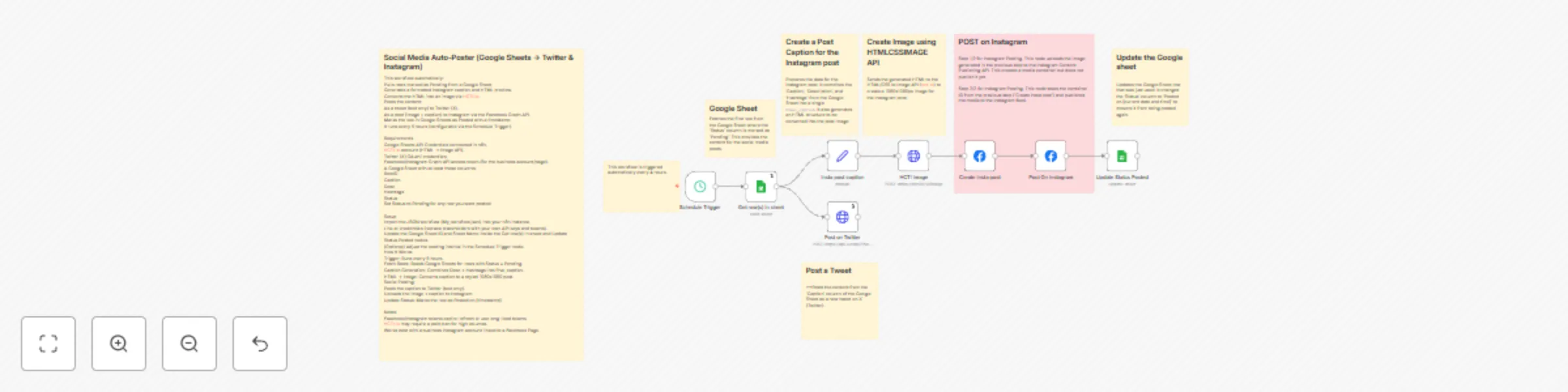
Workflow preview: Schedule social media posts from Google Sheets to Twitter & Instagram
Free advanced

Schedule social media posts from Google Sheets to Twitter & Instagram

# Social Media Auto-Poster (Google Sheets → Twitter & Instagram) This workflow automatically: 1. Pulls rows marked as `Pending` from a Google Sheet. 2. Generates a formatted Instagram caption and HTML preview. 3. Converts the HTML into an image via HCTI.io. 4. Posts the content: - As a tweet (text only) to Twitter (X). - As a post (image + caption) to Instagram via the Facebook Graph API. 5. Marks the row in Google Sheets as `Posted` with a timestamp. It runs **every 5 hours** (configurable via the `Schedule Trigger`). --- ## Requirements - **Google Sheets API Credentials** connected in n8n. - **HCTI.io account** (HTML → Image API). - **Twitter (X) OAuth1 credentials**. - **Facebook/Instagram Graph API** access token (for the business account/page). - A Google Sheet with at least these columns: - `RowID` - `Caption` - `Desc` - `Hashtags` - `Status` Set `Status` to `Pending` for any row you want posted. --- ## Setup 1. Import the JSON workflow (`My_workflow.json`) into your n8n instance. 2. Link all credentials (replace placeholders with your own API keys and tokens). 3. Update the Google Sheet ID and Sheet Name inside the `Get row(s) in sheet` and `Update Status Posted` nodes. 4. (Optional) Adjust the posting interval in the `Schedule Trigger` node. --- ## How It Works 1. **Trigger**: Runs every 5 hours. 2. **Fetch Rows**: Reads Google Sheets for rows with `Status = Pending`. 3. **Caption Generation**: Combines `Desc` + `Hashtags` into `final_caption`. 4. **HTML → Image**: Converts caption to a styled 1080x1080 post. 5. **Social Posting**: - Posts the caption to Twitter (text only). - Uploads the image + caption to Instagram. 6. **Update Status**: Marks the row as `Posted on [timestamp]`. --- ## Notes - Facebook/Instagram tokens **expire**; refresh or use long-lived tokens. - HCTI.io may require a paid plan for high volumes. - Works best with a **business Instagram account linked to a Facebook Page**. --- ## License This workflow can be reused and adapted freely under the MIT license.

P
Parag Javale
Social Media
24 Jul 2025
1394
0