Pauline
Workflows by Pauline
Get a Slack alert when a workflow went wrong
This workflow allows you to have a Slack alert when one of your n8n workflows gets an issue.  - **Error trigger**: This node launched the workflow when one of your active workflows gets an issue - **Slack node**: This node sends you a customized message to alert you and to check the error ⚠️ You don't have to activate this workflow for it to be effective
Transf meeting booking into Notion's Task with verified information
This workflow allows you to transform a meeting booking into Notion's task in order to centralize all of your activity.  - **Calendly trigger**: This node triggers the workflow when a new event gets scheduled. - **Dropcontact**: This node will find the verified email of the contact and enrich it to be able to contact him - **Notion**: This node will create a new task in Notion using the information from the previous node.
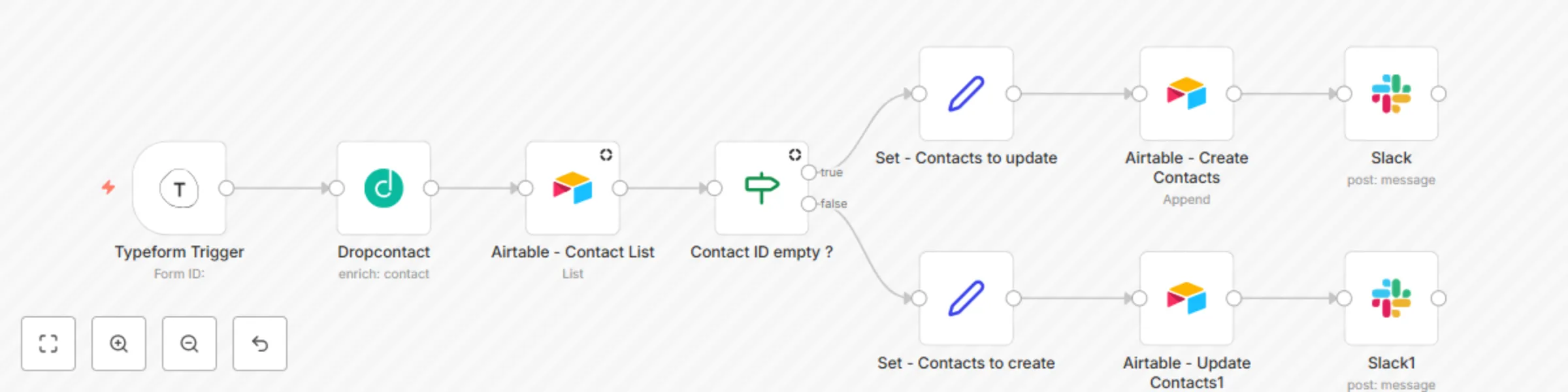
Find emails with Dropcontact on Typeform submission
This workflow automatically finds verified and nominative email and all information (with Dropcontact) to prospect properly from a Typeform.  - **Typeform Trigger**: This node triggers the workflow when a new Typeform is submitted. - **Dropcontact**: This node fetches the new contact information and returns the data of the person and the company associated with the email address, job function, and all legal information. - **Airtable - List**: This will list all the entries from your table in order to check if the subscriber is new or not. - **If**: Does the contact exist in your Airtable yet? - **Set**: Set values on the Airtable values - **Airtable Update**: This node updates your record with new and up-to-date data - **Airtable - Create**: This node creates a new record when the subscriber is a new lead - **Slack**: This node sends an alert when the record is added or updated
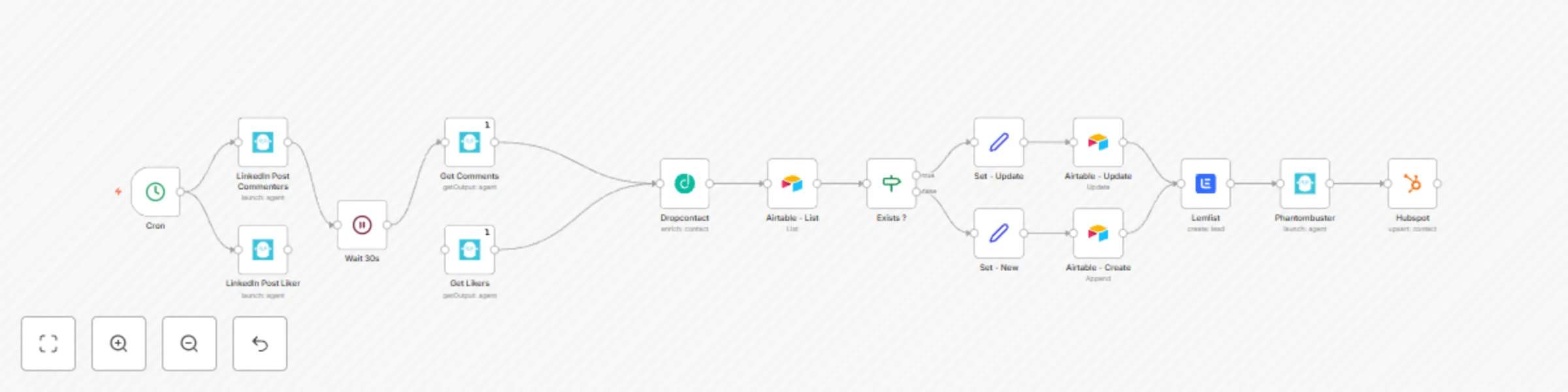
Create HubSpot contacts from LinkedIn post interactions
This workflow automatically does the following: - Scrapes comments and likes from a LinkedIn post. - Adds contact data (nominative and verified email address, gender, standardized first name and last name, all legal company information). - Adds these contacts to Airtable. - Sends an ultra-personalized cold email sequence. - Sends a Linkedin invitation after the cold email sending. - Pushes all contacts to HubSpot. ## Prerequisites - A Phantombuster account and [credentials](https://docs.n8n.io/integrations/credentials/phantombuster/) - A Lemlist account and [credentials](https://docs.n8n.io/integrations/credentials/lemlist/) - A Dropcontact account and [credentials](https://docs.n8n.io/integrations/credentials/dropcontact/) - A HubSpot account and [credentials](https://docs.n8n.io/integrations/credentials/hubspot/) ## How it works - [Cron node](https://docs.n8n.io/integrations/core-nodes/n8n-nodes-base.cron/) executes the workflow every hour. - [Phantombuster node](https://docs.n8n.io/integrations/nodes/n8n-nodes-base.phantombuster/) **(Launch agent)** launches the "LinkedIn Post Likers" phantom and the "LinkedIn Post Commenters" phantom. Note that you have to create these phantoms before setting your workflow automation. - **Phantombuster node (Get Output agent)** gets results from the previous phantoms. - [Dropcontact node](https://docs.n8n.io/integrations/nodes/n8n-nodes-base.dropcontact/) fetches the new contact information and returns the data of the person and the company associated with the email address, job function, and all legal information. - [Airtable node](https://docs.n8n.io/integrations/nodes/n8n-nodes-base.airtable/) **(List)** lists all the records in the Contacts table. - [IF node](https://docs.n8n.io/integrations/core-nodes/n8n-nodes-base.if/) routes the workflow based on whether a contact is in Airtable. - [Set node](https://docs.n8n.io/integrations/core-nodes/n8n-nodes-base.set/) sets the required data for the following nodes. - **Airtable node (Update)** updates the record's name. - **Airtable node (Append)** creates a record if the account doesn't exist yet. - [Lemlist node](https://docs.n8n.io/integrations/nodes/n8n-nodes-base.lemlist/) adds a contact to an existing campaign. - **Phantombuster node (Launch agent)** launches the "LinkedIn Network Booster" phantom. Note that you have to create these phantoms before setting your automation. - [Hubspot node](https://docs.n8n.io/integrations/nodes/n8n-nodes-base.hubspot/) creates or updates the contacts in the HubSpot CRM.
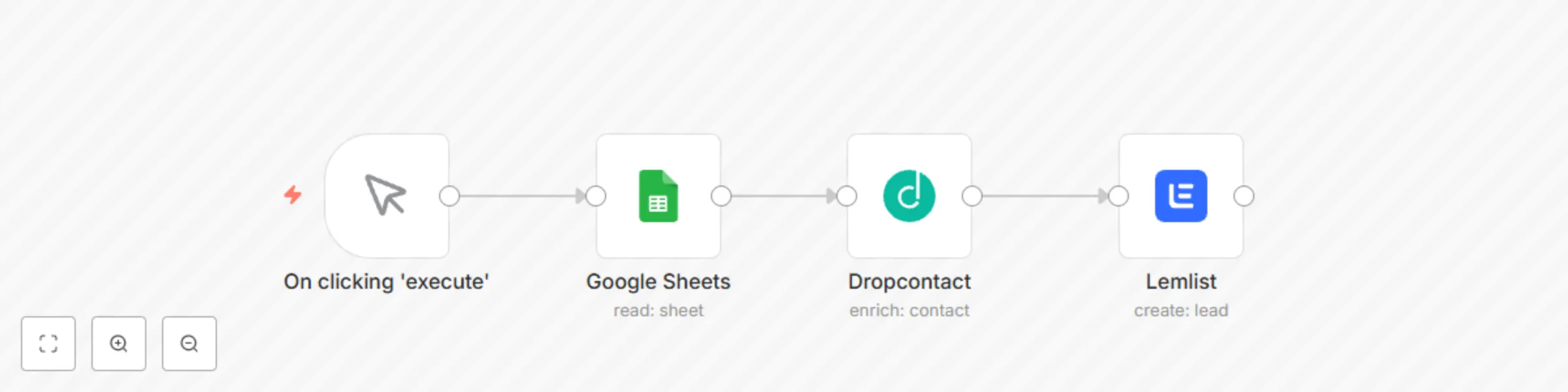
Enrich Google Sheet contacts with Dropcontact
This workflow allows you to find and verify emails and enrich your contact from a Google Sheet with Dropacontact and add them to Lemlist.  **Start node**: The start node exists by default when you create a new workflow. **Google Sheet node**: This node will list all the records from Google Sheet. **Dropcontact node**: This node will find the verified email of the contact and enrich it to be able to contact him **lemlist node**: This node will add a contact to an existing campaign