P

Patrik Schick

2
Workflows

Workflows by Patrik Schick
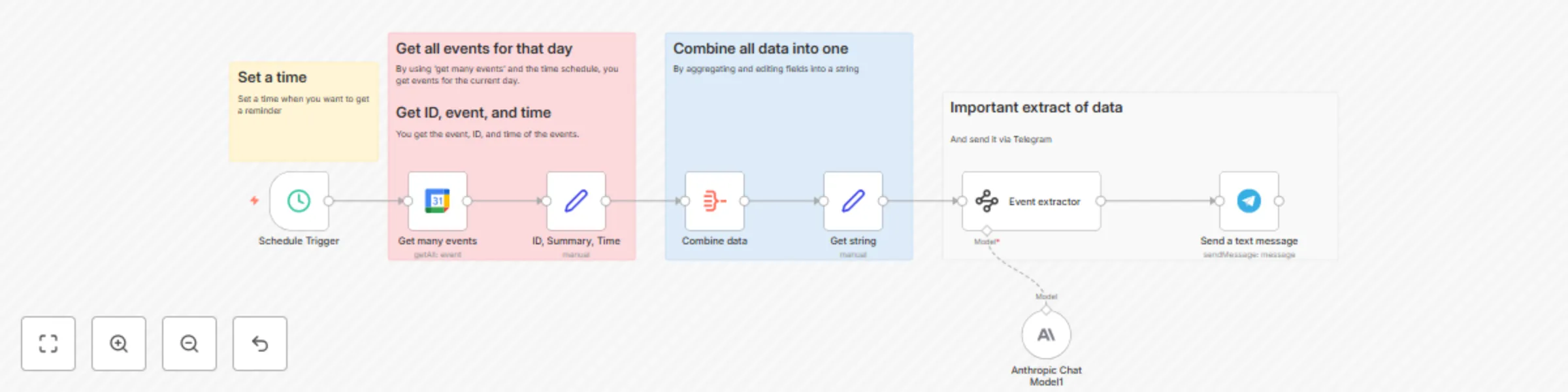
Workflow preview: Daily calendar digest: Format Google Calendar events with Claude 3.5 Sonnet for Telegram
Free intermediate

Daily calendar digest: Format Google Calendar events with Claude 3.5 Sonnet for Telegram

## How it works Every day at 6:00 AM, the workflow pulls all events from your Google Calendar scheduled for that day. It extracts each event’s ID, title, and start time, aggregates them into one list, and converts them into a text string. This text is passed to an AI-powered Information Extractor (using Claude 3.5 Sonnet) to format the events into a clear daily summary. Finally, the summary is sent as a Telegram message to your chosen chat ID, giving you a ready-to-read daily to-do list. ## How to use Connect your Google Calendar account to the Get many events node. Set the correct calendar in the calendar field. Link your Telegram account and set your chatId in the Send a text message node. Adjust the Schedule Trigger node if you want a different reminder time. Activate the workflow — it will run daily and send your event summary to Telegram automatically. ## Customising this workflow Reminder time: Change triggerAtHour in the Schedule Trigger node for morning, evening, or multiple reminders per day. Calendar source: Switch to another Google Calendar or add multiple Get many events nodes for different calendars. Message style: Edit the Information Extractor system prompt to change language, formatting, or level of detail in your summary. Delivery channel: Replace or add another messaging node (e.g., Email, Slack, WhatsApp) if you want your to-do list in different apps. Event filtering: Add a filter before aggregation to include only certain event types or keywords (e.g., “Meeting”, “Deadline”).

P
Patrik Schick
Personal Productivity
12 Aug 2025
254
0
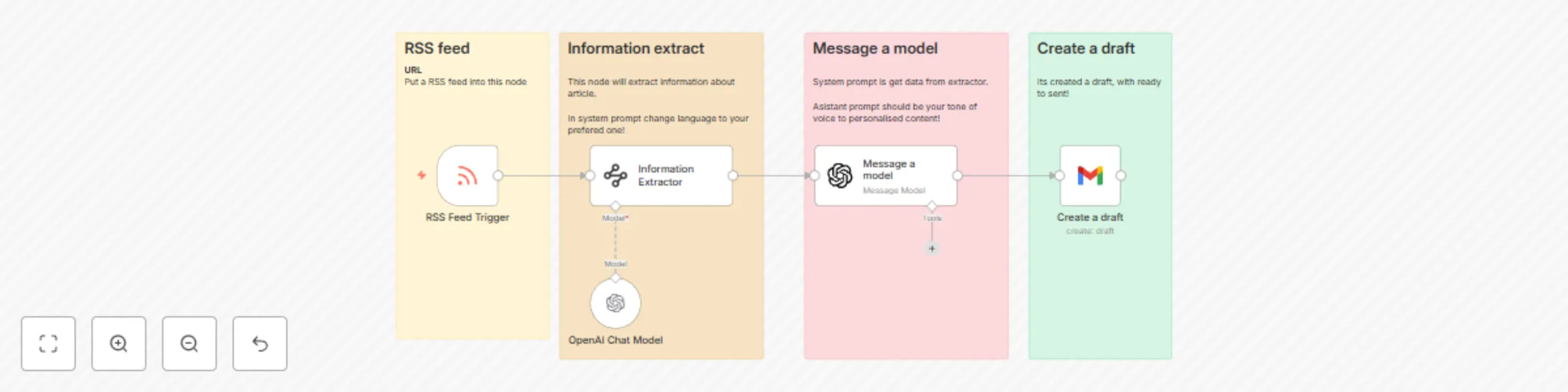
Workflow preview: Generate AI-summarized newsletter drafts from RSS feeds with GPT-4 and Gmail
Free intermediate

Generate AI-summarized newsletter drafts from RSS feeds with GPT-4 and Gmail

## **How it works** Every hour, the workflow checks the RSS feed https://www.artificialintelligence-news.com/feed/ for new articles. For each new item, it extracts the title, snippet, and full content, then sends them to an AI model to summarize and optionally translate. The processed summary is passed to another AI model (with a personalized “Patrik” assistant tone) to generate a newsletter-style text. Finally, the result is saved as a draft email in Gmail, ready to review and send. ## How to use Set your preferred language in the Information Extractor system prompt. Update the RSS feed URL if you want to pull articles from a different source. Customize the assistant tone in the Message a model node for your newsletter style. Connect your Gmail account to the Create a draft node. Activate the workflow — every hour it will fetch new articles, generate newsletter content, and save them as Gmail drafts. ## Customising this workflow Change the source: Replace the RSS feed URL in the RSS Feed Trigger node. Language & length: Edit the system prompt in the Information Extractor to set your preferred language and summary style. Tone & format: Adjust the Message a model node to define the assistant’s personality, structure (headlines, bullets, CTA), or output as HTML. Email settings: Change the subject, sender, or draft folder in the Create a draft node. Frequency: Modify the trigger schedule to run daily, weekly, or at custom intervals.

P
Patrik Schick
Social Media
12 Aug 2025
1159
0