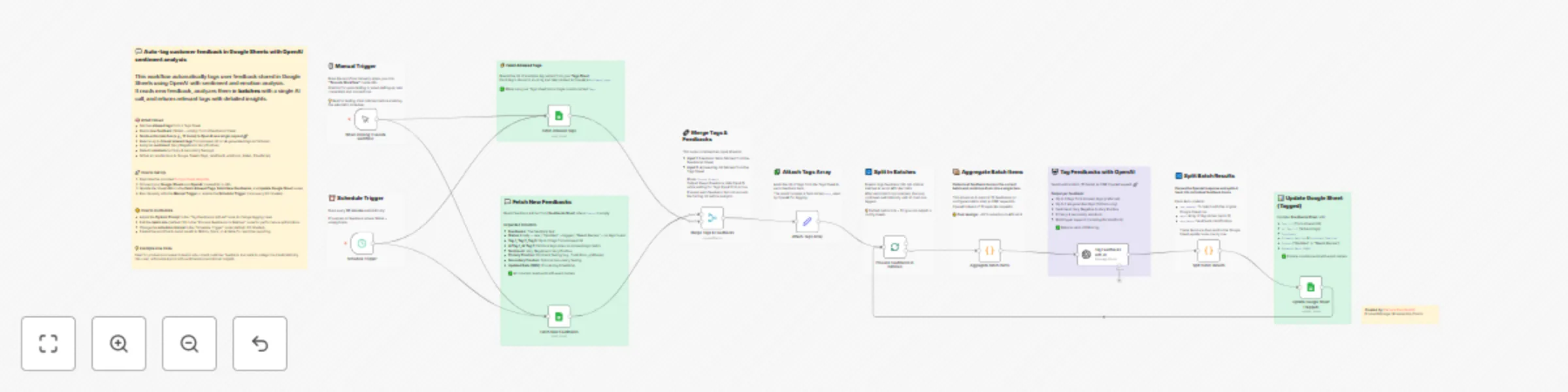
AI automate UX feedback: Sentiment & emotion analysis in Google Sheets + OpenAI
## Who's it for
[](https://youtu.be/tbx5rTQqIKs)
**Product managers**, **customer success teams**, and **UX researchers** who collect feedback in Google Sheets and want to automatically **categorize** and analyze it with **sentiment and emotions** insights. Ideal for teams processing dozens or hundreds of customer comments daily.
- [Read on Medium](https://medium.com/@parhumm/the-future-of-listening-how-ai-turns-feedback-into-clarity-free-ux-n8n-ai-workflow-5dea288ecde1)
- [Watch on Youtube](https://www.youtube.com/watch?v=tbx5rTQqIKs&feature=youtu.be)
## What it does
This workflow automatically tags and analyzes customer feedback stored in **Google Sheets** using OpenAI's GPT-4. It reads unprocessed feedback entries, sends them in batches to **OpenAI** for intelligent tagging and sentiment analysis, then writes the results back to your sheet—complete with up to **3 relevant tags per feedback, sentiment scores (Very Negative to Very Positive), and emotional analysis.**
The workflow uses batch processing to **optimize API costs:** instead of sending 10 separate requests, it sends one request with all 10 feedbacks, reducing API calls by ~90%.
## How it works
1. Fetches allowed tags from a Tags sheet and new feedback entries (where Status is empty) from a Feedbacks sheet
2. Merges tags with feedbacks and processes them in batches of 10
3. Sends each batch to OpenAI with a structured prompt requesting tags, sentiment, and emotional analysis
4. Writes results back to Google Sheets with tags, sentiment, emotions, and timestamps
## Requirements
- Google Sheets account with OAuth2 credentials
- OpenAI API account (uses GPT-4o-mini model)
- Google Sheet template with two sheets: "Tags" (single column) and "Feedbacks" (with columns: Feedbacks, Status, Tag 1-3, Sentiment, Primary/Secondary Emotion, AI Tag 1-2, Updated Date)
## Setup instructions
1. Duplicate the provided [Google Sheet template](https://docs.google.com/spreadsheets/d/1y7B3u5vgQLDidf-NdfPgAiBuQxP9Qa7RvdgsTPG14Fs/edit?gid=0#gid=0)
2. **Connect your credentials** in n8n:
- Google Sheets OAuth2 API
- OpenAI API
3. **Update Sheet URLs** in these nodes:
- "Fetch Allowed Tags" - point to your Tags sheet
- "Fetch New Feedbacks" - point to your Feedbacks sheet
- "Update Google Sheet (Tagged)" - point to your Feedbacks sheet
4. **Test manually** first using the Manual Trigger, then enable the Schedule Trigger for automatic processing every 60 minutes
## How to customize
- **Adjust batch size**: Change the batch size in "Process Feedbacks in Batches" (default: 10) to process more or fewer feedbacks per API call
- **Modify tagging logic**: Edit the system prompt in "Tag Feedbacks with AI" to change how tags are selected or add custom sentiment categories
- **Change schedule**: Update the Schedule Trigger interval (default: 60 minutes) based on your feedback volume
- **Extend the workflow**: Add nodes to send results to Slack, Notion, or Airtable for real-time alerts on negative feedback