P

Pake.AI

2
Workflows

Workflows by Pake.AI
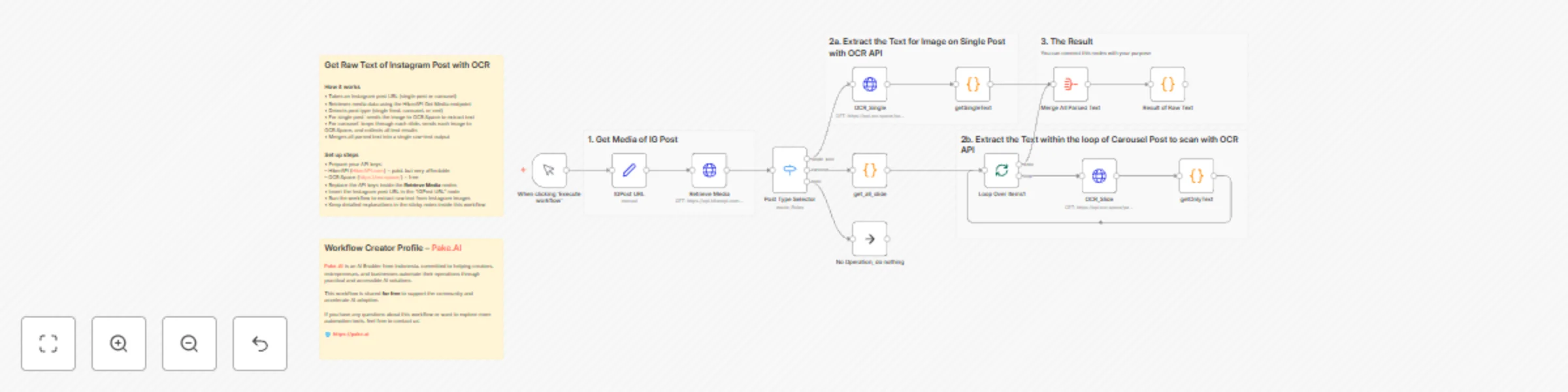
Workflow preview: Extract text from Instagram posts (single & carousel) using HikerAPI & OCR.Space
Free advanced

Extract text from Instagram posts (single & carousel) using HikerAPI & OCR.Space

## Overview This workflow extracts text from Instagram images by combining HikerAPI and OCR.Space. You can use it to collect text data from single posts or carousels, analyze visual content, or repurpose insights without manual copying. The process is fully automated inside N8N and helps marketers, researchers, and teams gather Instagram text quickly. ## How it works - Takes an Instagram post URL, either a single post or a carousel - Retrieves media data using the HikerAPI Get Media endpoint - Detects the post type, whether single feed, carousel, or reel - For single posts, sends the image to OCR.Space for text extraction - For carousels, loops through each slide and extracts text from every image - Merges all parsed results into one raw text output ## Use cases - Collecting text data from Instagram images for research - Extracting visual insights for marketing analysis - Repurposing creator content without manual transcription - Helping marketers, agencies, and researchers identify message patterns in visual posts ## Prerequisites - HikerAPI account with access to the Instagram media endpoint - OCR.Space API key for image text extraction - A valid Instagram post URL - N8N instance capable of running HTTP requests and looping through items ## Set up steps - Prepare your API keys for HikerAPI and OCR.Space - Insert both API keys into their respective HTTP Request nodes - Paste the Instagram post URL into the IGPost URL node - Run the workflow to generate raw text extracted from Instagram images - Check the sticky notes inside the workflow for additional guidance Made by @fataelislami https://pake.ai

P
Pake.AI
Market Research
15 Nov 2025
256
0

Workflow preview: Create SEO-Optimized Blog Articles with GPT-4o Mini's Multi-Stage Generation
Free advanced

Create SEO-Optimized Blog Articles with GPT-4o Mini's Multi-Stage Generation

## Overview This workflow converts a single topic into a full blog article through a structured multi-step process. Instead of generating everything in one pass, it breaks the task into clear stages to produce cleaner structure, better SEO consistency, and more predictable output quality. ## How this workflow differs from asking ChatGPT directly - It does not produce an article in one step. - It separates the process into two focused stages: outline generation and paragraph expansion. - This approach gives you more control over tone, SEO, structure, and keyword placement. ## How it works ### 1. Generate outline - The workflow sends your topic to an AI Agent. - It returns a structured outline based on the topic, desired depth, language, and keyword focus. ### 2. Expand each subtopic - The workflow loops through each outline item. - Every subtopic is expanded into a detailed, SEO-friendly paragraph. - Output is consistent and optimized for readability. ### 3. Produce final outputs - Combines all expanded sections into: - A clean JSON object - A Markdown version ready for blogs or CMS - The JSON includes: - Title - HTML content - Markdown content - You can send this directly to REST APIs such as WordPress, Notion, or documentation platforms. - Content is validated for readability and typically scores well in tools like Yoast SEO. - Uses GPT-4o Mini by default, with average token usage between 2000 and 3000 depending on outline size. ## Use cases - Auto-generate long-form articles for blogs or content marketing. - Turn Instagram or short-form scripts into complete SEO articles. - Create documentation or educational content using consistent templates. ## Setup steps ### 1. Prepare credentials - Add your OpenAI API Key inside n8n’s credential manager. ### 2. Adjust input parameters - Topic or main idea - Number of outline items - Language - Primary keyword - Tone or writing style (optional) ### 3. Customize the workflow - Switch the model if you want higher quality or lower token usage. - Modify the prompt for the outline or paragraph generator to match your writing style. - Add additional nodes if you want to auto-upload the final article to WordPress, Notion, or any API. ### 4. Run the workflow - Enter your topic - Execute the workflow - Retrieve both JSON and Markdown outputs for immediate publishing If you need help expanding this into a full content pipeline or want to integrate it with other automation systems, feel free to customize further.

P
Pake.AI
Content Creation
14 Nov 2025
358
0