Niclas Aunin
Workflows by Niclas Aunin
Generate product feature announcements from Notion to Google Docs with GPT-5 Mini and Claude
This n8n workflow automatically generates professional product announcements and blog articles from your Notion content planning database. ## Who's it for & Use Cases Product Marketers, Content Teams, Product Managers, and Founders who want to: * Automate product announcement creation from their Notion product backlog. * Generate SEO and AI Search/ALLMO optimized blog articles with consistent structure and brand voice * Maintain an up to date product changelog for products with frequent udpates. ## How It Works ### Phase 1: Notion Trigger & Validation 1. Workflow monitors your Notion "Content Plan" database for page updates 2. Validates that the entry is marked as ready for writing 3. Checks that content type is set to "Product" (filters other content types) ### Phase 2: AI Outline Generation 1. GPT-5 Mini creates a structured outline based on: - Project name from Notion - Notes field (context/instructions) - Built-in SEO and ALLMO best practices 2. Output includes sections, subsections, and key talking points ### Phase 3: Full Article Generation 1. Claude Sonnet 4.5 writes the complete product announcement using: - The generated outline - Project details from Notion - Expert product communications system prompt 2. Article follows structured format: headline, summary, feature sections, FAQ, CTA, and SEO metadata ### Phase 4: Google Docs Creation & Notion Update 1. Creates new Google Doc with your project name as title 2. Inserts the complete Markdown article into the document 3. Updates Notion page with Google Docs link for instant access 4. Marks the project as complete in Notion ## How to Setup * Connect your Notion account and select your Content Plan database * Enter API credentials in the Claude and OpenAI nodes * Configure your Google Docs folder location * Customize system prompts with your company description, target audience, and brand voice ## How to Expand * Replace the Notion node with a product backlog tool of your choice. * Update and fine tune the prompts. ## Output Structure * Full Markdown article with YAML front matter * Structured sections: headline, summary, feature descriptions, additional improvements, FAQ, CTA * SEO metadata included (title, meta description, slug, tags) * Automatically saved to Google Docs with link in Notion ## Requirements **API Credentials:** * Anthropic API (Claude Sonnet 4.5) * OpenAI API (GPT-5 Mini) **Connected Services:** * Notion workspace with Content Plan database * Google Docs/Drive account **Notion Database Fields:** * Project name (title/text) * Notes (text/description field) * Google_Docs_Link (URL field) * Status field to mark entries as ready (e.g., "Ready for Writing") * Content Type field set to "Product"
Generate AI search visibility datasets with Claude and GPT for tracking platforms
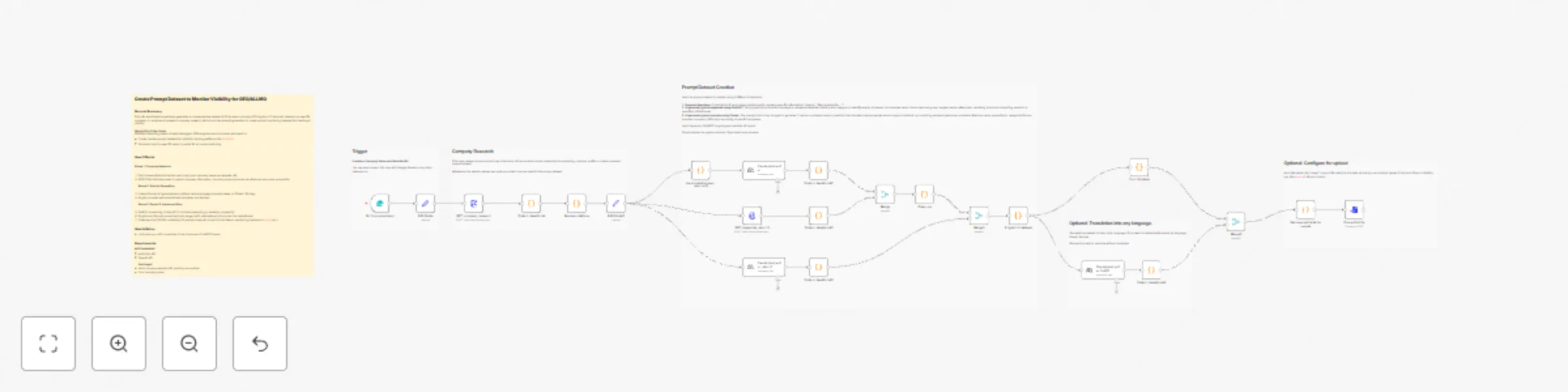
This n8n workflow automatically generates a comprehensive dataset of 50 AI search prompts tailored to a specific company. It combines AI-powered company research with structured prompt generation to create monitoring queries for tracking brand visibility across AI search engines like ChatGPT, Perplexity, Claude, and Gemini. The dataset is ready for use and can be uploaded to any major AI search analytics platforms (like ALLMO.ai,...) or used in your own model. **Who's it for & Use Cases** SEO/GEO Marketing teams, Growth Managers, GTM engineers and Founders who want to: - Create custom prompt datasets for visibility tracking platforms like ALLMO.ai - Generate industry-specific search queries for AI model monitoring ### **How It Works** **Phase 1: Company Research** 1. Start the workflow via the form and input your company name and website URL 2. GPT-5 Mini with web search collects company information, including buyer personas, key features, and value proposition **Phase 2: Prompt Generation** 3. Claude Sonnet 4.5 generates and refines natural language prompts based on Phase 1 findings 4. English prompts are automatically translated into German **Phase 3: Export & Implementation** 5. Wait for processing (~total of 2-5 minutes depending on website complexity) 6. English and German prompt sets are merged with metadata and structured into table format 7. Download the CSV file containing 50 prompts ready for import into AI Search monitoring systems (allmo.ai, etc.) ### **How to Setup** - Just enter your API credentials in the Claude and ChatGPT Nodes. ### **How to Expand** You can update the system prompts for the "prompt writing engine" to create more prompts. You can update or add more translations. **Output Structure:** - 25 English prompts + 25 German prompts (can be changed flexibly). - Each prompt tagged with: company name, industry, category, language, and AI model for simple tracking. - Ready for direct import into any GEO/ALLMO visibility tracking system. ### **Requirements** **API Credentials:** - Anthropic API (Claude Sonnet 4.5) - OpenAI API (GPT-5 Mini with web search capability) **Data Input:** - Valid company website URL (publicly accessible) - Company name as it should appear in tracking
Generate multiple LinkedIn posts from Notion with ChatGPT & Claude AI
# LinkedIn Content Generation Workflow ## Summary Automated workflow that transforms Notion content notes into publication-ready LinkedIn posts using Claude AI. Monitors Notion database and generates multiple variations based on structured outlines, so that the author can pick the one they like most. ## Use Cases - Automate LinkedIn content creation from content planning database. - Generate multiple post variations from a single outline. - Maintain consistent voice and formatting across all posts. - Scale content production while preserving quality. ## How It Works 1. **Trigger** - Monitors Notion "Content Plan" database hourly for updates. 2. **Conditional Check** - Verifies "LinkedIn Post (Main)" tag and "Ready for Writing" status 3. **Main Post** - Claude generates single post from project name and notes 4. **Outline Analysis** - Parallel process creates 3 distinct post concepts with different angles 5. **Multi-Post Generation** - Each outline becomes a complete LinkedIn post 6. **Save to Notion** - All posts automatically saved to database **AI Setup:** - Claude Sonnet 4.5 (`claude-sonnet-4-5-20250929`) - Main post: temperature 0.8 (creative) - Multi-post: default temperature (consistent) ## How to Use 1. **Setup a content database in notion, or link your existing one:** - Use field mapping as outlined below or update field mapping in n8n template. 1. **Add content to Notion:** - Project name (topic) - Notes (article content/key points) - Tag: "LinkedIn Post (Main)" - Status: "Ready for Writing" 2. **Workflow triggers automatically** (hourly check) 3. **Retrieve posts** from Notion database 4. **Review and publish** to LinkedIn ## Requirements **Credentials:** - Notion API (access to Content Plan database) - Anthropic API key - OpenAI API Key **Notion Database:** - Connect Database - Required properties: - Project name (text) - Notes (rich text) - Tags (multi-select with "LinkedIn Post (Main)") - Status (select with "Ready for Writing") **Notes:** - Posts optimized for 1800 character limit - Generates both single posts and multi-angle variations