N

Nayankumar Thakor

1
Workflow

Workflows by Nayankumar Thakor

Workflow preview: Create SEO blog drafts in WordPress from trending topics with Perplexity and HuggingFace
Free advanced

Create SEO blog drafts in WordPress from trending topics with Perplexity and HuggingFace

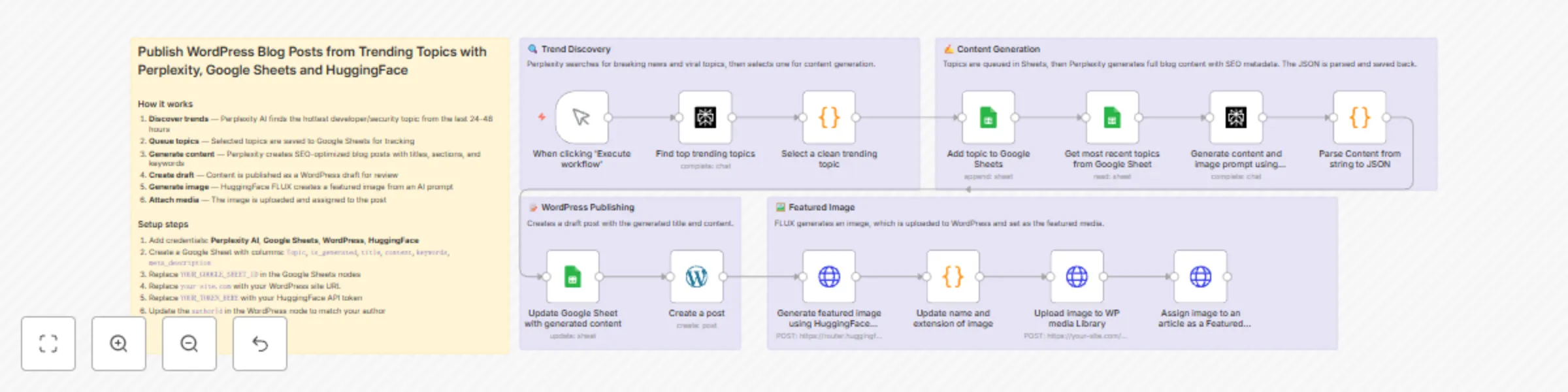
Automatically discover trending developer and security topics, generate SEO-optimized blog posts, and publish them to WordPress as drafts — complete with AI-generated featured images. ### How it works 1. **Discover trends** — Perplexity AI identifies the hottest topic from the last 24-48 hours 2. **Queue topics** — Topics are saved to Google Sheets for tracking and management 3. **Generate content** — Perplexity creates complete blog posts with titles, sections, keywords, and meta descriptions 4. **Create draft** — Content is published as a WordPress draft for your review 5. **Generate image** — HuggingFace FLUX creates a featured image based on the content 6. **Attach media** — The image is uploaded to WordPress and assigned to the post ### Setup steps 1. Add credentials for Perplexity AI, Google Sheets, WordPress, and HuggingFace 2. Create a Google Sheet with columns: `Topic`, `is_generated`, `title`, `content`, `keywords`, `meta_description` 3. Replace `YOUR_GOOGLE_SHEET_ID` in the Google Sheets nodes with your sheet ID 4. Replace `your-site.com` with your WordPress site URL 5. Replace `YOUR_TOKEN_HERE` with your HuggingFace API token 6. Update the `authorId` in the WordPress node to match your author ### Tools used - **Perplexity AI** — Trend discovery and content generation - **Google Sheets** — Topic queue and workflow tracking - **WordPress REST API** — Post creation and media uploads - **HuggingFace FLUX** — AI image generation Ideal for developers, content marketers, and agencies who want automated content pipelines with editorial control.

N
Nayankumar Thakor
Content Creation
2 Jan 2026
79
0