N

Nasser

6
Workflows

Workflows by Nasser
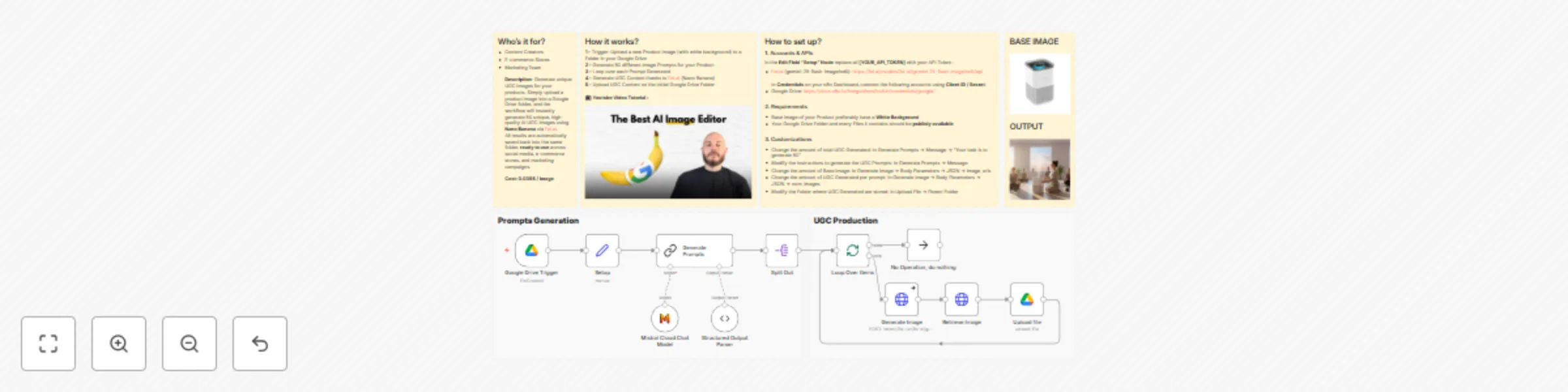
Workflow preview: Create high quality UGC images with Nano Banana (Cheaper & Faster)
Free advanced

Create high quality UGC images with Nano Banana (Cheaper & Faster)

## Who’s it for? - Content Creators - E-commerce Stores - Marketing Team **Description**: Generate unique UGC images for your products. Simply upload a product image into a Google Drive folder, and the workflow will instantly generate 50 unique, high-quality AI UGC images using Nano Banana via Fal.ai. All results are automatically saved back into the same folder, ready to use across social media, e-commerce stores, and marketing campaigns. --- ## How it works? 📺 **YouTube Video Tutorial:** [![Watch on YouTube](https://img.youtube.com/vi/b6tb5mnYU48/maxresdefault.jpg)](https://www.youtube.com/watch?v=b6tb5mnYU48) **1 -** Trigger: Upload a new Product Image (with white background) to a Folder in your Google Drive **2 -** Generate 50 different Image Prompts for your Product **3 -** Loop over each Prompt Generated **4 -** Generate UGC Content thanks to Fal.ai (Nano Banana) **5 -** Upload UGC Content on the initial Google Drive Folder ==**Cost: 0.039$ / image**== --- ## How to set up? ### 1. Accounts & APIs In the **Edit Field "Setup" Node** replace all ==[YOUR_API_TOKEN]== with your API Token : - Fal.ai (gemini-25-flash-image/edit): https://fal.ai/models/fal-ai/gemini-25-flash-image/edit/api In **Credentials** on your n8n Dashboard, connect the following accounts using ==Client ID / Secret==: - Google Drive: https://docs.n8n.io/integrations/builtin/credentials/google/ ### 2. Requirements - Base Image of your Product preferably have a **White Background** - Your Google Drive Folder and every Files it contains should be **publicly available** ### 3. Customizations - Change the amount of total UGC Generated: In Generate Prompts → Message → "Your task is to generate 50" - Modify the instructions to generate the UGC Prompts: In Generate Prompts → Message - Change the amount of Base Image: In Generate Image → Body Parameters → JSON → image_urls - Change the amount of UGC Generated per prompt: In Generate Image → Body Parameters → JSON → num_images - Modify the Folder where UGC Generated are stored: In Upload File → Parent Folder

N
Nasser
Content Creation
16 Sep 2025
4363
0

Workflow preview: Turn any Youtube video into VIRAL shorts
Free advanced

Turn any Youtube video into VIRAL shorts

## For Who? - Content Creators - Youtube Automation - Marketing Team --- ## How it works? **1 -** Enter the video ID (in Edit Field Node) you want to use as a base to create Short Form videos **2 -** Use **yt-transcript-api (self-hosted on docker)** to retrieve the transcript of the video **3 -** Format the transcript to be usable by an LLM **4 -** LLM select clips based on specific rules (prompt customizable) **5 -** Split out the selected Clips and perform a loop for each Clip **6 -** Use **yt-clip-api (self-hosted on docker)** to edit the video in ready-to-use Short Form videos --- ## What you get? **🧩 Copy-Paste Setup** – You’ll get a straightforward, easy-to-follow system with clear instructions, even with minimal technical skills. **🎛️ Built-in Customization Guide** – The documentation includes a dedicated section to help you easily adjust the system to your own channel, video style, or workflow needs. **💬 Full Personalized Support** – I’ll personally help you until the workflow is fully running on your side. **++System Cost to run++: $0** **++Time to Setup++: 20-40min (depending on your experience)** --- ## ⚠️ PRE-REQUISITES Before purchasing, please make sure you meet the following requirements: - The YouTube channel you want to clip includes face-cam + screen recording (like on my videos). - You have basic knowledge of code (enough to follow simple setup instructions). You can also use AI to help you 😉 --- 👨‍💻 **More Workflows :** [https://n8n.io/creators/nasser/](https://n8n.io/creators/nasser/)

N
Nasser
Content Creation
2 Aug 2025
372
0
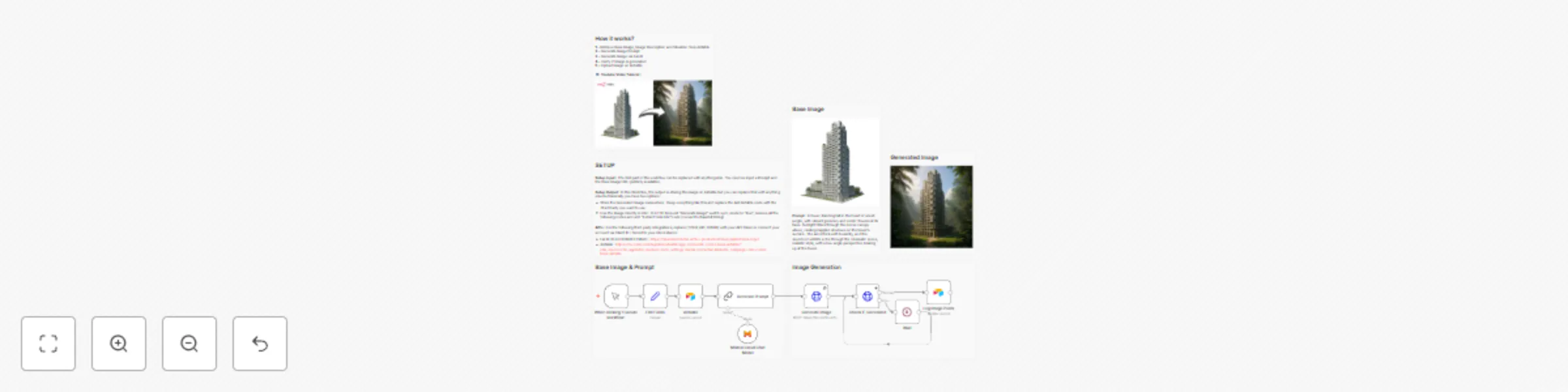
Workflow preview: Transform images with AI image editor using FLUX.1 Kontext
Free advanced

Transform images with AI image editor using FLUX.1 Kontext

## For Who? - Content Creators - Youtube Automation - Marketing Team --- ## How it works? **1 -** Retrieve Base Image, Image Description and Situation from Airtable **2 -** Generate Image Prompt **3 -** Generate Image via Fal AI **4 -** Verify if Image is generated **5 -** Upload Image on Airtable 📺 **YouTube Video Tutorial:** [![Watch on YouTube](https://img.youtube.com/vi/0SVj70-dA0Q/maxresdefault.jpg)](https://www.youtube.com/watch?v=0SVj70-dA0Q) --- ## SETUP **Setup Input :** The first part of the workflow can be replaced with anything else. You need as input a Prompt and the Base Image URL (publicly available). **Setup Output :** In this Workflow, the output is storing the image on Airtable but you can replace that with anything else but basically you have two options : - Store the Generated Image somewhere : Keep everything like this and replace the last Airtable node with the Third Party you want to use. - Use the Image directly in n8n : In HTTP Request "Generate Image" switch sync_mode to "true", remove all the following nodes and add "Extract form File" node (convert to Base64 String) **APIs :** For the following third-party integrations, replace ==[YOUR_API_TOKEN]== with your API Token or connect your account via Client ID / Secret to your n8n instance: - Fal AI (FLUX KONTEXT MAX) : https://fal.ai/models/fal-ai/flux-pro/kontext/max/api#schema-input - Airtable : https://docs.n8n.io/integrations/builtin/app-nodes/n8n-nodes-base.airtable/?utm_source=n8n_app&utm_medium=node_settings_modal-credential_link&utm_campaign=n8n-nodes-base.airtable

N
Nasser
Content Creation
27 Jun 2025
885
0
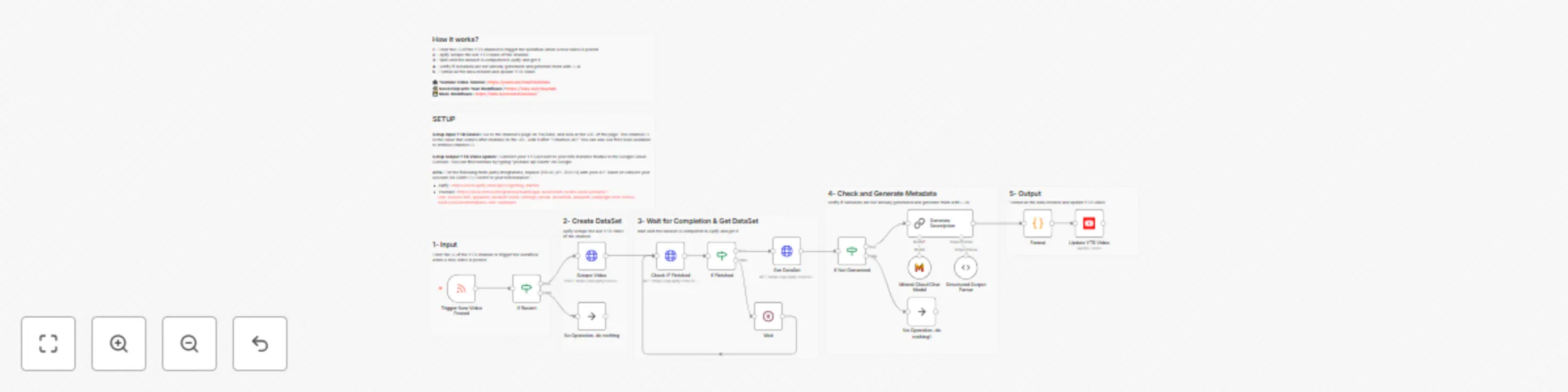
Workflow preview: Generate Youtube video metadata (timestamps, tags, description, ...)
Free advanced

Generate Youtube video metadata (timestamps, tags, description, ...)

## For Who? - Content Creators - Youtube Automation - Marketing Team --- ## How it works? **1 -** Enter the ID of the YTB channel to trigger the workflow when a new video is posted **2 -** Apify scrape the last YTB video of the channel **3 -** Wait until the dataset is completed in Apify and get it **4 -** Verify if Metadata are not already generated and generate them with LLM **5 -** Format all the data created and update YTB Video 📺 **YouTube Video Tutorial:** [![Watch on YouTube](https://img.youtube.com/vi/HaQPAa6l5bU/maxresdefault.jpg)](https://www.youtube.com/watch?v=HaQPAa6l5bU) --- ## SETUP **Setup Input YTB Chanel :** Go to the channel's page on YouTube, and look at the URL of the page. The channel ID is the value that comes after channel/ in the URL. Add it after "?channel_id=" You can also use free tools available to retrieve channel ID. **Setup Output YTB Video Update :** Connect your YTB account to your n8n instance thanks to the Google Cloud Console. You can find tutorials by typing "youtube api Oauth" on Google. **APIs :** For the following third-party integrations, replace ==[YOUR_API_TOKEN]== with your API Token or connect your account via Client ID / Secret to your n8n instance : - Apify : [https://docs.apify.com/api/v2/getting-started](https://docs.apify.com/api/v2/getting-started) - Youtube : [https://docs.n8n.io/integrations/builtin/app-nodes/n8n-nodes-base.youtube/?utm_source=n8n_app&utm_medium=node_settings_modal-credential_link&utm_campaign=n8n-nodes-base.youTube#templates-and-examples](https://docs.n8n.io/integrations/builtin/app-nodes/n8n-nodes-base.youtube/?utm_source=n8n_app&utm_medium=node_settings_modal-credential_link&utm_campaign=n8n-nodes-base.youTube#templates-and-examples) --- 👨‍💻 **More Workflows :** [https://n8n.io/creators/nasser/](https://n8n.io/creators/nasser/)

N
Nasser
Content Creation
30 May 2025
30459
0

Workflow preview: Automate VIRAL Youtube titles & thumbnails creation (FLUX.1 + Apify)
Free advanced

Automate VIRAL Youtube titles & thumbnails creation (FLUX.1 + Apify)

## For Who? - Content Creators - Youtube Automation - Marketing Team --- ## How it works? **1 -** Enter your content idea in the Edit Fields node in a "raw" format. Ex : Boil Eggs Perfectly **2 -** LLM create 3 keywords request based on the idea and Apify scrape the YTB Search **3 -** Wait until the dataset is completed in Apify **4 -** Retrieve Dataset from Apify, calculate approximation of CTR and filter top performing videos **5 -** LLM analyze patterns of best performing titles and create a prompt based on it. Another LLM create 5 titles based on these criteria **6 -** LLM analyze patterns of best performing thumbnails and create a prompt based on it. Another LLM create 1 thumbnail based on these criteria **7 -** Return titles and thumbnail in a HTML Page **📺 YouTube Video Tutorial:** [![Watch on YouTube](https://img.youtube.com/vi/Upuj9Pi94g0/maxresdefault.jpg)](https://www.youtube.com/watch?v=Upuj9Pi94g0) --- ## SETUP **Setup Input Content Idea :** Enter Keyword Related to the niche you want. Trigger can be replaced with anything as long as you retrieve a content idea. For example : Form submission, Database entry, etc ... If you want to change the number of keywords, update the data accordingly in the "Create Keywords" LLM Chain node ➡️ Structured Output Parser AND in the "YTB Search Scrape" HTTP Request Node in Body ➡️ JSON ➡️ searchQueries. If you want to change the number of scraped videos for each keyword, update the data accordingly in the "Create Videos Dataset" HTTP Request Node in Body ➡️ JSON ➡️ maxResults. If you want to adjust the CTR Calculation feel free to update it in the Code Node ➡️ Follow the Comments (after "//") to find what you're looking for. If you want to adjust the level of virality of the videos kept for analaysis go to Filter Node ➡️ Value. **Setup Output HTML Page :** You can also replace this part with any type of storage. For example : Airtable Database, Google Drive/Google Sheet, Send to an email, etc ... **APIs :** For the following third-party integrations, replace ==[YOUR_API_TOKEN]== with your API Token or connect your account via Client ID / Secret to your n8n instance : - Apify : [https://docs.apify.com/api/v2/getting-started ](https://docs.apify.com/api/v2/getting-started ) - OpenAI : [https://platform.openai.com/docs/overview](https://platform.openai.com/docs/overview) (base URL : https://api.openai.com/v1) OR OpenRouter : [https://openrouter.ai/docs/quickstart](https://openrouter.ai/docs/quickstart) (base URL : https://openrouter.ai/api/v1) - HuggingFace (FLUX.1) : [https://huggingface.co/docs](https://huggingface.co/docs) --- 👨‍💻 **More Workflows :** [https://n8n.io/creators/nasser/](https://n8n.io/creators/nasser/)

N
Nasser
Content Creation
30 May 2025
2296
0
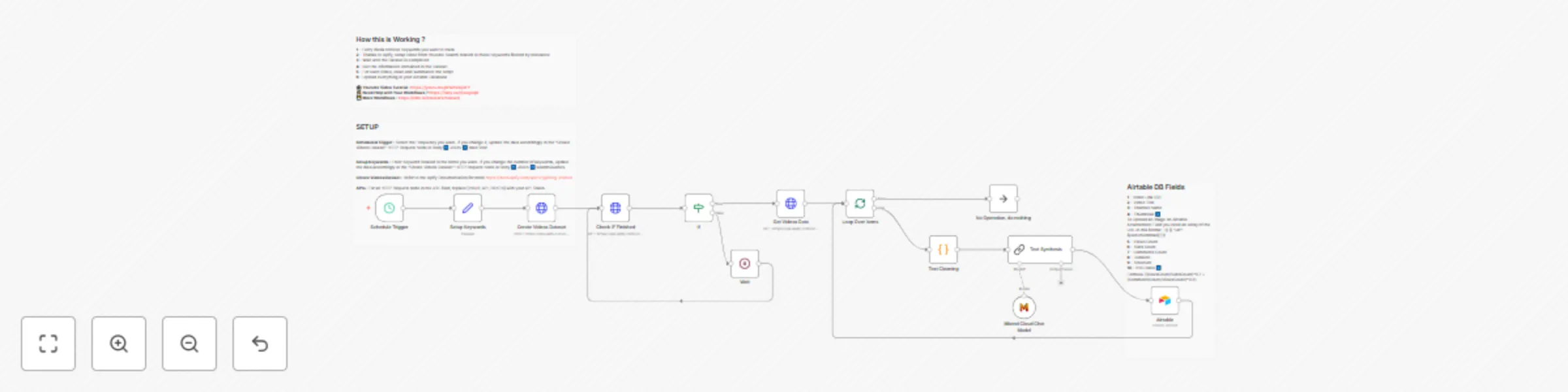
Workflow preview: Discover HIDDEN Youtube trends / outlier videos in your niche (Apify + Airtable)
Free advanced

Discover HIDDEN Youtube trends / outlier videos in your niche (Apify + Airtable)

## For Who? - Content Creators - Youtube Automation - Marketing Team --- ## How it works? **1 -** Every week, retrieve the keywords you want to track **2 -** Thanks to Apify, scrape videos from YouTube Search related to these keywords, filtered by relevance **3 -** Wait until the dataset is completed **4 -** Get the information contained in the dataset **5 -** For each video, clean and summarize the script **6 -** Upload everything to your Airtable database **📺 YouTube Video Tutorial:** [![Watch on YouTube](https://img.youtube.com/vi/pH2hVaij3FY/maxresdefault.jpg)](https://www.youtube.com/watch?v=pH2hVaij3FY) --- ## Setup (~5min) **Scheduled Trigger:** Select the frequency you want. If you change it, update the data accordingly in the "Create Videos Dataset" HTTP Request node in Body ➡️ JSON ➡️ dateFilter. **Setup Keywords:** Enter keywords related to the niche you want. If you change the number of keywords, update the data accordingly in the "Create Videos Dataset" HTTP Request node in Body ➡️ JSON ➡️ searchQueries. **Create Videos Dataset:** Refer to the Apify documentation for more: [https://docs.apify.com/api/v2/getting-started](https://docs.apify.com/api/v2/getting-started) **APIs:** For all HTTP Request nodes in the URL field, replace `[YOUR_API_TOKEN]` with your API token. --- 👨‍💻 **More Workflows :** [https://n8n.io/creators/nasser/](https://n8n.io/creators/nasser/)

N
Nasser
Market Research
18 May 2025
1876
0