M

Muhammadumar

1
Workflow

Workflows by Muhammadumar

Workflow preview: Generate & test SQL code with GPT/OpenRouter AI and PostgreSQL sandbox
Free advanced

Generate & test SQL code with GPT/OpenRouter AI and PostgreSQL sandbox

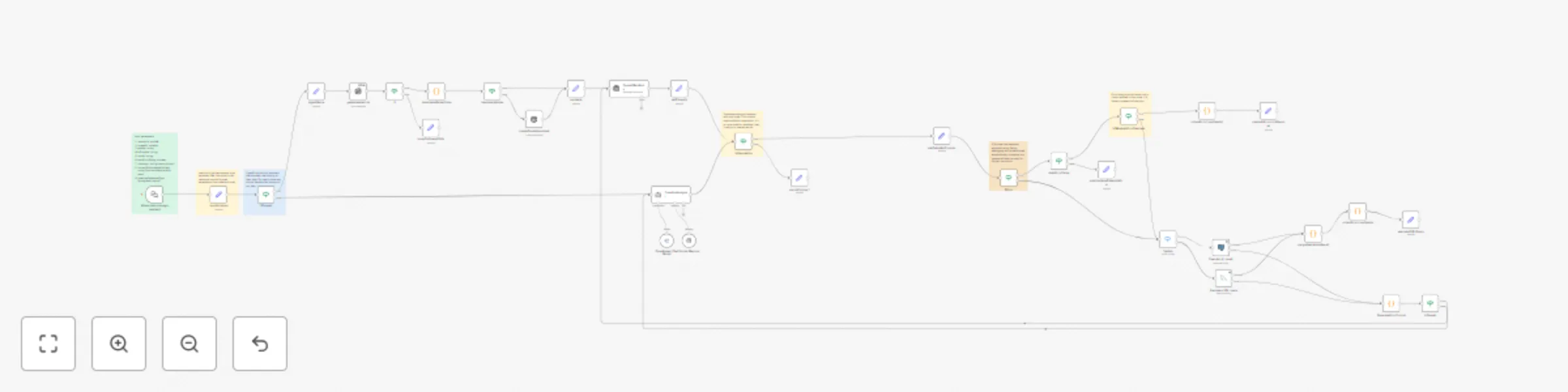
This is the core AI agent used for [queryverify.com]( https://queryverify.com). Don't trust complex AI-generated SQL queries without double-checking them in a safe environment. That's where queryverify comes in. It automatically creates a test environment with the necessary data, generates code for your task, runs it to double-check for correctness, and handles errors if necessary. If you enable auto-fixing, queryverify will detect and fix issues on its own. If not, it will ask for your permission before making changes during debugging. In the end, you get thoroughly verified code along with full details about the environment it ran in. ## Setup It is an embedded chat for the website, but you can pin input data and run it on your own n8n instance. ### Input data --- 1. `sessionId`: *uuid\_v4*. **Required** to handle ongoing conversations and to create table names (used as a prefix). 2. `threadId`: *string | nullable*. If `aiProvider` is **openai**, conversation history is managed on OpenAI’s side. This is not needed in the first request—it will start a new conversation. For ongoing conversations, you must provide this value. You can get it from the `OpenAIMainBrain` node output after the first run. If you want to start a new conversation, just leave it as `null`. 3. `apiKey`: *string*. Your API key for the selected `aiProvider`. 4. `aiProvider`: *string*. Currently supported values: **openai**, **openrouter**. 5. `model`: *string*. The AI model key (e.g., `gpt-4.1`, `o3-mini`, or any supported model key from OpenRouter). 6. `autoErrorFixing`: *boolean*. If `true`, it will automatically fix errors encountered when running code in the environment. If `false`, it will ask for your permission before attempting a fix. 7. `chatInput`: *string*. The user's prompt or message. 8. `currentDbSchemaWithData`: *string*. A JSON representation of the database schema with sample data. Used to inform the AI about the current database structure during an ongoing conversation. Please use the '[]' value in the first request. Example string for filled db structure : `'{"users":[{"id":1,"name":"John Doe","email":"[email protected]"},{"id":2,"name":"Jane Smith","email":"[email protected]"}],"products":[{"product_id":101,"product_name":"Laptop","price":999.99}]}'` --- Make sure to fill in your credentials: 1. Your OpenAI or OpenRouter API key 2. Access to a local PostgreSQL database for test execution You can view your generated tables using your preferred PostgreSQL GUI. We recommend **DBeaver**. Alternatively, you can activate the **“Deactivated DB Visualization”** nodes below. To use them, connect each to the most recent successful **Set** node and manually adjust the output. However, the easiest and most efficient method is to use a GUI. ## Workflow Explanation 1. We store all input values in the `localVariables` node. Please use this node to *get* the necessary data. 2. `OpenAI` has a built-in assistant that manages chat history on their side. For OpenRouter, we handle chat history locally. That’s why we use separate nodes like `ifOpenAi` and `isOpenAi`. Note that `if` logic can also be used *inside* nodes. 3. The `AutoErrorFixing` loop will run only a limited number of times, as defined by the `isMaxAutoErrorReached` node. This prevents infinite loops. 4. The `Execute_AI_result` node connects to the PostgreSQL test database used to execute queries. ## Guidance on customization This setup is built for **PostgreSQL**, but it can be adapted to any **programming language**, and the logic can be extended to any **programming framework**. To customize the logic for other programming languages: 1. Change `instruction` parameter in `localVariables` node. 2. Replace the `Execute_AI_result` PostgreSQL node with another executable node. For example, you can use the HTTP Request node. 3. Update the `GenerateErrorPrompt` node's `prompt` parameter to generate code specific to your target language or framework. *Any workflows built on top of this must credit the original author and be released under an open-source license.*

M
Muhammadumar
Engineering
28 Jul 2025
498
0