M

Meelioo

7
Workflows

Workflows by Meelioo

Workflow preview: Automate Telegram support handover from AI to humans with GPT4 and email alerts
Free advanced

Automate Telegram support handover from AI to humans with GPT4 and email alerts

## How it Works This is a **Telegram AI-to-Human Handover System** that seamlessly transitions customer support conversations between an AI agent and human operators: 1. **AI-First Response**: When users message the Telegram bot, an AI agent handles the conversation initially, using memory to maintain context across messages. 2. **Smart Handover Detection**: The AI recognizes when users request human assistance and triggers a two-step confirmation process (user approval, then operator availability check). 3. **Topic-Based Routing**: Once confirmed, the system creates a dedicated Telegram Forum topic named after the user's ID, where operators can respond. Messages are automatically forwarded between the user's private chat and the operator's topic. 4. **Session Management**: A data table tracks conversation states ('ai', 'human', 'open', 'closed'), ensuring messages route correctly and maintaining conversation history. 5. **Clean Closure**: Operators type "exit" in the topic to close conversations, updating the database and closing the forum topic. ## Set-up Steps **Estimated Time: 30-45 minutes** (first-time setup) You'll need to: - Create and configure a Telegram bot via BotFather - Set up a Telegram group with Topics enabled and add your bot as admin - Configure SMTP credentials (Gmail app password recommended) - Create an n8n Data Table with specific columns (type, status, topic, user) - Add your bot token to multiple HTTP Request nodes - Set up AI model credentials (OpenRouter or Azure OpenAI) - Fill in the Configuration node with your IDs and email addresses - Test the flow using the included Personal Trigger to capture your group/user IDs **Note**: The template includes detailed video guides (1-minute overview and 10-minute setup walkthrough) plus extensive documentation in sticky notes covering every node and credential setup.

M
Meelioo
Support Chatbot
21 Oct 2025
166
0
Workflow preview: Daily workflow backup to GitLab with Slack notifications
Free advanced

Daily workflow backup to GitLab with Slack notifications

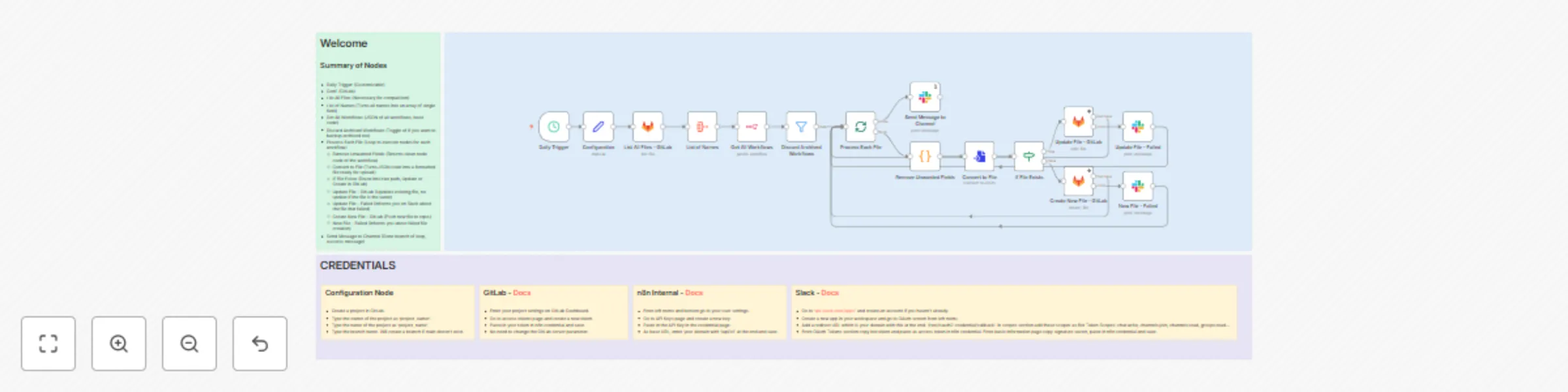
## How it Works This workflow creates automated daily backups of your n8n workflows to a GitLab repository: 1. **Scheduled Trigger** - Runs automatically at noon each day to initiate the backup process 2. **Fetch Workflows** - Retrieves all active workflows from your n8n instance, filtering out archived ones 3. **Compare & Process** - Checks existing files in GitLab and compares them with current workflows 4. **Smart Upload** - For each workflow, either updates the existing file in GitLab (if it exists) or creates a new one 5. **Notification System** - Sends success/failure notifications to a designated Slack channel with execution details >The workflow intelligently handles each file individually, cleaning up unnecessary metadata before converting workflows to formatted JSON files ready for version control. ## Set up Steps **Estimated setup time: 15-20 minutes** You'll need to configure three credential connections and customize the Configuration node: - **GitLab API**: Create a project access token with write permissions to your backup repository - **n8n Internal API**: Generate an API key from your n8n user settings - **Slack Bot**: Set up a Slack app with bot token permissions for posting messages to your notification channel > Once credentials are configured, update the Configuration node with your GitLab project owner, repository name, and target branch. The workflow includes detailed setup instructions in the sticky notes for each credential type. After setup, activate the workflow to begin daily automated backups.

M
Meelioo
DevOps
10 Oct 2025
593
0
Workflow preview: Beginner's Guide to Workflow Automation with OpenAI, LangChain & API Integrations
Free advanced

Beginner's Guide to Workflow Automation with OpenAI, LangChain & API Integrations

## How it works This beginner-friendly workflow demonstrates the core building blocks of n8n. It guides you through: - **Triggers** – Start workflows manually, on a schedule, via webhooks, or through chat. - **Data processing** – Use Set and Code nodes to create, transform, and enrich data. - **Logic and branching** – Apply conditions with IF nodes and merge different branches back together. - **API integrations** – Fetch external data (e.g., users from an API), split arrays into individual items, and extract useful fields. - **AI-powered steps** – Connect to OpenAI for generating fun facts or build interactive assistants with chat triggers, memory, and tools. - **Responses** – Return structured results via webhooks or summary nodes. By the end, it demonstrates a full flow: creating data → transforming it → making decisions → calling APIs → using AI → responding with outputs. ## Set up steps **Time required: 5–10 minutes.** - What you need: - An n8n instance (cloud or self-hosted). - Optional: API credentials (e.g., OpenAI) if you want to test AI features. - Setup flow: - Import this workflow. - Add your API keys where needed (OpenAI, etc.). - Trigger the workflow manually or test with webhooks. >👉 Detailed node explanations and examples are already included as sticky notes inside the workflow itself, so you can learn step by step as you explore.

M
Meelioo
Engineering
6 Oct 2025
580
0
Workflow preview: Automated error handling with email alerts & smart workflow deactivation
Free advanced

Automated error handling with email alerts & smart workflow deactivation

## How it works This workflow **automatically handles errors** in your n8n workflows by: 1. Detecting when an error occurs and capturing the error details 2. Sending an email notification with the error message and affected node 3. Allowing you to deactivate the workflow or ignore the error via email response 4. Optionally rerouting the error notification to another user for approval The workflow includes two templates: a **basic version** with simple deactivate/ignore options, and an **advanced version** that allows error rerouting to a second user. ## Set up steps **Estimated time: 5-10 minutes** You'll need to configure **SMTP credentials** for sending emails, set up **n8n API** access for workflow management, and update email addresses and workflow URLs throughout the nodes. Choose which template (basic or reroute logic) fits your needs, then activate the workflow to start monitoring for errors.

M
Meelioo
DevOps
1 Oct 2025
656
0
Workflow preview: Pdf RAG agent with Telegram chat & auto-ingestion from Google Drive
Free advanced

Pdf RAG agent with Telegram chat & auto-ingestion from Google Drive

## How it works This workflow creates an intelligent document assistant called "Mookie" that can answer questions based on your uploaded documents. Here's how it operates: - **Document Ingestion:** The system can automatically load PDF files from Google Drive or accept PDFs uploaded directly through Telegram, then processes and stores them in a PostgreSQL vector database using Mistral embeddings - **Smart Retrieval:** When users ask questions via Telegram or a web chat interface, the AI agent searches through the stored documents to find relevant information using vector similarity matching - **Contextual Responses:** Using GPT-4 and the retrieved document context, Mookie provides accurate answers based solely on the ingested documents, avoiding hallucination by refusing to answer questions not covered in the stored materials - **Memory & Conversation:** The system maintains conversation history for each user, allowing for natural follow-up questions and contextual discussions ## Set up steps **Estimated setup time:** 30-45 minutes You'll need to configure several external services and credentials: - Set up a PostgreSQL database with PGVector extension for document storage - Create accounts and API keys for Azure OpenAI (GPT-4), Mistral Cloud (embeddings), and Google Drive access - Connect your own LLM's if you don't have these credentials. - Configure a Telegram bot and obtain API credentials for chat functionality - Update webhook URLs throughout the workflow to match your n8n instance - Test the document ingestion pipeline with sample PDFs - Verify the chat interfaces (both Telegram and web) are responding correctly >The workflow includes approval mechanisms for PDF ingestion and handles both automated bulk processing from Google Drive and real-time document uploads through Telegram. Read the sticky notes provided in the template code for clear instructions.

M
Meelioo
Internal Wiki
23 Sep 2025
683
0
Workflow preview: Monitor Reddit job posts with GPT-4o analysis & Telegram alerts using Google Sheets
Free advanced

Monitor Reddit job posts with GPT-4o analysis & Telegram alerts using Google Sheets

## How It Works * **Monitors Reddit:** Automatically searches specified subreddits for posts matching your keywords or flair filters (template is n8n - Now Hiring flair) * **AI Analysis:** Processes found posts using AI to create personalized summaries based on your custom prompts * **Smart Filtering:** Tracks previously sent posts in Google Sheets to avoid duplicate notifications * **Telegram Delivery:** Sends AI-generated summaries directly to your Telegram chat ## Set Up Steps *Time required: ~15-20 minutes* * **Configure Credentials (10 mins):** Set up Telegram bot token, Reddit app credentials, and Google Sheets access * **Customize Search Parameters (3 mins):** Define target subreddit, keywords/flairs, and post limits * **Personalize AI Settings (2 mins):** Adjust AI model and system prompts for your preferred summary style * **Set Schedule & Chat (2 mins):** Choose monitoring frequency and configure your personal Telegram chat ID >The workflow includes detailed setup instructions and configuration guidance in the sticky notes within the template.

M
Meelioo
Market Research
1 Sep 2025
163
0
Workflow preview: Categorize emails & get Telegram alerts with Azure OpenAI & Google Sheets
Free advanced

Categorize emails & get Telegram alerts with Azure OpenAI & Google Sheets

*This workflow contains community nodes that are only compatible with the self-hosted version of n8n.* ## Understanding This Workflow - In simple terms, this workflow triggers when you receive an e-mail in your inbox; classifies this e-mail based on the subject and notifies you using Telegram. It's fully customizable so you can change, add categoies and continue each data flow separately. - E-Mails can hold pretty important information. But one can forget to check-up or rather not prefer to do so. This workflow keeps you updated of what's most important to you. Not only that, you can always talk to the bot to checkup on E-Mails you've missed. ### Set Up Overview - **IMAP E-Mail Trigger:** You can switch to a Gmail node aswell. - **Google Sheets:** Google Sheets is easy to use so I recommend you to keep it. - **AI Model:** Use any model of your preferance. As long as it is smart and uses less tokens. - **Telegram:** Refer to documentation to understand how to create a bot. > There is no correct line of setting up these credentials, as the workflow needs all to work; as long as you don't change the logic of the workflow. #### Note Please refer to the sticky notes in the workflow for a clear guide on setup, workflow description etc. If you need any help or need a hand, you can always message me. >https://community.n8n.io/u/mookie_lian

M
Meelioo
Ticket Management
31 Jul 2025
377
0