Mike Russell
Workflows by Mike Russell
Share YouTube videos with AI summaries on Discord
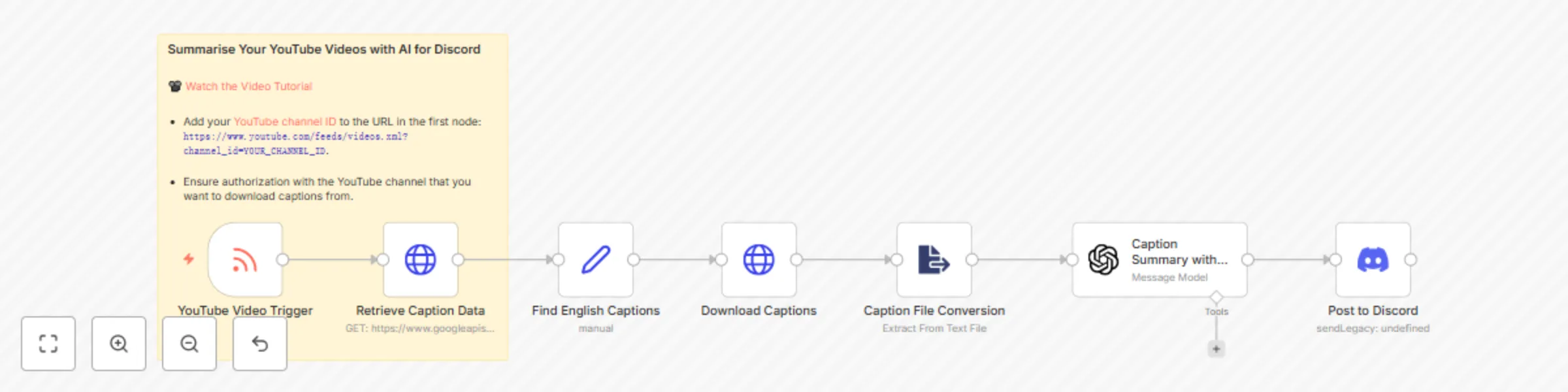
Boost engagement on your Discord server by automatically sharing new YouTube videos along with AI generated summaries of their content. This workflow is ideal for content creators and community managers looking to provide value and spark interest through summarized content, making it easier for community members to decide if a video is of interest to them. [Watch this video tutorial](https://mrc.fm/ai2d) to learn more about the template. ## How it works - **RSS Feed Trigger**: Monitors your YouTube channel for new uploads using the RSS feed. - **Video Captions Retrieval**: Fetches video captions using the YouTube API to get detailed content data. - **AI Summary Generation**: Uses an AI model to generate concise summaries from the video captions, highlighting key points. - **Discord Notification**: Posts video announcements along with their AI generated summaries to a specified Discord channel using a webhook. ## Set up steps 1. **Configure YouTube RSS Feed**: Set up the RSS feed node to detect new video uploads. Add your [YouTube channel ID](https://www.youtube.com/account_advanced) to the URL in the first node: `https://www.youtube.com/feeds/videos.xml?channel_id=YOUR_CHANNEL_ID`. 2. **Connect OpenAI Account**: To enable AI summary generation, connect your OpenAI account in n8n. 3. **Set Up Discord Webhook**: Create a webhook in your Discord server and configure it in the Discord node. 4. **Design the Message**: Format the Discord message as you like to include the video title, link, and the AI generated summary. ## Example  This template empowers you to maintain a highly engaging Discord community, ensuring members receive not only regular updates but also valuable insights into each video's content without needing to watch immediately.
Post New YouTube Videos to X
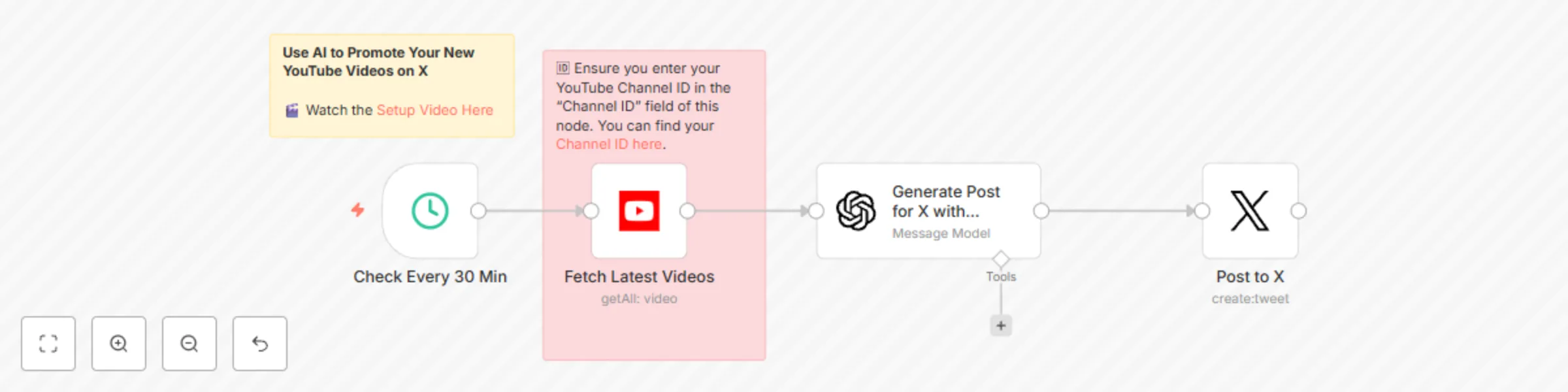
# Automated YouTube Video Promotion Workflow Automate the promotion of new YouTube videos on X (formerly Twitter) with minimal effort. This workflow is perfect for content creators, marketers, and social media managers who want to keep their audience updated with fresh content consistently. ## How it works This workflow triggers every 30 minutes to check for new YouTube videos from a specified channel. If a new video is found, it utilizes OpenAI's ChatGPT to craft an engaging, promotional message for X. Finally, the workflow posts the generated message to Twitter, ensuring your latest content is shared with your audience promptly. ## Set up steps 1. Schedule the workflow to run at your desired frequency. 2. Connect to your YouTube account and set up the node to fetch new videos based on your Channel ID. 3. Integrate with OpenAI to generate promotional messages using GPT-3.5 turbo. 4. Link to your X account and set up the node to post the generated content. Please note, you'll need API keys and credentials for YouTube, OpenAI, and X. Check out [this quick video tutorial](https://mrc.fm/ai2x) to make the setup process a breeze. ## Additional Tips - Customize the workflow to match your branding and messaging tone. - Test each step to ensure your workflow runs smoothly before going live.