M

Miftah Rahmat

2
Workflows

Workflows by Miftah Rahmat

Workflow preview: Automate water bill calculations with Telegram, Gemini AI, and Google Sheets
Free advanced

Automate water bill calculations with Telegram, Gemini AI, and Google Sheets

## **Automate Water Bill Calculations with Telegram, Gemini AI, and Google Sheets** ![Screen Shot 20250911 at 20.48.18.png](fileId:2357) This workflow automates the calculation of monthly water bills. Residents can send a photo of their water meter along with their name via Telegram. The workflow uses Gemini AI to extract the meter reading, calculates the usage difference compared to the previous month, and updates a Google Sheet with the billing details. Finally, the workflow sends a summary back via Telegram. Don’t hesitate to reach out if you have any questions or run into issues! 🙌 **Requirements** - A Telegram bot token (created via BotFather). - A Google account with access to Google Sheets. - A Gemini API key ([](Google AI Studio)). - A pre-created Google Sheet with the required columns. **Google Sheet Setup** Create a new Google Sheet with the following columns: Nama, Volume Sebelumnya, Volume Saat Ini, Harga/m³, Jumlah Bayar, Beban, Total Bayar, Tanggal Input **Workflow Setup Instructions** 1. Connect Google Sheets - Add your Google Sheets credentials in n8n. - Link the workflow to your sheet with the structure above. 2. Set Up Telegram Bot - Create a Telegram bot via BotFather. - Copy your bot token into the Telegram Trigger node. 3. Configure Gemini AI - Obtain a Gemini API key from Google AI Studio. - Add it to your n8n credentials. - The workflow will parse the meter reading from the uploaded image. **Example Calculation** Previous Volume: 535 m³ Current Volume: 545 m³ Usage: 10 m³ Price per m³: Rp3.000 Fixed cost: Rp3.000 Total Bill: Rp33.000 **How It Works** - User sends a photo of the water meter with caption (name). - Telegram Trigger receives the message. - Gemini AI reads the meter number from the photo. - Workflow fetches previous volume from Google Sheets. - Usage and total bill are calculated. - Data is stored back into Google Sheets. - Bot replies in Telegram with detailed bill info. **Customization** - Change Harga/m³ in the sheet to match your community’s water price. - Update Beban if your community uses a different fixed fee. - Edit the Telegram reply message node to adjust wording. *With this workflow, you can streamline water billing for residents, ensure accuracy, and save time on manual calculations.*

M
Miftah Rahmat
File Management
10 Sep 2025
230
0
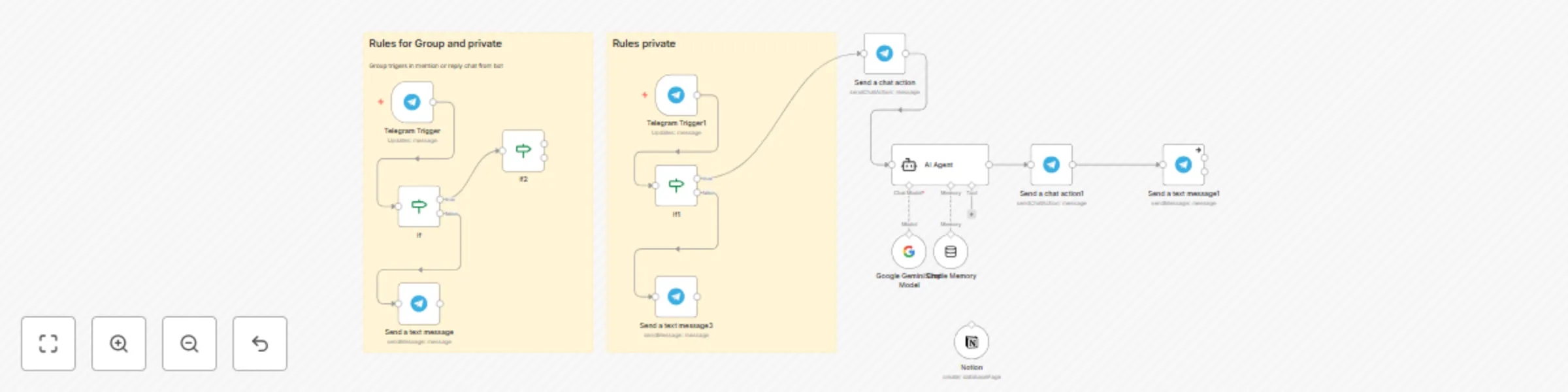
Workflow preview: Automate content requests from Telegram to Notion with Gemini AI
Free advanced

Automate content requests from Telegram to Notion with Gemini AI

### ⚡ Overview This workflow connects Telegram with an AI Agent (Gemini) and Notion to automate content requests. Team members can request content ideas directly in Telegram. The AI processes the request, then automatically creates a new entry in your Notion Content database. ### 🛠️ Features 🤖 **AI-powered assistant**: Gemini AI with memory to understand context and generate better responses. 📲 **Telegram integration**: Accepts requests directly from your Telegram bot. 🗂️ **Notion automation**: Auto-creates records in your Notion database (title, content draft, channel, assignee, date, references, type). 🛡️ **Secure & flexible**: No hardcoded API keys, placeholders used for easy setup. ### 📝 Setup Instructions Add your Telegram Bot Token, Google Gemini API Key, and Notion Integration Token in n8n credentials. Steps: Import this template JSON into your n8n instance. Configure credentials in n8n (Telegram, Notion, Gemini API). ### 🎯 Use Cases Content marketing teams managing requests via Telegram. Automating idea collection from distributed teams. Keeping Notion Content updated without manual entry.

M
Miftah Rahmat
Content Creation
30 Aug 2025
162
0