Michael Muenzer
Workflows by Michael Muenzer
Write personalised direct messages for Instagram with Apify, OpenAI, GSheets
*This workflow contains community nodes that are only compatible with the self-hosted version of n8n.* Fetch Instagram profile information with Apify and generate personalized DMs in Google Sheets. This is great for creator outreach, customer interviews, partnership prospecting, and streamlining your social Direct Messaging workflow. Saving hours per campaign or research study. ## How it works * We read a list of Instagram accounts from a Google Sheet * We trigger the Apify Instagram Post Scraper task to fetch the latest post data per account * We pull the image URL of the newest post and analyze it with OpenAI Vision * We use the analysis plus account metadata to generate a personalized DM * We write the message back to the Google Sheet for easy sending and tracking Note: Both Apify and OpenAI provide free credits that can cover initial runs of this workflow (20.08.2025). ## Set up steps * Copy Google Sheet template and add it in all Google Sheet nodes * Make sure that n8n has read & write permissions for your Google sheet. * Add your list of Instagram accounts in the first column in the Google sheet * Add Apify credentials (e.g. API key) * Create task for [Instagram Post Scraper](https://apify.com/apify/instagram-post-scraper) on Apify * Add OpenAI API credentials ## What you can achieve **How do I scale creator outreach while keeping messages personal?** This workflow pulls each profile’s latest post and bio, then generates a DM that references those specifics. One consistent prompt, fresh data per profile. Personal at scale. **How do I craft partnership or affiliate pitches that feel tailored to the creator’s audience?** This n8n workflow spots niche, recent themes, and milestones, then inserts a targeted value prop like an affiliate code or UTM so the pitch mirrors their content and audience. **How can I personalize interview invites using details from a recent post or bio?** This workflow opens with a concrete reference from the newest post or bio, states your interview topic, and adds a short CTA. If there’s no recent post, it switches to a bio-based hook. **How do I personalize at scale for thousands of profiles without duplicating outreach?** This n8n workflow processes each handle once, logs status in Google Sheets, and skips already‑messaged rows, so you get unique, data-backed DMs across hundreds of profiles without repeats.
Audience problem keyword research workflow with OpenAI, Ahrefs and Google Sheets
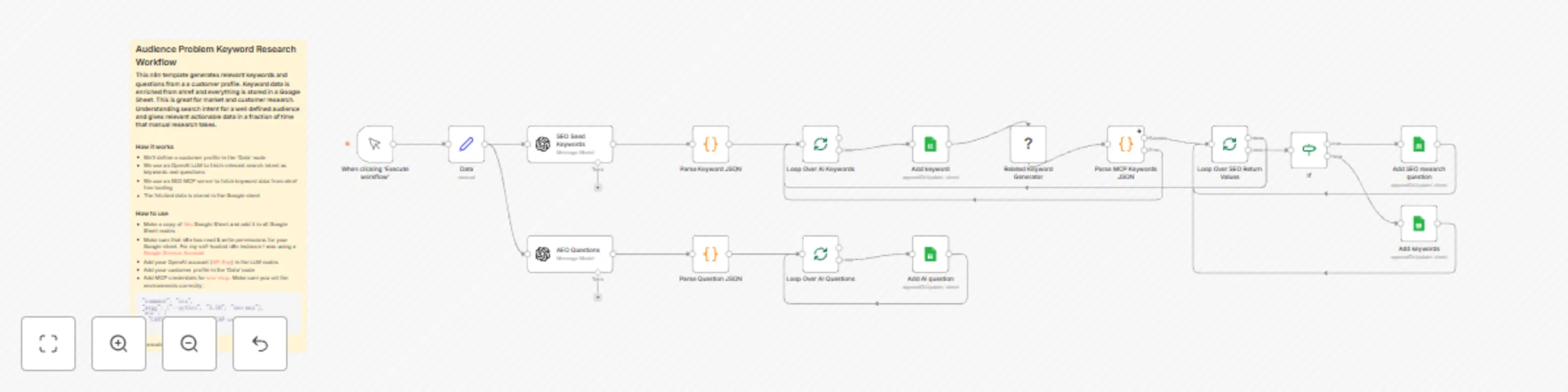
*This workflow contains community nodes that are only compatible with the self-hosted version of n8n.* Generates relevant keywords and questions from a a customer profile. Keyword data is enriched from ahref and everything is stored in a Google Sheet. This is great for market and customer research. Understanding search intent for a well defined audience and gives relevant actionable data in a fraction of time that manual research takes. ## How it works * We'll define a customer profile in the 'Data' node * We use an OpenAI LLM to fetch relevant search intent as keywords and questions * We use an SEO MCP server to fetch keyword data from ahref free tooling * The fetched data is stored in the Google sheet ## Set up steps * Copy Google Sheet template and add it in all Google Sheet nodes * Make sure that n8n has read & write permissions for your Google sheet. * Add your list of domains in the first column in the Google sheet * Add MCP credentials for [seo-mcp](https://github.com/cnych/seo-mcp) * Add OpenAI [API](https://docs.n8n.io/integrations/builtin/credentials/openai/#using-api-key) credentials
Automate SEO analysis for multiple domains with Ahrefs and Google Sheets
*This workflow contains community nodes that are only compatible with the self-hosted version of n8n.* Fetch SEO and traffic information from ahref for a list of domains in a Google Sheet. This is great for marketing research and SEO workflow optimizations and saves tons of time. ## How it works * We'll import domains from the Google sheet * We use an SEO MCP server to fetch data from ahref free tooling * The fetched data is stored in the Google sheet ## Set up steps * Copy Google Sheet template and add it in all Google Sheet nodes * Make sure that n8n has read & write permissions for your Google sheet. * Add your list of domains in the first column in the Google sheet * Add MCP credentials for [seo-mcp](https://github.com/cnych/seo-mcp)