Mehedi Ahamed
Workflows by Mehedi Ahamed
Process images with VLM run: Auto segmentation & detection with Drive-Telegram sharing
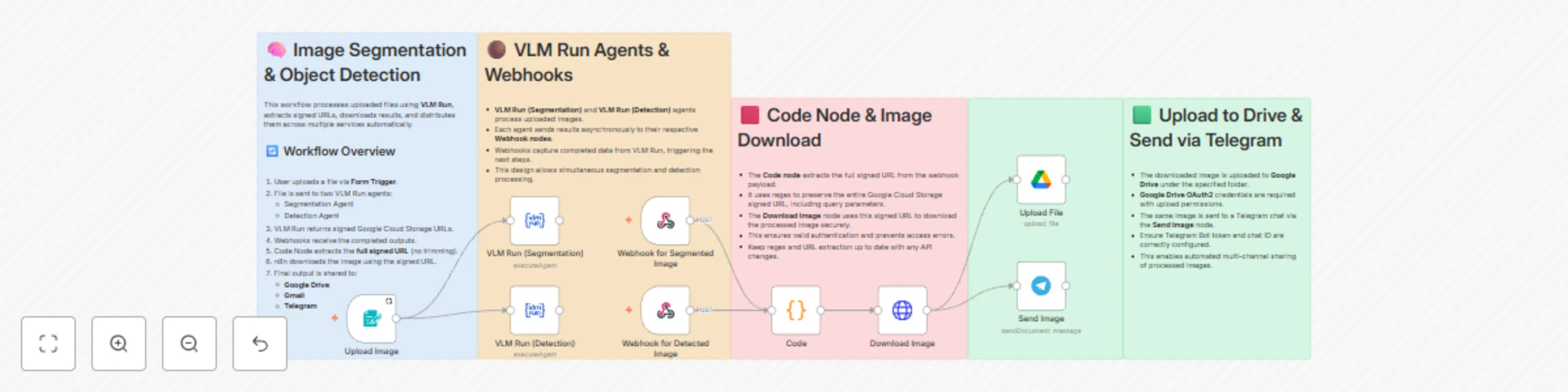
This workflow automates **image processing using VLM Run**, extracting signed URLs, downloading results, and distributing them via multiple channels (Google Drive & Telegram). ## ✅ Key Features * Upload image files through a **Form Trigger**. * Process images through two VLM Run agents simultaneously: * **Segmentation Agent** → extracts objects. * **Detection Agent** → generates bounding boxes. * Webhooks capture completed results asynchronously. * **Code Node** extracts the full signed URL for secure downloading. * Downloaded images are automatically: * Uploaded to **Google Drive** * Sent to a **Telegram chat** ## ⚙️ Workflow Flow 1. **User Uploads File** → Form Trigger node 2. **VLM Run Agents** → Segmentation & Detection agents 3. **Webhook Nodes** → Receive processed results 4. **Code Node** → Extract signed URLs 5. **Download Node** → Retrieve processed images 6. **Distribution Nodes** → Upload to Google Drive & Telegram ## 📌 Notes * Ensure **Google Drive OAuth2** credentials have upload permissions. * Telegram Bot token and chat ID must be configured correctly. * Regex in the Code Node is critical for capturing full signed URLs including query parameters. * Workflow allows multi-channel sharing of images automatically. --- ## ⚠️ Community Node Disclaimer > **This workflow uses VLM Run node**
Automate X-ray analysis with VLM Orion and distribute to Gmail, Telegram & Drive
## 📌 Overview This workflow provides an **automated pipeline for processing medical X-ray images** using **VLM Run (model: `vlmrun-orion-1:auto`)**, and distributing the AI-generated analysis to multiple channels—**email, Telegram, and Google Drive**. --- ## ⚙️ How It Works ### **1. Upload X-Ray Image** A **Form Trigger** allows the user to upload an X-ray file. Once the image is submitted, the workflow immediately starts processing. --- ### **2. Automated X-Ray Analysis** The uploaded X-ray image is sent to **VLM Run (`vlmrun-orion-1:auto`)** via an OpenAI-compatible endpoint. The model returns: * A text-based interpretation or description * A disease-highlighted output image (if detected) * A URL reference pointing to the annotated result image stored in Google Cloud --- ### **3. Extract Artifact** From artifact reference, download file using artifact node. --- ### **4. Generate Report File** The **Convert to File** node transforms the analysis text into a shareable `.txt` report. This file is used both for email and Drive storage. --- ### **5. Send Notifications to Gmail & Telegram** The workflow automatically: 📧 **Emails the doctor** (or configured staff email): * The diagnostic description * The generated report file * The annotated X-ray image 📨 **Sends a Telegram message** containing: * The same report * The disease-highlighted X-ray image This ensures instant notification and cross-platform availability. --- ### **6. Upload to Google Drive** The final step uses **Google Drive OAuth2** to store: * The report file * The annotated medical image These files are uploaded to a designated Drive folder for archiving and future reference. --- ## 🧩 Key Features * ✔️ Automated X-ray processing using VLM Run * ✔️ Structured extraction of annotated medical images * ✔️ Multi-channel notification (Email + Telegram) * ✔️ Centralized archive via Google Drive * ✔️ Zero manual intervention after upload * ✔️ Works with OpenAI-compatible VLM endpoints --- ## 🔧 Requirements * **VLM Run API Credentials** Required to call `vlm-agent-1` for image analysis. * **Gmail OAuth2 Credentials** Needed to automatically email the diagnostic report. * **Telegram Bot Token** Sends analysis results to a Telegram chat or group. * **Google Drive OAuth2** Stores reports and annotated images in Google Drive. --- ## 📎 Notes This workflow automates image handling and communication. All AI-generated content must be reviewed by a qualified medical professional before any clinical use.
Chat with news articles using AI analysis in Telegram with vector search
## 📌 **Overview** This workflow allows users to send any **newspaper or article link** to a Telegram bot. The workflow then: 1. Validates the URL 2. Scrapes the webpage (title, description, full text, images, OG metadata) 3. Processes it using a Vision-Language Model (VLM) 4. Generates structured summaries & highlights 5. Downloads images (if available) 6. Sends a formatted report + document back to Telegram 7. Stores the summary in a vector database 8. Allows users to **chat with the article** using semantic search Perfect for: ✔ News researchers ✔ Students ✔ Journalists ✔ Telegram-based AI assistants ✔ Automated media monitoring --- ## 🧠 **What the Workflow Does** ### **1. Telegram Trigger** * Listens for messages from the user. * Detects if the message contains a valid link. ### **2. URL Scraper** A custom n8n Code node fetches the webpage and extracts: * Meta description paragraph text * All image sources * Open Graph metadata (og:title, og:image) Returns everything as structured JSON. ### **3. VLM Run – Highlighter** A Vision-Language Model analyzes the scraped content and outputs: ```json { "news_summary": { "headline": "", "source_url": "", "published_date": "", "key_points": "", "summary": "", "extracted_images_url": "" } } ``` ### **4. Image Validation & Download** * Checks if image URLs are valid. * Downloads them (if any). * Sends them to Telegram as documents. ### **5. Summary File Generation** * Converts VLM output into a `.txt` report. * Sends the report back to the user. ### **6. Vector Store + Q&A Agent** * Converts the summary into embeddings. * Stores the vector in an in-memory store. * Provides the user with a **chat interface**: * Ask anything about the newspaper article. * The AI agent retrieves information using the vector store. --- ## 📤 **Outputs** You receive: ✔ Telegram message summary ✔ Downloadable summary `.txt` file ✔ Extracted images (if available) ✔ Chat-based Q&A agent to explore the newspaper details --- ## 🚀 **Use Cases** * News summarization bots * Media intelligence agents * Educational news explorers * Topic-based daily digest creators