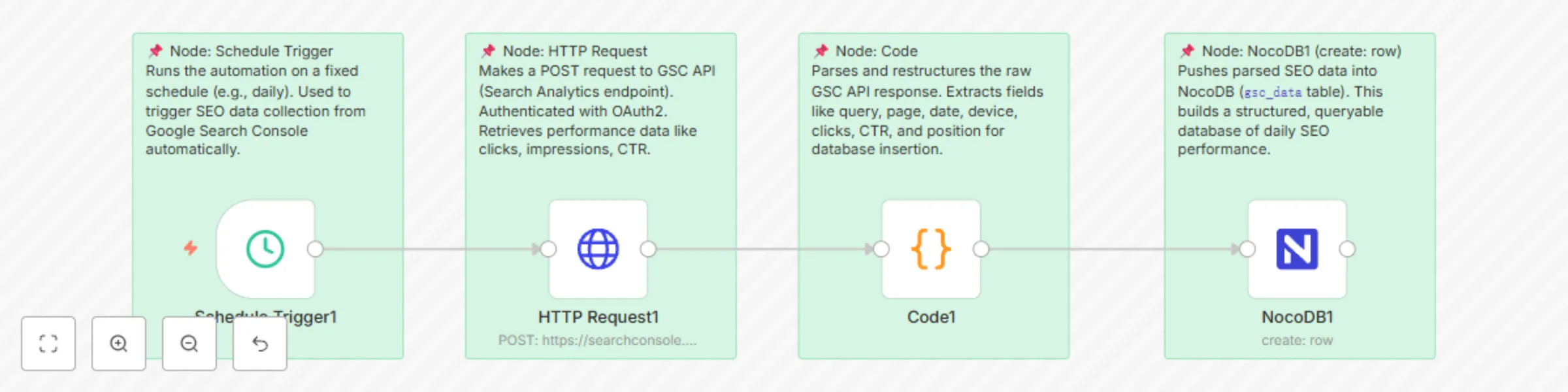
Automated SEO performance collection from Google Search Console to NocoDB
### Problem
Monitoring SEO performance from Google Search Console (GSC) manually is repetitive and prone to human error. For marketers or analysts managing multiple domains, checking reports manually and copying data into spreadsheets or databases is time-consuming. There is a strong need for an automated solution that collects, stores, and updates SEO metrics regularly for easier analysis and dashboarding.
### Solution
This workflow automatically pulls performance metrics from Google Search Console — including queries, pages, CTR, impressions, positions, and devices — and stores them in a structured format inside a NocoDB table. It’s ideal for SEO specialists, marketing teams, or data analysts who need to automate SEO reporting and centralize data for analytics or dashboards (like Superset or Metabase).
### Setup Instructions
1. **Authorize your Google Search Console account**
Connect via OAuth2 (requires GSC API access).
2. **Create a NocoDB table**
Define fields to match GSC response:
- `query` (text)
- `page` (URL)
- `device` (text)
- `clicks` (number)
- `impressions` (number)
- `ctr` (percentage)
- `position` (number)
3. **Add credentials in n8n**
Use credential nodes for both:
- Google OAuth2
- NocoDB API Token
4. **Customize schedule trigger**
Set the frequency (e.g., weekly) and adjust the domain/date range as needed.
5. **Generalize domains**
Replace specific domains like `martechmafia.net` with `your-domain.com` before submission.
### NocoDB Table Structure
The NocoDB table must match the fields coming from GSC's Search Analytics API. Here's a sample schema:
```json
{
"query": "string",
"page": "string",
"device": "string",
"clicks": "number",
"impressions": "number",
"ctr": "number",
"position": "number"
}