Margo Rey
Workflows by Margo Rey
Generate personalized sales emails with MadKudu research & OpenAI for Outreach.io sequences
# AI-Powered Email Generation with MadKudu sent via Outreach.io This workflow researches prospects using MadKudu MCP, generates personalized emails with OpenAI, and syncs them to Outreach with automatic sequence enrollment. Its for SDRs and sales teams who want to scale personalized outreach by automating research and email generation while maintaining quality. ## ✨ Who it's for - Sales Development Representatives (SDRs) doing cold outreach - Business Development teams needing personalized emails at scale - RevOps teams wanting to automate prospect research workflows - Sales teams using Outreach for email sequences ## 🔧 How it works **1. Input Email & Research:** Enter prospect email via chat trigger. Extract email and generate comprehensive account brief using MadKudu MCP account-brief-instructions. **2. Deep Research & Email Generation:** AI Agent performs 6 research steps using MadKudu MCP tools: - Account details (hiring, partnerships, tech stack, sales motion, risk) - Top users in the account (for name-dropping opportunities) - Contact details (role, persona, engagement) - Contact web search (personal interests, activities) - Contact picture web search (LinkedIn profile insights) - Company value prop research AI generates 5 different email angles and selects the best one based on relevance. **3. Outreach Integration:** Checks if prospect exists in Outreach by email. If exists: Updates custom field (custom49) with generated email. If new: Creates new prospect with email in custom field. Enrolls prospect in specified email sequence (ID 781) using mailbox (ID 51). Waits 30 seconds and verifies successful enrollment. ## 📋 How to set up **Set your OpenAI credentials** Required for AI research and email generation. **Create a n8n Variable to store your MadKudu API key named madkudu_api_key** Used for the MadKudu MCP tool to access account research capabilities. **Create a n8n Variable to store your company domain named my_company_domain** Used for context in email generation and value prop research. **Create an Oauth2 API credential to connect your Outreach account** Used to create/update prospects and enroll in sequences. **Configure Outreach settings** Update Outreach Mailbox ID (currently set to 51) in the "Configure Outreach Settings" node. Update Outreach Sequence ID (currently set to 781) in the same node. Adjust custom field name if using different field than custom49. ## 🔑 How to connect Outreach 1. In n8n, add a new Oauth2 API credential and copy the callback URL 2. Now go to Outreach developer portal Click "Add" to create a new app 3. In Feature selection add Outreach API (OAuth) 4. In API Access (Oauth) set the redirect URI to the n8n callback 5. Select the following scopes accounts.read, accounts.write, prospects.read, prospects.write, sequences.read 6. Save in Outreach 7.Now enter the Outreach Application ID into n8n Client Id and the Outreach Application Secret into n8n Client secret 8. Save in n8n and connect via Oauth your Outreach Account ## ✅ Requirements - MadKudu account with access to API Key - Outreach Admin permissions to create an app - OpenAI API Key ## 🛠 How to customize the workflow **Change the research steps** Modify the AI Agent prompt to adjust the 6 research steps or add additional MadKudu MCP tools. **Update Outreach configuration** Change Mailbox ID (51) and Sequence ID (781) in the "Configure Outreach Settings" node. Update custom field mapping if using different field than custom49. **Modify email generation** Adjust the prompt guidelines, tone, or angle priorities in the "AI Email Generator" node. **Change the trigger** Swap the chat trigger for a Schedule, Webhook, or integrate with your CRM to automate prospect input.
AI-generated account briefs with MadKudu, OpenAI & Salesforce for Outreach
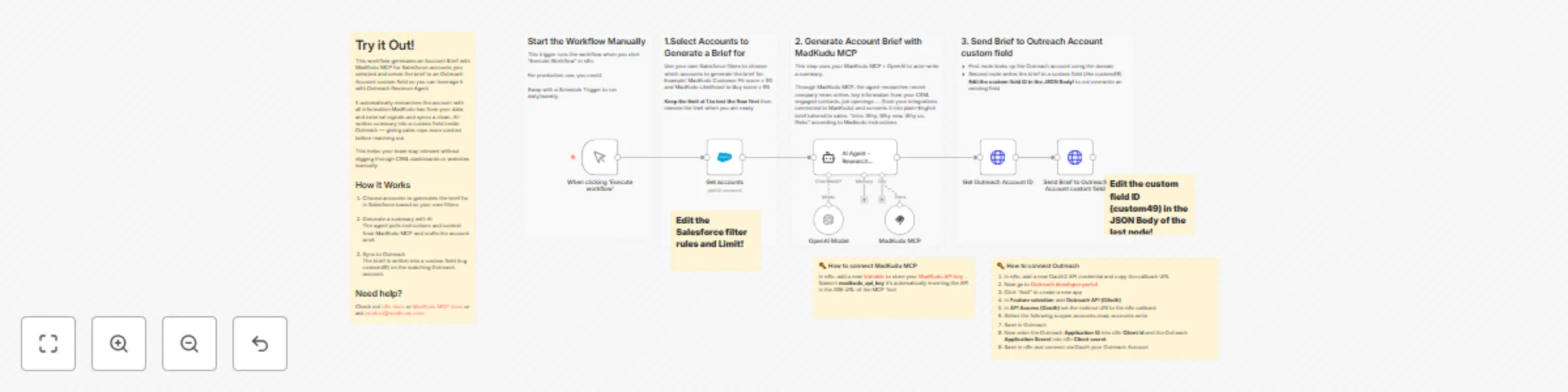
# Generate and send MadKudu Account Brief into Outreach This workflow generates an account brief tailored to your company using MadKudu MCP and OpenAI and syncs it to a custom field in Outreach. Its for Sales who want to give reps rich account context right inside Outreach, and draft Outreach email with Outreach Revenue Agent based on MadKudu account brief. ## ✨ Who it's for - RevOps or GTM teams using MadKudu + Salesforce + Outreach Sales teams needing dynamic, AI-generated context for target accounts ## 🔧 How it works #### 1. Select Accounts: - Use a Salesforce node to define which accounts to brief. - Filter logic can be updated to match ICP or scoring rules (e.g., MadKudu Fit + LTB). #### 2. Generate Brief with MadKudu MCP & AI - MadKudu MCP provides the account brief instructions, research online for company recent news and provides structured account context from your integrations connected to MadKudu + external signals (firmographics, past opportunities, active contacts, job openings...) - The AI agent (OpenAI model) turns this into a readable account brief. #### 3. Send to Outreach - Match account in Outreach via domain. - Update a custom field (e.g., custom49) with the brief text. ## 📋 How to set up 1. Connect your Salesforce account Used to pull accounts that need a brief. 2. Set your OpenAI credentials Required for the AI Agent to generate the brief. 3. Create a n8n **[Variable](https://docs.n8n.io/code/variables/)** to store your **[MadKudu API key](https://developers.madkudu.com/getting-started/quickstart)** named **madkudu_api_key** used for the MadKudu MCP tool The AI Agent pulls the account brief instructions and all the context necessary to generate the briefs. 3. Create an Oauth2 API credential to connect your Outreach account Used to sync to brief to Outreach. 4. Customize the Salesforce filter In the “Get accounts” node, define which accounts should get a brief (e.g. Fit > 90). 5. Map your Outreach custom field Update the JSON Body request with your actual custom field ID (e.g. custom49). #### 🔑 How to connect Outreach 1. In n8n, add a new Oauth2 API credential and copy the callback URL 2. Now go to **[Outreach developer portal](https://developers.outreach.io/apps/)** 2. Click “Add” to create a new app 3. In **Feature selection** add **Outreach API (OAuth)** 4. In **API Access (Oauth)** set the redirect URI to the n8n callback 5. Select the following scopes accounts.read, accounts.write 6. Save in Outreach 7. Now enter the Outreach **Application ID** into n8n **Client Id** and the Outreach **Application Secret** into n8n **Client secret** 8. Save in n8n and connect via Oauth your Outreach Account ## ✅ Requirements - MadKudu account with access to API Key - Salesforce Oauth - Outreach Admin permissions to create an app - OpenAI API Key ## 🛠 How to customize the workflow - **Change the targeting logic** Edit the Salesforce filter to control which accounts are eligible. - **Rewrite the prompt** Tweak the prompt in the AI Agent node to adjust format, tone, or insights included in the brief. - **Change the Outreach account field** Update the Outreach field where the brief is sync-ed if you're using a different custom field (e.g. custom48, custom32, etc). - **Use a different trigger** Swap the manual trigger for a Schedule or Webhook to automate the flow end-to-end.
Generate AI meeting briefs for Google Calendar with GPT-4 & MadKudu MCP
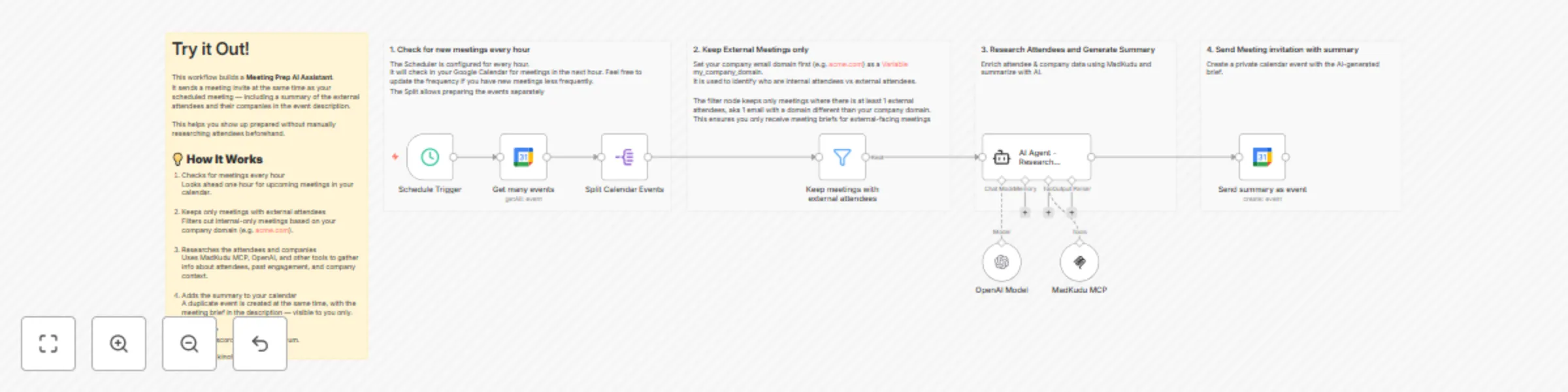
# Prepare external meetings in Google Calendar with AI summaries powered by MadKudu Intelligence Automatically prepare for external meetings by generating AI-powered attendee briefs and sending them to your calendar, using MadKudu MCP. ## Who’s it for This workflow is designed for customer-facing professionals—such as Account Executives, Customer Success Managers, or Founders—who want to walk into meetings informed, without spending time researching attendees. It’s perfect for teams that use Google Calendar, manage accounts in a CRM, and want to automate meeting prep with real-time enrichment and summaries. ## How it works 1. The workflow checks Google Calendar every hour for upcoming meetings. 2. It filters out internal-only meetings using your company email domain. For meetings with external attendees, it: - Uses MadKudu MCP to enrich attendees and company - Summarizes attendee details and context using an OpenAI model 3. It creates a private calendar event with the meeting brief, visible only to you. ## How to set up - Connect your Google Calendar account. - Set your MadKudu API Key as a variable - Connect your OpenAI credentials. - Set your company domain (e.g. acme.com) as a variable Test and Activate the workflow. ## Requirements - Google Calendar integration - OpenAI credentials - MadKudu account with access to API key ## How to customize the workflow Adjust the trigger frequency to check more or less often. Update the prompt in the AI Agent node to control the summary format or tone.