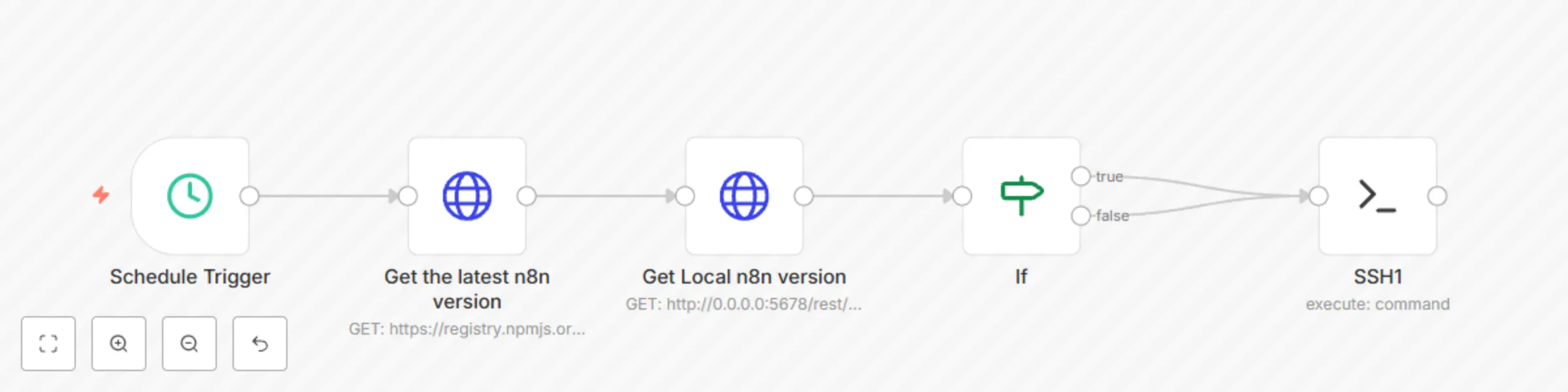
Automatically update n8n version
# 🔄 n8n Workflow: Check and Update n8n Version
This workflow automatically **checks if the local n8n version is outdated** and, if so, **creates a file to signal an update is needed**.
---
## 🖥️ Working Environment
- **Operating System:** Ubuntu 24.04
- **n8n Installation:** Docker container
---
## 📁 Project Directory Structure
n8n/
├── check_update.txt
├── check-update.sh
├── compose.yml
├── update_n8n.cron
---
## 🧾 File Descriptions
### `check_update.txt`
Contains a single word:
- `true`: Update is needed
- `false`: No update required
---
### `check-update.sh`
```bash
#!/bin/bash
PATH=/usr/local/sbin:/usr/local/bin:/usr/sbin:/usr/bin:/sbin:/bin
if grep -q "true" /home/sysadmin/n8n/check_update.txt; then
# Place your update logic here
echo "Update needed - please insert update logic"
echo true > /home/sysadmin/n8n/check_update.txt
fi
```
**Purpose:**
- Checks the contents of `check_update.txt`
- If it contains `true`, executes update logic (currently a placeholder)
- Resets `check_update.txt` to `true`
---
### `update_n8n.cron`
```cron
SHELL=/bin/sh
10 5 * * * /bin/sh /home/sysadmin/n8n/check-update.sh
```
**Purpose:**
- Runs the `check-update.sh` script daily at 5:10 AM
- Uses `/bin/sh` as the shell environment
## 🧩 n8n Workflow Breakdown
### 1. Schedule Trigger 🕓
- **Purpose:** Triggers the workflow every day at 5:00 AM
- **Node Type:** Schedule Trigger
---
### 2. Get the latest n8n version 🌐
- **Purpose:** Fetches the latest version of n8n from npm
- **Endpoint:** `https://registry.npmjs.org/n8n/latest`
- **Node Type:** HTTP Request
---
### 3. Get Local n8n version 🖥️
- **Purpose:** Retrieves the currently running n8n version
- **Endpoint:** `http://192.168.100.18:5678/rest/settings`
- **Node Type:** HTTP Request
---
### 4. If 🔍
- **Purpose:** Compares the local and latest versions
- **Condition:** If not equal → update is needed
---
### 5. SSH1 🧾
- **Purpose:** Writes the result to a file on the host via SSH
- **Logic:**
```bash
echo "{{ $('If').params.conditions ? 'false' : 'true' }}" > check_update.txt
```
**Effect**: Updates `check_update.txt` with `"true"` if an update is needed, `"false"` otherwise.
## 🛠️ Setting up Crontab on Ubuntu
### 1. Register the cron job with:
```bash
crontab update_n8n.cron
```
### 2. Verify that your cron job is registered:
```bash
crontab -l
```
## ✅ Result
- **5:00 AM** – n8n workflow checks versions and writes result to `check_update.txt`
- **5:10 AM** – Cron runs `check-update.sh` to respond to update flag