Lucía Maio Brioso
Workflows by Lucía Maio Brioso
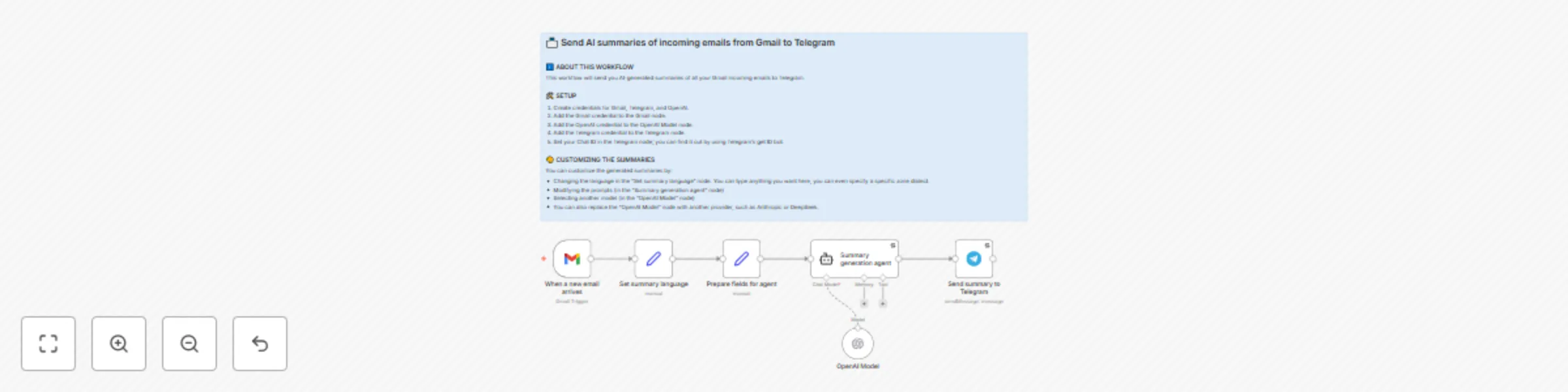
Gmail to Telegram: email summaries with OpenAI GPT-4o
### 🧑💼 Who is this for? This workflow is for **anyone who receives too many emails** and wants to **stay informed without drowning in their inbox**. If you're constantly checking your Gmail and wish you had someone summarizing messages and sending just the important parts to your phone, this is for you. Especially useful for solopreneurs, customer support, busy professionals, or newsletter addicts. ### 🧠 What problem is this workflow solving? Email is powerful, but also overwhelming. Important info gets buried in threads, and staying on top of things can mean hours wasted scanning messages. This workflow turns that chaos into clarity: as soon as a new email arrives, you get a **concise AI-generated summary** in Telegram — straight to your pocket. No more checking Gmail constantly. No more missing key updates. Just a clean, human-style summary, written in the language you choose. ### ⚙️ What this workflow does * Watches your Gmail inbox for new messages * Prepares the content, including sender, subject, and message body * Sends it to OpenAI to generate a **friendly, casual summary** * Delivers that summary to your Telegram chat All in seconds, completely automated. ### 🛠️ Setup 1. **Connect your accounts**: Gmail, Telegram, and OpenAI credentials must be added to the respective nodes. 2. **Set your Telegram chat ID**: Use a bot like [@userinfobot](https://t.me/userinfobot) to get it. 3. **Customize the language** in the `Set summary language` node (default is English). 4. **Activate the workflow** — and watch it go. ### 🧩 How to customize this workflow to your needs You can make this workflow your own in a few easy ways: * **Summarize only some emails**: Add a `Filter` node after the Gmail trigger (e.g., only messages from certain senders). * **Change the tone or detail of summaries**: Tweak the system prompt in the `Summary generation agent`. * **Use a different model**: Swap OpenAI’s GPT-4o for another provider like Claude or DeepSeek. * **Translate to your preferred language**: Just change `"english"` to `"español"`, `"français"`, etc.
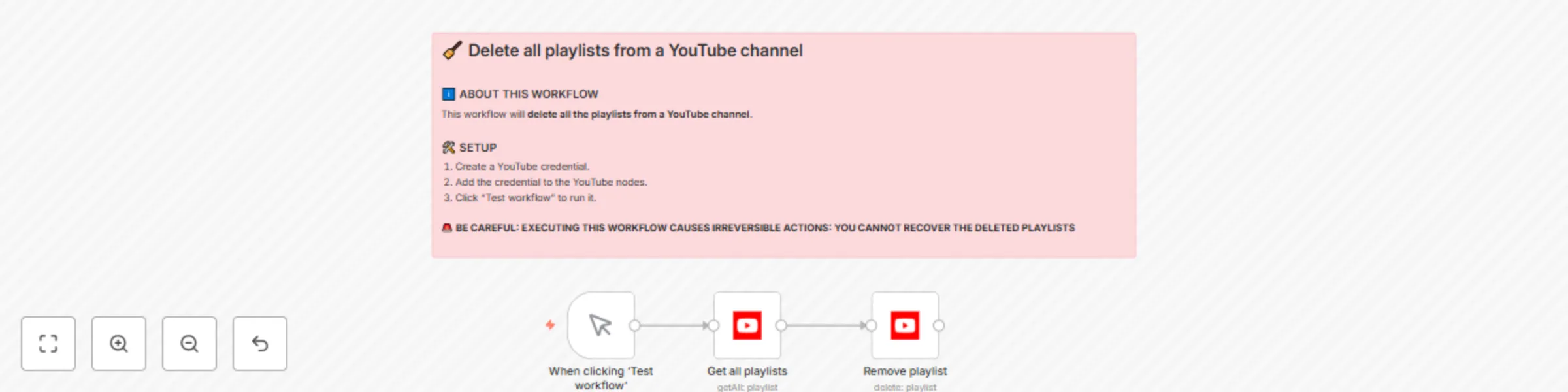
Bulk delete all YouTube playlists from your channel
### 🧑💼 Who is this for? This workflow is for **any YouTube user** who wants to **bulk delete all playlists** from their own channel — whether to start fresh, clean up old content, or prepare the account for a new purpose. It’s useful for: * Creators reorganizing their channel * People transferring content to another account * Anyone who wants to avoid deleting playlists manually one by one ### 🧠 What problem is this workflow solving? YouTube does not offer a built-in way to delete multiple playlists at once. If you have dozens or hundreds of playlists, removing them manually is extremely time-consuming. This workflow **automates the entire deletion process** in seconds, saving you hours of repetitive effort. ### ⚙️ What this workflow does * Connects to your YouTube account * Fetches **all playlists** you’ve created (excluding system playlists) * **Deletes them one by one** automatically > ⚠️ This action is **irreversible**. Once a playlist is deleted, it cannot be recovered. Use with caution. ### 🛠️ Setup 1. 🔐 **Create a YouTube OAuth2 credential** in n8n for your channel. 2. 🧭 Assign the credential to both YouTube nodes. 3. ✅ Click **“Test workflow”** to execute. > 🟨 By default, this workflow deletes everything. If you want to be more selective, see the customization tips below. ### 🧩 How to customize this workflow to your needs * ✅ **Add a confirmation flag** Insert a `Set` node with a custom field like `confirm_delete = true`, and follow it with an `IF` node to prevent accidental execution. * ✂️ **Delete only some playlists** Add a `Filter` node after fetching playlists — you can match by title, ID, or keyword (e.g. only delete playlists containing “old”). * 🛑 **Add a pause before deletion** Insert a `Wait` or `NoOp` node to give you a moment to cancel before it runs. * 🔁 **Adapt to scheduled cleanups** Use a `Cron` trigger if you want to periodically clear temporary playlists.
🔁 Copy all YouTube playlists from one channel to another
### 🧑💼 Who is this for? This workflow is for **anyone with two YouTube channels** who wants to **copy playlists from one to the other** — no technical skills required. Whether you're a content creator, hobbyist, educator, or just someone managing multiple channels, this workflow helps you **save time** and avoid the manual work of recreating playlists video by video. ### 🧠 What problem is this workflow solving? YouTube doesn't provide an option to transfer or duplicate playlists between accounts or channels. That means if you want the same playlists in two places, you're stuck: * Creating new playlists manually * Searching for each video again * Copy-pasting links one by one This workflow automates the entire process for you — **accurately, quickly, and with no manual work**. ### ⚙️ What this workflow does * Retrieves **all playlists** from a source YouTube channel (excluding private ones) * For each playlist: * Gets all its videos * Filters out private or unavailable videos * Creates a new playlist in the **target channel** with the same title * Adds the videos to the new playlist * Continues smoothly even if some videos fail to copy (e.g., if they’re restricted or deleted) ### 🛠️ Setup 1. **Create two YouTube OAuth2 credentials** in n8n: * One for your **source channel** * One for your **target channel** 2. **Assign the credentials** to the correct nodes as indicated in the sticky notes: * Source nodes → source credentials * Target nodes → target credentials 3. **Click “Test workflow”** to run it. > ⚠️ Note: If you have many playlists or videos, you may hit YouTube’s API quota. You can request a quota increase in your Google Cloud Console if needed. ### 🧩 How to customize this workflow to your needs * ✂️ **Copy only specific playlists** Use a `Filter` node after the playlist fetch to include only certain titles or IDs. * 📝 **Change the title of the copied playlists** Modify the title in the `Create playlist` node (e.g., add “(Copy)” or a prefix). * 🔄 **Automate it regularly** Replace the `Manual Trigger` with a `Cron` node if you want to run this periodically. * 🧪 **Test safely** If you're unsure, use a secondary channel as your test target before applying changes to your main account.
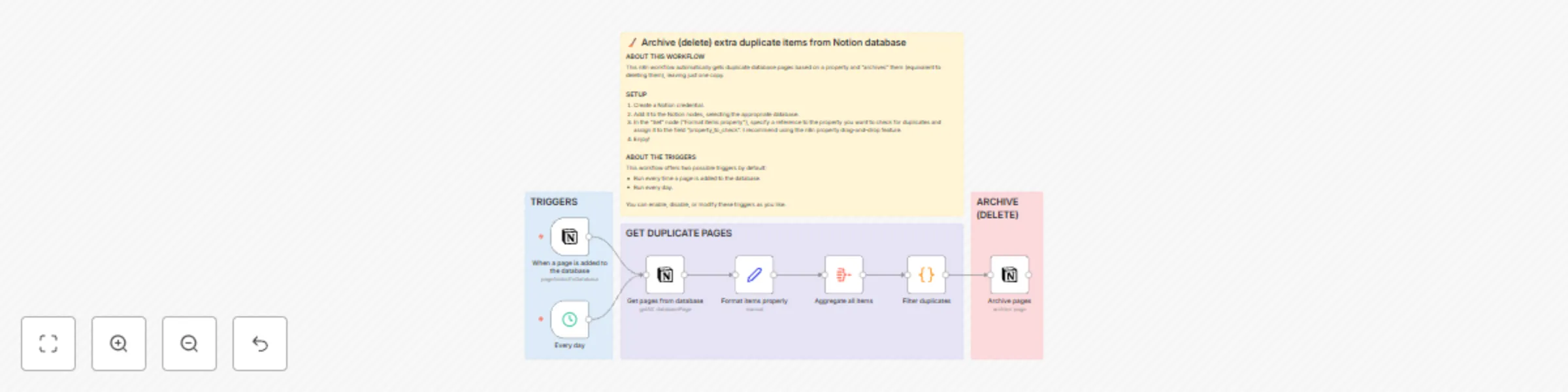
🧹 Archive (delete) duplicate items from a Notion database
### 🧑💼 Who is this for? If you’re using **Notion** to manage a database (like saving links, tasks, notes, or anything really), and it’s starting to get messy with duplicate entries, this workflow is for you. It’s especially useful if you want to keep things tidy *without* doing any manual cleanup. ### 🧠 What problem is this workflow solving? Notion doesn’t have a built-in way to find or remove duplicates, so you either clean them up manually 😩 or just let them pile up. This workflow automatically finds entries that share the same property (like a URL or title) and archives the extra copies, keeping just one. ### ⚙️ What this workflow does - Pulls all pages from a Notion database. - Identifies duplicates based on a property you choose. - Archives the duplicate pages (which is like soft-deleting them). - Keeps one version of each duplicate group. It includes **two optional triggers**: - Run it every day ⏰ - Or trigger it automatically when a new page is added to the database ⚡ ### 🛠️ Setup 1. Connect your Notion account in n8n. 2. Select your database in the Notion nodes. 3. In the **“Format items properly”** node, replace `"SET YOUR PROPERTY HERE"` with a reference to the property you want to use for detecting duplicates. I recommend using the n8n property drag-and-drop feature. 4. Enable whichever trigger you prefer — or both. And that’s it. It runs on its own after that. ### 🧩 How to customize this workflow to your needs - Use a different property for detecting duplicates by updating the `Set` node. - Want to tag duplicates instead of archiving them? Just replace the last Notion node with an update operation. - Adjust the schedule to run it hourly, weekly, or whenever suits your setup.