K

Kornel Dubieniecki

1
Workflow

Workflows by Kornel Dubieniecki

Workflow preview: Analyze LinkedIn content performance with OpenAI, Bright Data and NocoDB
Free advanced

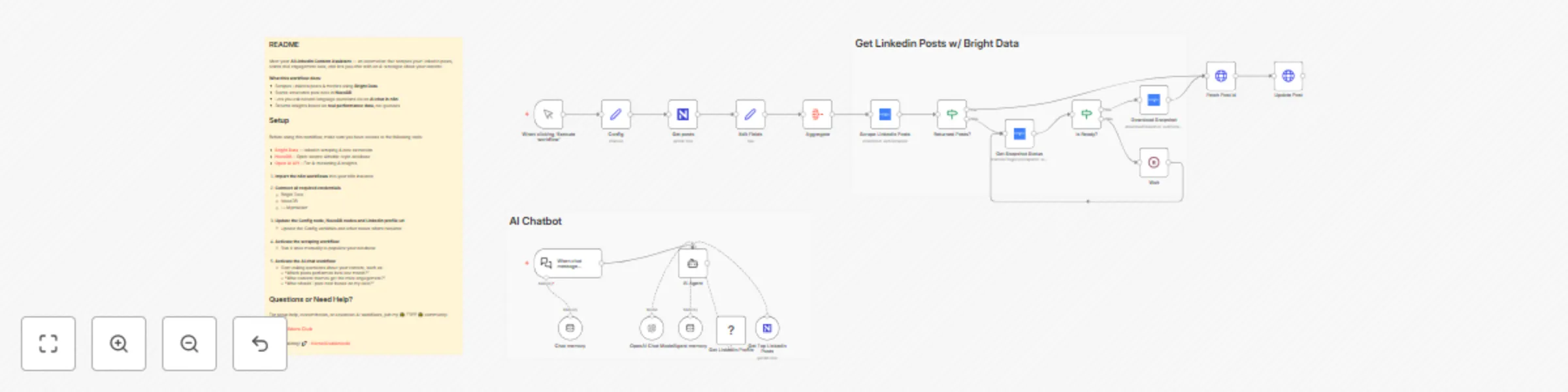
Analyze LinkedIn content performance with OpenAI, Bright Data and NocoDB

## AI LinkedIn Content Assistant using Bright Data and NocoDB ## Who’s it for This template is designed for **creators, founders, and automation builders** who publish regularly on LinkedIn and want to analyze their content performance using real data. It’s especially useful for users who are already comfortable with n8n and want to build **data-grounded AI assistants** instead of relying on generic prompts or manual spreadsheets. --- ## What this workflow does This workflow builds an **AI-powered LinkedIn content assistant** backed by real engagement data. It automatically: - Scrapes LinkedIn posts and engagement metrics using [**Bright Data**](https://link.kornel.me/brightdata) - Stores structured post data in [**NocoDB**](https://nocodb.com) - Enables an AI chat interface in [**n8n**](https://link.kornel.me/n8n) to query and analyze your content - Returns insights based on historical performance (not hallucinated data) You can ask questions like: - “Which posts performed best last month?” - “What content got the most engagement?” - “What should I post next?” --- ## Requirements - Self-hosted or cloud [**n8n**](https://link.kornel.me/n8n) instance - [**Bright Data**](https://link.kornel.me/brightdata) – LinkedIn scraping & data extraction - [**NocoDB**](https://nocodb.com) – Open-source Airtable-style database - [**Open AI API**](https://platform.openai.com/settings) – For AI reasoning & insights --- ## Setup 1. Import the workflow into your n8n instance 2. Open the **Config** node and fill in required variables 3. Connect your credentials for [**Bright Data**](https://link.kornel.me/brightdata), [**NocoDB**](https://nocodb.com), and [**Open AI API**](https://platform.openai.com/settings) 4. Activate the workflow and run the scraper once to populate data --- ## How to customize the workflow You can extend this template by: - Adding new metrics or post fields in NocoDB - Scheduling regular data refreshes - Changing the AI system prompt to match your content strategy - Connecting additional channels (email, Slack, dashboards) This template is fully modular and designed to be adapted to your workflow. --- ## Questions or Need Help? For setup help, customization, or advanced AI workflows, join my 🌟 FREE 🌟 community: ### [Tech Builders Club](https://link.kornel.me/discord-tbc) Happy building! 🚀 - [**Kornel Dubieniecki**](https://link.kornel.me/website)

K
Kornel Dubieniecki
Market Research
15 Dec 2025
62
0