LEDGERS
Workflows by LEDGERS
Parse and create LEDGERS contacts from unstructured data with GPT-4o
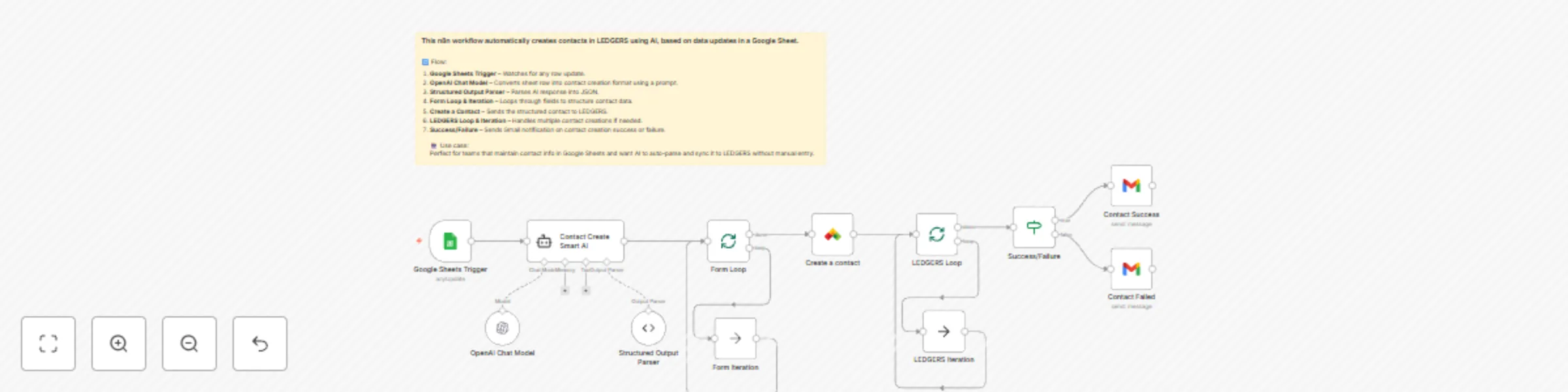
# 🤖 AI Contact Creator for LEDGERS (Works with Any Trigger) **### Before using this template:** ==**#### 👉 Search for LEDGERS in the nodes list and install it from Community Nodes (required for this workflow to run).**== ##### 🔧 What This Workflow Does: This smart n8n template automatically creates contacts in LEDGERS using AI, triggered by any node (like Google Sheets, Webhook, Airtable, Forms, etc.). It’s designed for teams who maintain contact data across platforms and want to auto-parse raw data using AI and sync it to LEDGERS—without manual entry. #### ⚙️ Flow Overview: Trigger Node – Can be anything: Google Sheets, Webhook, API call, etc. Chat Model (Claude / GPT-4o) – Uses AI to generate structured contact data from raw inputs. Structured Output Parser – Parses AI response into clean JSON. Form Loop & Iteration – Loops through fields in the structured output. Create a Contact – Sends the data to LEDGERS via API. LEDGERS Loop & Iteration – Supports bulk contact creation if needed. Success/Failure Path – Sends email notifications via Gmail node depending on the outcome. #### 💡 Use Case: Automate contact creation from form submissions, CRM exports, sheet updates, webhook data, etc. Clean and structure messy data with AI before syncing to LEDGERS. Save manual hours and reduce errors in contact data entry.
Validate and create LEDGERS contacts from Google Sheets with error handling
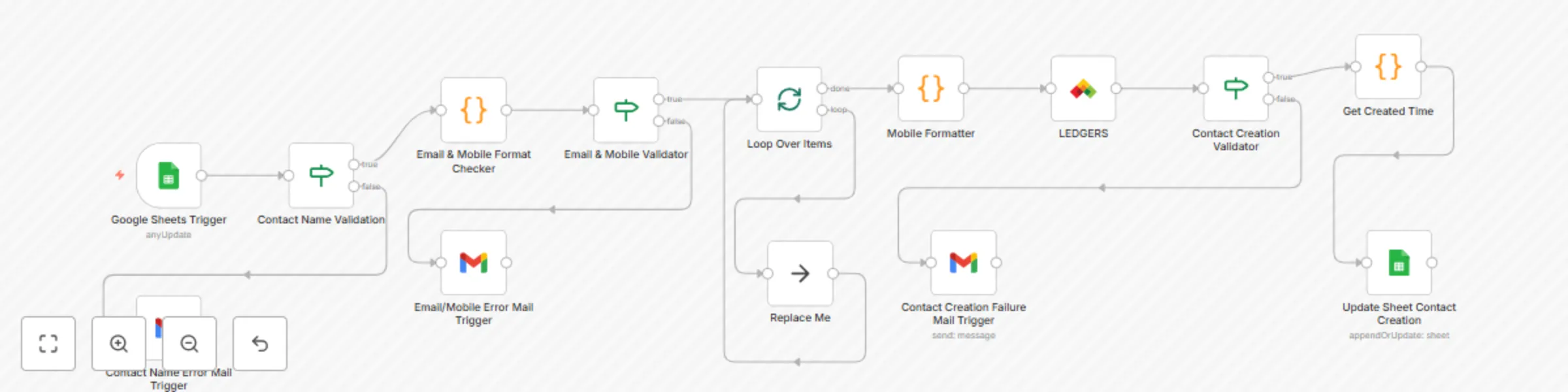
**Before Using this Template first search LEDGERS in the nodes list and Update!** The workflow automates contact creation in LEDGERS from a Google Sheets document, while performing validation checks on contact data to ensure data quality. **Key Features:** ✅ Google Sheets Trigger – Polls the sheet every minute to detect new or updated rows. ✅ Contact Name Validation – Checks if the contact name is provided; sends an email notification if missing. ✅ Email & Mobile Validation – Uses custom code to validate the format of email and mobile fields. ✅ Dynamic Routing – If both email and mobile are valid → proceeds to create the contact in LEDGERS. If either is invalid → sends an error notification via Gmail. ✅ Mobile Number Formatter – Extracts country code and mobile number for consistent formatting before creating the contact. ✅ LEDGERS API Integration – Creates the contact using the LEDGERS custom node. ✅ Error Handling – If contact creation fails (e.g., duplicate email), sends a failure email with details. ✅ Audit Trail – Appends results (including timestamps) back to Google Sheets for record-keeping. **Extended Field Support** This workflow is designed to be flexible. 👉 Along with core fields (Name, Email, Mobile), users can optionally map and include additional fields when creating a contact in LEDGERS, such as: - Mobile Country Code - GSTIN - Business Name - Billing Address 1 - Billing Address 2 - City - State - Country ➡ The workflow’s LEDGERS node can be configured to map these fields dynamically from Google Sheets if desired. **Customization** ✅ Users can extend or modify the workflow to handle these additional fields without needing structural changes — just by updating the mapping in the LEDGERS node parameters. **Requirements:** A connected Google Sheets document with at least Name column Configured Gmail credentials for sending email notifications A LEDGERS account with API access and credentials set up in n8n