Laura Piraux
Workflows by Laura Piraux
Generate an AI summary of your Notion comments
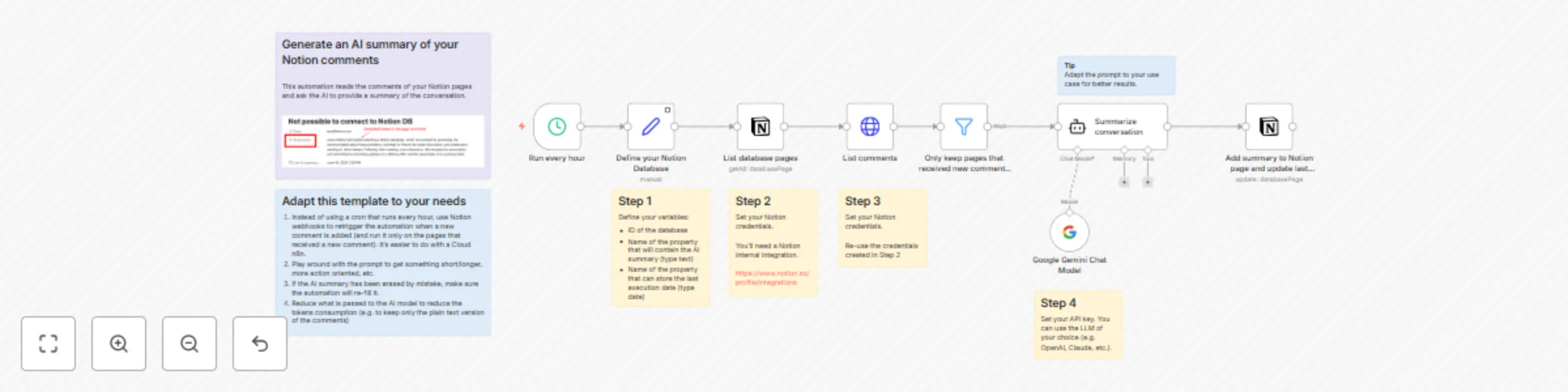
## Use case This automation is for teams working in Notion. When you have a lot of back and forth in the comment section, it’s easy to lose track of what is going on in the conversation. This automation relies on AI to generate a summary of the comment section.  ## How it works Every hour (the trigger can be adapted to your need and usecase), the automation checks if new comments have been added to the pages of your Notion database. If there are new comments, the comments are sent to an AI model to write a summary. The summary is then added to a predefined page property. The automation also updates a “Last execution” property. This prevents to re-generate the AI summary when no new comments have been received. ## Setup - Define your Notion variables: Notion database, property that will hold the AI summary, property that will hold the last execution date of the automation. - Set up your Notion credentials. - Set up your AI model credentials (API key). ## How to adjust it to your needs - Use the LLM model of your choice. In this template, I used Gemini but you can easily replace it by ChatGPT, Claude, etc. - Adapt the prompt to your use case to get better summaries: specify the maximum number of characters, give an example, etc. - Adapt the trigger to your needs. You could use Notion webhooks as trigger in order to run the automation only when a new comment is added (this setup is advised if you’re on n8n cloud version).
Create a Notion AI assistant with Google Gemini for managing tasks & content
**This n8n workflow template uses community nodes and is only compatible with the self-hosted version of n8n.** # Build an AI agent for Notion (with Notion official MCP server)  ## Use case This template empowers Notion power-users to build their own AI assistant, deeply integrated with their workspace. It solves the constant problem of copy-pasting and context-switching between a separate AI chat and Notion by creating a direct, conversational bridge. Now you can interact with an intelligent agent that can create, retrieve, and update your Notion databases and pages on your behalf, turning your workspace into a truly dynamic productivity hub.  ## How it works When you send a message via the chat interface, the workflow passes it to your chosen AI model. The model, connected to the official Notion tool server, analyzes your request to see if it can be fulfilled by one of its available Notion actions. If it matches a tool, the workflow executes the command using the Notion API—like creating a new page or searching a database—and the AI then confirms the action is complete back in the chat. ## Setup **Prerequisite:** This template is for **self-hosted n8n instances only**, as it requires a community node. 1. Copy this workflow into your self-hosted n8n instance 2. Install the required community node (n8n-nodes-mcp). 3. Add your credentials for your chosen AI Model and the Notion MCP Server. 4. Test the workflow by starting chatting with your new Notion assistant. ## How to adjust it to your needs - You can use the AI model you want and even easily compare different AI models. - You can start from this template and then provide other tools to your AI agent to build more powerful workflows.