L

Lakshit Ukani

3
Workflows

Workflows by Lakshit Ukani

Workflow preview: Automated video creation using Google Veo3 and n8n workflow
Free advanced

Automated video creation using Google Veo3 and n8n workflow

## Who is this for? Content creators, social media managers, digital marketers, and businesses looking to automate video production without expensive equipment or technical expertise. ## What problem is this workflow solving? Traditional video creation requires cameras, editing software, voice recording equipment, and hours of post-production work. This workflow eliminates all these barriers by automatically generating professional videos with audio using just text prompts. ## What this workflow does This automated workflow takes video ideas from Google Sheets, generates optimized prompts using AI, creates videos through Google's V3 model via Fal AI, monitors the generation progress, and saves the final video URLs back to your spreadsheet for easy access and management. ## Setup 1. Sign up for Fal AI account and obtain API key 2. Create Google Sheet with video ideas and status columns 3. Configure n8n with required credentials (Google Sheets, Fal AI API) 4. Import the workflow template 5. Set up authentication for all connected services 6. Test with sample video idea ## How to customize this workflow to your needs Modify the AI prompts to match your brand voice, adjust video styles and camera movements, change polling intervals for video generation status, customize Google Sheet column mappings, and add additional processing steps like thumbnail generation or social media posting.

L
Lakshit Ukani
Content Creation
11 Jun 2025
11165
0

Workflow preview: Schedule & publish all Instagram content types with Facebook Graph API
Free advanced

Schedule & publish all Instagram content types with Facebook Graph API

# Automated Instagram posting with Facebook Graph API and content routing ## Who is this for? This workflow is perfect for **social media managers**, **content creators**, **digital marketing agencies**, and **small business owners** who need to automate their Instagram posting process. Whether you're managing multiple client accounts or maintaining consistent personal branding, this template streamlines your social media operations. ## What problem is this workflow solving? Manual Instagram posting is time-inconsistent and prone to inconsistency. Content creators struggle with: - Remembering to post at optimal times - Managing different content types (images, videos, reels, stories, carousels) - Maintaining posting schedules across multiple accounts - Ensuring content is properly formatted for each post type This workflow eliminates manual posting, reduces human error, and ensures consistent content delivery across all Instagram format types. ## What this workflow does The workflow automatically publishes content to Instagram using Facebook's Graph API with intelligent routing based on content type. It handles **image posts**, **video stories**, **Instagram reels**, **carousel posts**, and **story content**. The system creates media containers, monitors processing status, and publishes content when ready. It supports both HTTP requests and Facebook SDK methods for maximum reliability and includes automatic retry mechanisms for failed uploads. ## Setup 1. **Connect Instagram Business Account** to a Facebook Page 2. **Configure Facebook Graph API credentials** with `instagram_basic` permissions 3. **Update the "Configure Post Settings" node** with your Instagram Business Account ID 4. **Set media URLs** and captions in the configuration section 5. **Choose post type** (http_image, fb_reel, http_carousel, etc.) 6. **Test workflow** with sample content before going live ## How to customize this workflow to your needs Modify the **post_type** variable to control content routing: - Use `http_*` prefixes for direct API calls - Use `fb_*` prefixes for Facebook SDK calls - **Use both HTTP and Facebook SDK nodes as fallback mechanisms** - if one method fails, automatically try the other for maximum success rate - Add scheduling by connecting a **Cron node** trigger - Integrate with **Google Sheets** or **Airtable** for content management - Connect **webhook triggers** for automated posting from external systems - Customize wait times based on your content file sizes - **Set up error handling** to switch between HTTP and Facebook SDK methods when API limits are reached

L
Lakshit Ukani
Social Media
30 May 2025
6270
0
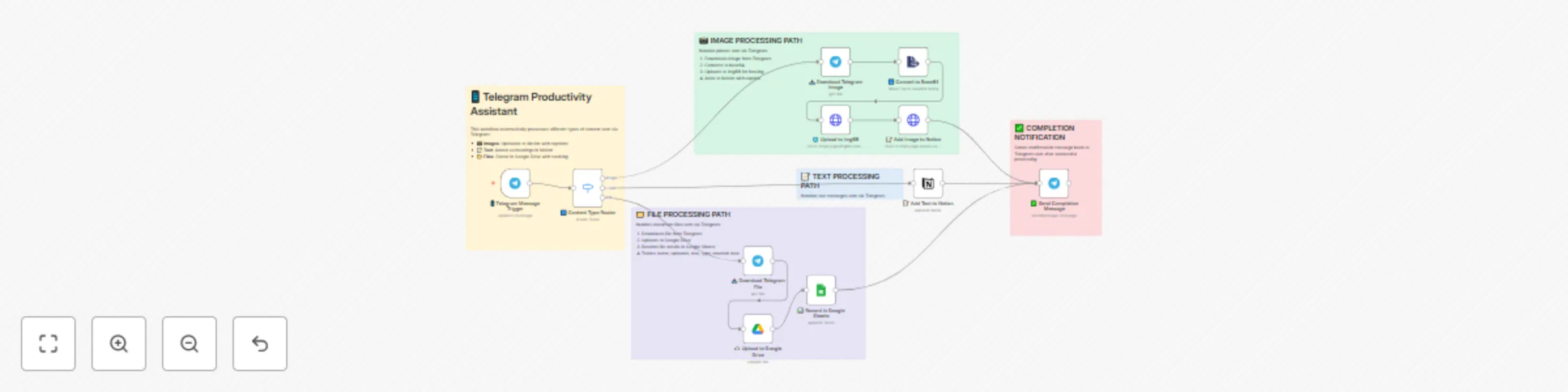
Workflow preview: One-way sync between Telegram, Notion, Google Drive, and Google Sheets
Free advanced

One-way sync between Telegram, Notion, Google Drive, and Google Sheets

# One-way sync between Telegram, Notion, Google Drive, and Google Sheets ## Who is this for? This workflow is perfect for productivity-focused teams, remote workers, virtual assistants, and digital knowledge managers who receive documents, images, or notes through Telegram and want to automatically organize and store them in Notion, Google Drive, and Google Sheets—without any manual work. ## What problem is this workflow solving? Managing Telegram messages and media manually across different tools like Notion, Drive, and Sheets can be tedious. This workflow automates the classification and storage of incoming Telegram content, whether it’s a text note, an image, or a document. It saves time, reduces human error, and ensures that media is stored in the right place with metadata tracking. ## What this workflow does - **Triggers on a new Telegram message** using the Telegram Trigger node. - **Classifies the message type** using a Switch node: - Text messages are appended to a Notion block. - Images are converted to base64, uploaded to imgbb, and then added to Notion as toggle-image blocks. - Documents are downloaded, uploaded to Google Drive, and the metadata is logged in Google Sheets. - **Sends a completion confirmation** back to the original Telegram chat. ## Setup 1. **Telegram Bot**: Set up a bot and get the API token. 2. **Notion Integration**: - Share access to your target Notion page/block. - Use the Notion API credentials and block ID where content should be appended. 3. **Google Drive & Sheets**: - Connect the relevant accounts. - Select the destination folder and spreadsheet. 4. **imgbb API**: Obtain a free API key from [imgbb](https://api.imgbb.com/). Replace placeholder credential IDs and asset URLs as needed in the imported workflow. ## How to customize this workflow to your needs - **Change Storage Locations**: - Update the Notion block ID or Google Drive folder ID. - Switch Google Sheet to log in a different file or sheet. - **Add More Filters**: - Use additional Switch rules to handle other Telegram message types (like videos or voice messages). - **Modify Response Message**: - Personalize the Telegram confirmation text based on the file type or sender. - **Use a different image hosting service** if you don’t want to use imgbb.

L
Lakshit Ukani
File Management
26 May 2025
9553
0