F

Fariez

2
Workflows

Workflows by Fariez

Workflow preview: Generate & post animated anime wallpapers to TikTok with Flux AI and Fal AI
Free advanced

Generate & post animated anime wallpapers to TikTok with Flux AI and Fal AI

**Automatically create AI-generated anime wallpapers, transform them into animated videos, and post them to TikTok — all with one n8n workflow.** ## What Problem Is This Workflow Solving? / Use Case Creating and publishing engaging anime content for TikTok is often time-consuming. From generating ideas, creating visuals, animating them, and finally uploading to TikTok, the process usually requires multiple tools and manual effort. This workflow solves that by automating the entire pipeline — from **anime wallpaper generation** to **video animation** and **auto-posting on TikTok** — all in one place. Perfect for content creators, anime enthusiasts, and marketers who want to consistently deliver fresh, unique TikTok content without the hassle. --- ## Who Is This For - **Anime Creators & Fans**: Share unique AI-generated anime content with your TikTok audience. - **Content Creators & Influencers**: Keep your TikTok feed active without spending hours designing and editing. - **Marketers & Social Media Managers**: Automate anime-themed campaigns to attract new audiences. - **Automation Enthusiasts**: Explore creative ways to connect AI models and publishing platforms using n8n. --- ## What This Workflow Does - Collects anime topic & style via an **n8n Form** (or scheduled trigger). - Uses **Groq + GPT-OSS** to generate a text-to-image prompt. - Creates an anime wallpaper using the **Flux AI model (Pollination AI)**. - Transforms the wallpaper into an animated video with **Fal AI (Minimax Hailuo 02 Fast)**. - Automatically posts the final video to **TikTok** via the **GetLate API**. --- ## How to Use 1. **Set up Groq** - Add your **Groq API Key** to the **Groq Chat Model** node. - Select an LLM model (default: **OpenAI GPT-OSS 120B**). 2. **Set up TikTok posting** - Get your API key from [getlate.dev](https://getlate.dev/). - Add the credentials to the **Upload IMG** and **TikTok Post** nodes. 3. **Set up Fal AI for video generation** - Get your API key from [Fal.ai](https://fal.ai/dashboard/keys) and top up credits. - Add your **Fal AI credentials** to the **Create Video**, **Get Status**, and **Get Video** nodes. 4. **Run the workflow** - Open the **n8n Form URL** (Test or Production). - Enter your anime topic and style. - The workflow will generate the image, animate it, and post directly to TikTok. ### Possible Customizations: - Replace the default **Form Trigger** with a **Scheduled Trigger**. - Connect a topics database (e.g., Google Sheets or Airtable) to automatically generate and post animated anime wallpapers on TikTok at regular intervals.

F
Fariez
Content Creation
16 Sep 2025
2686
0
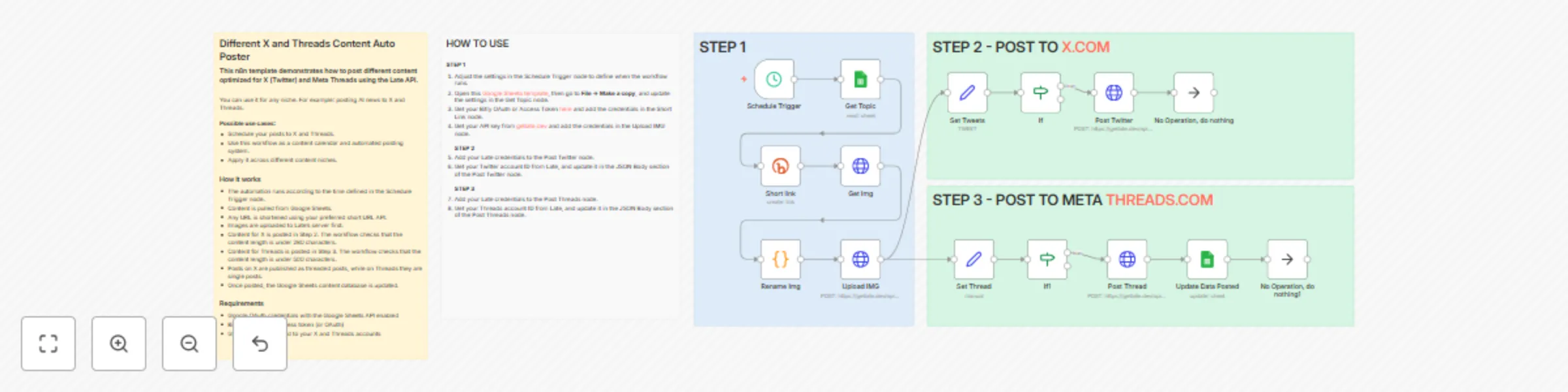
Workflow preview: Auto-post platform-optimized content to X and Threads with late API and Google Sheets
Free advanced

Auto-post platform-optimized content to X and Threads with late API and Google Sheets

X (Twitter) and Threads (by Meta) both have different maximum character lengths. ## Different X and Threads Content Auto Poster ### This n8n template demonstrates how to post different content optimized for X (Twitter) and Meta Threads using the Late API. You can use it for any niche. For example: posting AI news to X and Threads. **Possible use cases:** - Schedule your posts to X and Threads. - Use this workflow as a content calendar and automated posting system. - Apply it across different content niches. ### How it works - The automation runs according to the time defined in the Schedule Trigger node. - Content is pulled from Google Sheets. - Any URL is shortened using your preferred short URL API. - Images are uploaded to Late’s server first. - Content for X is posted in Step 2. The workflow checks that the content length is under 280 characters. - Content for Threads is posted in Step 3. The workflow checks that the content length is under 500 characters. - Posts on X are published as threaded posts, while on Threads they are single posts. - Once posted, the Google Sheets content database is updated. ### Requirements - Google OAuth credentials with the Google Sheets API enabled - Bitly account and access token (or OAuth) - GetLate API connected to your X and Threads accounts --- ## HOW TO USE **STEP 1** 1. Adjust the settings in the Schedule Trigger node to define when the workflow runs. 2. Open this [Google Sheets template](https://docs.google.com/spreadsheets/d/1CtpVHtzu_y9KoELS7Cee3BDivtRN2zVg-Uuy7uZD4ko/edit?usp=sharing), then go to **File → Make a copy**, and update the settings in the Get Topic node. 3. Get your Bitly OAuth or Access Token [here](https://app.bitly.com/settings/api) and add the credentials in the Short Link node. 4. Get your API key from [getlate.dev](https://getlate.dev/) and add the credentials in the Upload IMG node. **STEP 2** 1. Add your Late credentials to the Post Twitter node. 2. Get your Twitter account ID from Late, and update it in the JSON Body section of the Post Twitter node. **STEP 3** 1. Add your Late credentials to the Post Threads node. 2. Get your Threads account ID from Late, and update it in the JSON Body section of the Post Threads node.

F
Fariez
Social Media
3 Sep 2025
2770
0