suzuki
Workflows by suzuki
Monitor commodity markets with Apify, DeepL translation & sector impact analysis
Stay ahead of commodity market movements with automated news collection, translation, and sector impact analysis. This workflow monitors Oil, Gold, and Grain markets from global English sources, translates them to Japanese using DeepL, and delivers categorized alerts showing which business sectors are affected. ## Who is this for - Trading company staff and procurement managers affected by raw material prices - CFD and commodity futures traders - Economists and market researchers tracking inflation indicators - Anyone who needs early warning on geopolitical risks affecting commodities ## What this workflow does 1. Fetches latest news every 4 hours for three commodity categories using Apify 2. Categorizes news and identifies impacted business sectors automatically 3. Translates headlines and summaries from English to Japanese using DeepL 4. Adds unit conversion notes (barrel, troy ounce, bushel) for easier understanding 5. Formats a comprehensive report with sector impact tags 6. Delivers alerts to Discord, Telegram, and Gmail simultaneously ## How to set up 1. Get your Apify API token from apify.com (Settings → Integrations → API) 2. Replace the token placeholder in all HTTP Request nodes 3. Add DeepL API credentials (free tier: 500,000 chars/month) 4. Configure at least one notification channel 5. Set your Telegram Chat ID and email address 6. Activate the workflow ## Requirements - Apify account (free tier available) - DeepL API key (free tier available) - At least one notification channel (Discord, Telegram, or Gmail)
Real-time ISS overhead alert with weather check and multi-channel notifications
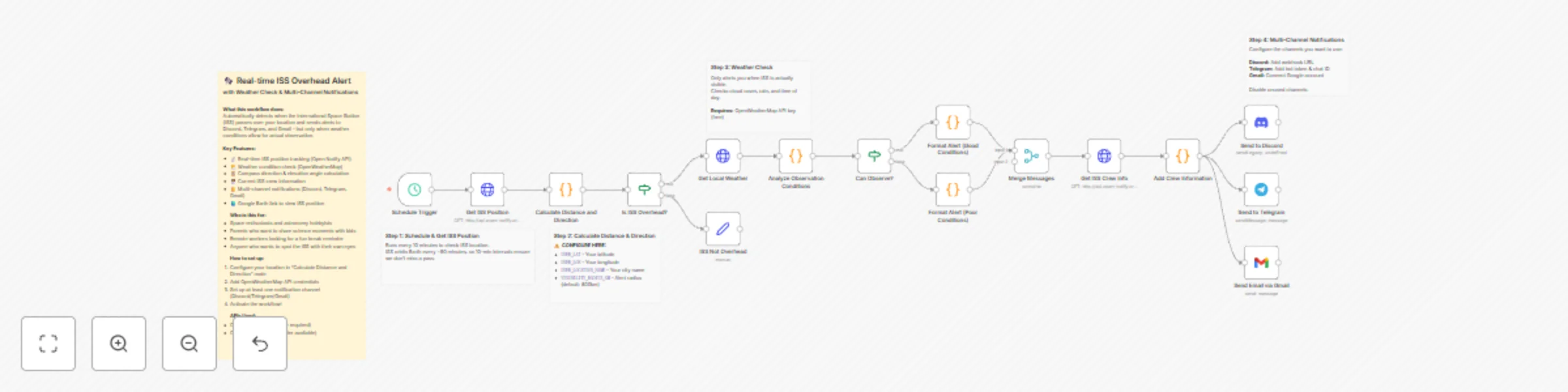
Get notified when the International Space Station passes over your location - but only when you can actually see it! This workflow combines real-time ISS tracking with weather condition checks to send you alerts at the perfect moment for observation. ## Who is this for - Space enthusiasts and astronomy hobbyists who want to spot the ISS - Parents looking to share exciting science moments with their kids - Remote workers who want a unique break reminder - Educators creating engaging science experiences ## What this workflow does 1. Tracks ISS position every 10 minutes using the Open Notify API 2. Calculates distance and direction from your location using the Haversine formula 3. Checks weather conditions via OpenWeatherMap to determine if ISS will be visible 4. Provides observation guidance including compass direction, elevation angle, and viewing tips 5. Includes crew information showing who is currently aboard the ISS 6. Sends multi-channel alerts to Discord, Telegram, and Gmail simultaneously ## How to set up 1. Configure your location in the Calculate Distance and Direction node 2. Add OpenWeatherMap credentials (free tier available) 3. Set up at least one notification channel (Discord, Telegram, or Gmail) 4. Activate the workflow ## Requirements - OpenWeatherMap API key (free) - At least one notification channel configured
Collect viral Instagram AI art with GPT-4 analysis and Telegram delivery
## Who is this for? This template is perfect for: - **AI art enthusiasts** who want to stay updated on trending AI-generated artwork - **Content curators** looking to automate art discovery - **Japanese-speaking users** who want translated captions - **Social media managers** tracking AI art trends across platforms ## What this workflow does This workflow automatically collects viral AI art posts from Instagram and delivers them to your Telegram with Japanese translations. It runs daily and filters only high-engagement posts to ensure quality content. **Key Features:** - 📸 Collects from 4 AI art hashtags (#AIart, #midjourney, #stablediffusion, #aiartwork) - 🔥 Filters viral posts only (100+ likes threshold) - 🇯🇵 Auto-translates captions to Japanese via DeepL - ⚠️ Sends error alerts to Telegram if something goes wrong - ⏱️ Built-in rate limiting to avoid API blocks ## How it works 1. **Schedule Trigger** - Runs daily at 18:00 2. **Instagram Scraping** - Apify collects posts from multiple AI art hashtags 3. **Viral Filter** - Only posts with 100+ likes and valid captions pass through 4. **Translation** - DeepL translates captions from English to Japanese 5. **Image Download** - Fetches the post image 6. **Telegram Delivery** - Sends photo with translated caption, likes count, and source link 7. **Rate Limiting** - 3-second delay between posts to avoid API limits ## Setup Requirements - **Apify account** - Sign up at [apify.com](https://apify.com) for Instagram scraping - **DeepL API key** - Get free API access at [deepl.com/pro-api](https://www.deepl.com/pro-api) - **Telegram Bot** - Create via [@BotFather](https://t.me/botfather) and get your Chat ID ## How to set up 1. Import this workflow into n8n 2. Set up credentials: - Connect your Apify account - Add your DeepL API key - Configure Telegram Bot token 3. Replace `YOUR_TELEGRAM_CHAT_ID` with your actual Chat ID in both Telegram nodes 4. (Optional) Adjust the viral threshold in the Filter node 5. (Optional) Modify hashtags in the Apify node 6. Activate the workflow ## How to customize - **Change hashtags:** Edit the `directUrls` array in the Apify node - **Adjust viral threshold:** Change the `100` value in the Filter node - **Change schedule:** Modify the trigger time in the Schedule Trigger node - **Change language:** Update the `translateTo` parameter in the DeepL node - **Modify caption format:** Edit the caption template in the Telegram node ```