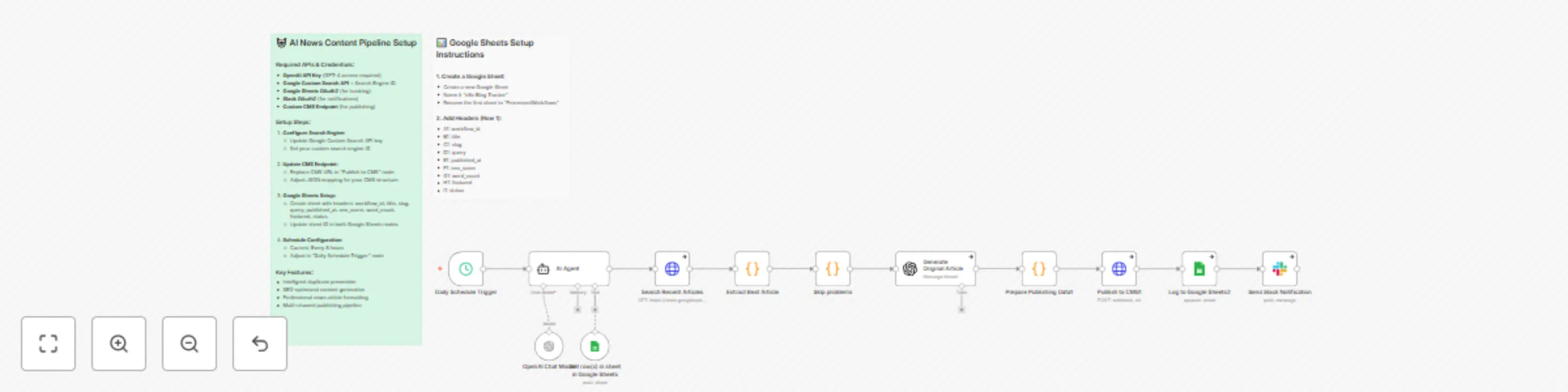
Automate news discovery & publishing with GPT-4, Google Search API & Slack
# 🚀 Automate News Discovery & Publishing with GPT-4, Google Search API & Slack
## 🎯 Overview
Automated content publishing system that discovers industry news, transforms it into original articles using GPT-4, and publishes across multiple channels with SEO optimization and intelligent duplicate prevention.
## ✨ Key Features
- **🤖 Smart Query Generation** - AI agent generates unique search queries while checking Google Sheets to avoid duplicates
- **🔍 News Discovery** - Uses Google Custom Search API to find recent articles (last 7 days)
- **🧠 Content Intelligence** - Processes search results and skips anti-bot protected sites automatically
- **📝 GPT-4 Article Generation** - Creates professional, SEO-optimized news articles in Reuters/Bloomberg style
- **📢 Multi-Channel Publishing** - Publishes to CMS with automatic Slack notifications
- **📊 Comprehensive Tracking** - Logs all activity to Google Sheets for analytics and duplicate prevention
## 🔄 How It Works
1. **⏰ Scheduled Trigger** runs every 8 hours to maintain consistent content flow
2. **🤖 AI Agent** generates targeted search queries for your niche while checking historical data
3. **🔍 Google Search** finds recent articles and extracts metadata (title, snippet, source)
4. **🛡️ Smart Content Handler** bypasses sites with anti-bot protection, using search snippets instead
5. **⚡ GPT-4 Processing** transforms snippets into comprehensive 2000+ word articles with proper formatting
6. **🚀 Publishing Pipeline** formats content for CMS with SEO metadata and publishes automatically
7. **📱 Notification System** sends detailed Slack updates with article metrics
8. **📈 Activity Logging** tracks all published content to prevent future duplicates
## 🔧 Setup Requirements
### 📋 Prerequisites
- Google Custom Search API key and Search Engine ID
- OpenAI GPT-4 API access
- Google account for tracking spreadsheet
- Slack workspace for notifications
- CMS or website with API endpoint for publishing
### 🛠️ Step-by-Step Setup
#### Step 1: 🔎 Google Custom Search Configuration
1. Go to [Google Custom Search Engine](https://cse.google.com/cse/)
2. Create a new search engine
3. Configure to search the entire web
4. Copy your Search Engine ID (cx parameter)
5. Get your API key from [Google Cloud Console](https://console.cloud.google.com/)
#### Step 2: 📊 Google Sheets Template Setup
Create a Google Sheet with these required columns:
- **Column A:** `timestamp` - ISO date format (YYYY-MM-DD HH:MM:SS)
- **Column B:** `query` - The search query used
- **Column C:** `title` - Published article title
- **Column D:** `url` - Published article URL
- **Column E:** `status` - Publication status (success/failed)
- **Column F:** `word_count` - Final article word count
Template URL: [Copy this Google Sheets template](link-to-template)
#### Step 3: 🔑 Credential Configuration
Set up the following credentials in n8n:
1. **📊 Google Sheets API** - OAuth2 connection to your Google account
2. **🤖 OpenAI API** - Your GPT-4 API key
3. **📱 Slack Webhook** - Webhook URL for your notification channel
4. **🔍 Custom Search API** - Your Google Custom Search API key
#### Step 4: ⚙️ Workflow Customization
Modify these key parameters to fit your needs:
- **🎯 Search Topic:** Edit the AI agent prompt to focus on your industry
- **⏰ Publishing Schedule:** Adjust the cron trigger (default: every 8 hours)
- **📝 Article Length:** Modify GPT-4 prompt for different word counts
- **🌐 CMS Endpoint:** Update the publishing node with your website's API
## 🎨 Customization Options
### 🎯 Content Targeting
- Modify the AI agent's search query generation to focus on specific industries
- Adjust date restrictions (currently set to last 7 days)
- Change the number of search results processed per run
### ✍️ Article Style
- Customize GPT-4 prompts for different writing styles (formal, casual, technical)
- Adjust article length requirements
- Modify SEO optimization parameters
### 📡 Publishing Channels
- Add additional CMS endpoints for multi-site publishing
- Configure different notification channels (Discord, Teams, etc.)
- Set up social media auto-posting integration
## 💡 Use Cases
- 📰 Automated news websites
- 📝 Industry blog content generation
- 🔍 SEO content pipeline automation
- 📊 News aggregation and republishing
- 📈 Content marketing automation
## 🛠️ Technical Notes
- Workflow includes error handling for anti-bot protection
- Duplicate prevention through Google Sheets tracking
- Rate limiting considerations for API usage
- Automatic retry logic for failed requests
## 🆘 Support
For setup assistance or customization help, refer to the workflow's internal documentation nodes or contact the template creator.