J

Jose Cuartas

1
Workflow

Workflows by Jose Cuartas

Workflow preview: Sync Gmail emails to PostgreSQL with S3 attachment storage
Free advanced

Sync Gmail emails to PostgreSQL with S3 attachment storage

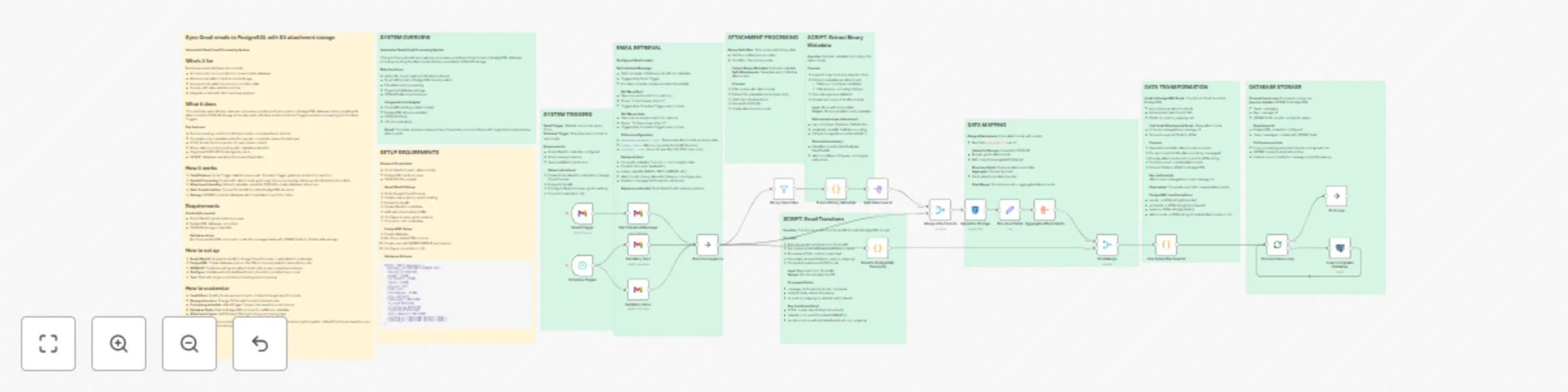
## Sync Gmail emails to PostgreSQL with S3 attachment storage **Automated Gmail Email Processing System** ## Who's it for Businesses and individuals who need to: - Archive email communications in a searchable database - Backup email attachments to cloud storage - Analyze email patterns and communication data - Comply with data retention policies - Integrate emails with other business systems ## What it does This workflow automatically captures, processes, and stores Gmail emails in a PostgreSQL database while uploading file attachments to S3/MinIO storage. It handles both individual emails (via Gmail Trigger) and bulk processing (via Schedule Trigger). **Key features:** - Dual processing: real-time individual emails + scheduled bulk retrieval - Complete email metadata extraction (sender, recipients, labels, timestamps) - HTML to plain text conversion for searchable content - Binary attachment processing with metadata extraction - Organized S3/MinIO file storage structure - UPSERT database operations to prevent duplicates ## How it works 1. **Email Capture**: Gmail Trigger detects new emails, Schedule Trigger gets bulk emails from last hour 2. **Parallel Processing**: Emails with attachments go through binary processing, others go directly to transformation 3. **Attachment Handling**: Extract metadata, upload to S3/MinIO, create database references 4. **Data Transformation**: Convert Gmail API format to PostgreSQL structure 5. **Storage**: UPSERT emails to database with linked attachment information ## Requirements **Credentials needed:** - Gmail OAuth2 (gmail.readonly scope) - PostgreSQL database connection - S3/MinIO storage credentials **Database setup:** Run the provided SQL schema to create the messages table with JSONB fields for flexible data storage. ## How to set up 1. **Gmail OAuth2**: Enable Gmail API in Google Cloud Console, create OAuth2 credentials 2. **PostgreSQL**: Create database and run the SQL schema provided in setup sticky note 3. **S3/MinIO**: Create bucket "gmail-attachments" with proper upload permissions 4. **Configure**: Update authenticatedUserEmail in transform scripts to your email 5. **Test**: Start with single email before enabling bulk processing ## How to customize - **Email filters**: Modify Gmail queries (in:sent, in:inbox) to target specific emails - **Storage structure**: Change S3 file path format in Upload node - **Processing schedule**: Adjust trigger frequencies based on email volume - **Database fields**: Extend PostgreSQL schema for additional metadata - **Attachment types**: Add file type filtering in binary processing logic **Note**: This workflow processes emails from the last hour to avoid overwhelming the system. Adjust timeframes based on your email volume and processing needs.

J
Jose Cuartas
Document Extraction
23 Sep 2025
186
0