J

Jordan Lee

2
Workflows

Workflows by Jordan Lee

Workflow preview: Business lead generation with Apify web scraping and Google Sheets storage
Free intermediate

Business lead generation with Apify web scraping and Google Sheets storage

## This flexible template scrapes business listings for any industry and location, perfect for sales teams, marketers, and researchers. ### Good to know - Works with any business category (restaurants, contractors, retailers, etc.) - Fully customizable search parameters - Results automatically organized in Google Sheets - Built-in delay ensures scraping completes before data collection ## How it works 1. Trigger: Manual or scheduled start 2. Apify Configuration: Sets scraping parameters (industry, location, data fields) 3. Scraping Execution: Runs the web scraping job 4. Data Processing: Cleans and structures the raw data 5. Storage: Saves results to your Google Sheets ### What is Apify? Apify is a webscraping tool, in this workflow the data is scraped from a google maps scraper: **https://apify.com/compass/crawler-google-places** ## How to use ### Apify Small # Lead Generation (Purple) **https://apify.com/compass/crawler-google-places** #### 1. Add location and industry to scrape (Apify) 2. Add the number of leads to output (Apify) 3. Copy over the JSON file into N8N 4. Copy & paste API endpoint "Get Run URL" in N8N ### Apify Large # Lead Generation (Grey) #### Configure the Manual Trigger When clicking 'Execute workflow' node is ready to use as-is This triggers the entire lead generation process #### Setup "Start Results (Apify)" Node Get Your Apify API Information #### Go to Apify.com and create a free account Navigate to Settings → Integrations → API tokens Copy your API token Find the Google Maps scraper actor ID: #### Configure the HTTP Request (start results) Method: POST URL: Replace "enter apify (get run)" with: https://api.apify.com/v2/acts/nwua9Gu5YrADL7ZDj/runs?token=YOUR_API_TOKEN C. Customize the JSON Body Parameters In the JSON body, modify these key fields: Location & Search: "locationQuery": Change "Toronto" to your target city "searchStringsArray": Change ["barber"] to your business type Examples: ["restaurants"], ["dentists"], ["contractors"] #### Configure the HTTP Request (start results) Method : Get Url: enter the get dataset URL from Apify #### Split Out Node Select fields to append in the google sheet #### Test the Configuration Click Execute workflow to test Check that the Apify job starts successfully Note the job ID returned for the next section This section initiates the scraping process and should complete in 30-60 seconds depending on your lead count. #### Setup Google Sheets Create a new Google Sheet with these columns: title (business name) address (full address) state (state/province) neighborhood (area/district) phone (contact number) emails (email addresses) Copy your Google Sheets document ID for workflow configuration ## Requirements - Apify account - Google Sheets document - Google OAuth credentials ## Customization Options ### For different use cases: - Lead Gen: Get business leads - Local SEO: Collect competitor data - Market Research: Analyze industry trends ### Advanced mofications: - Add email enrichment - Integrate with CRM systems - Set up automatic daily runs

J
Jordan Lee
Lead Generation
2 Jul 2025
6530
0
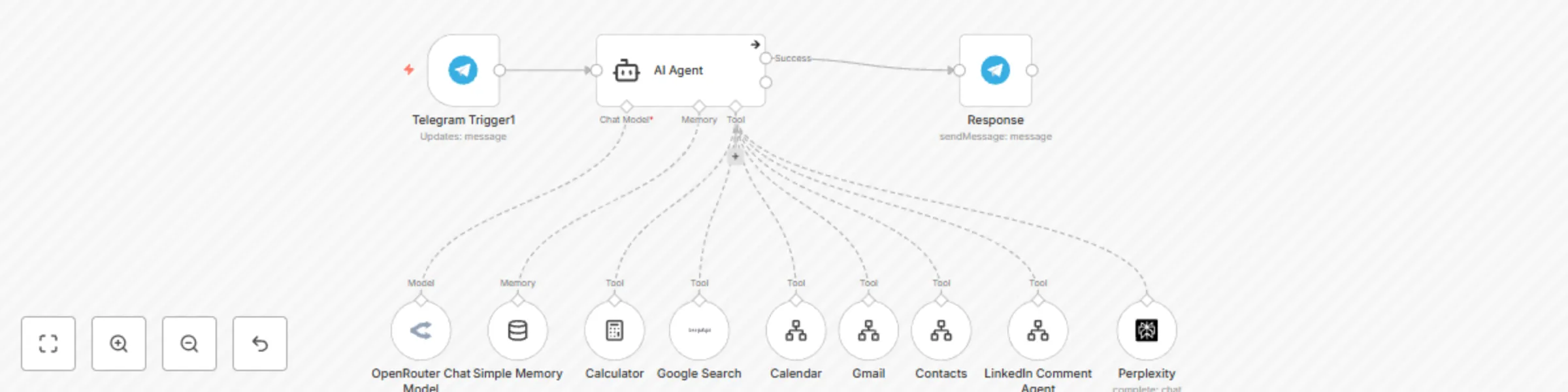
Workflow preview: AI personal assistant with GPT-4o: Email, calendar, search & CRM integration
Free intermediate

AI personal assistant with GPT-4o: Email, calendar, search & CRM integration

## This n8n template demonstrates how to use AI as a comprehensive personal assistant with multiple specialized agents. Use cases include email management, scheduling, web search, calculations, and more - all automated through AI coordination. ## Good to know This template integrates multiple AI services through OpenRouter Each agent specializes in different tasks (Gmail, Calendar, Search, etc.) Memory persistence maintains context across interactions ## How it works The workflow is triggered by Telegram messages (can be replaced with other triggers) A router node directs requests to the appropriate specialized agent Agents include: Gmail for email management Calculator for math operations Google Search for information retrieval Calendar for scheduling Contacts for CRM functions The OpenRouter Chat Model coordinates responses Final responses are sent back through Telegram ## How to use Connect your Telegram bot credentials Configure each service with appropriate API keys The system will automatically route requests to the right agent ## Requirements OpenRouter account for AI services Telegram bot token Google API credentials for relevant services ## Customising this workflow Add more specialized agents as needed Replace Telegram with other communication channels Adjust routing logic for different use cases

J
Jordan Lee
Personal Productivity
2 Jul 2025
15888
0