M

Marketing Canopy

3
Workflows

Workflows by Marketing Canopy

Workflow preview: Utm link creator & QR code generator with scheduled Google Analytics reports
Free intermediate

Utm link creator & QR code generator with scheduled Google Analytics reports

# **UTM Link Creator & QR Code Generator with Scheduled Google Analytics Reports** This workflow enables marketers to **generate UTM-tagged links**, **convert them into QR codes**, and **automate performance tracking** in **Google Analytics** with scheduled reports every 7 days. This solution helps **monitor traffic sources** from different marketing channels and **optimize campaign performance** based on analytics data. --- ## **Prerequisites** Before implementing this workflow, ensure you have the following: ### **Google Analytics 4 (GA4) Account & Access** - Ensure you have a **GA4 property** set up. - Access to the **GA4 Data API** to schedule performance tracking. Refer to the [Google Analytics Data API Overview](https://developers.google.com/analytics/devguides/reporting/data/v1) for more information. ### **Airtable Account & API Key** - Create an **Airtable base** to store UTM links, QR codes, and analytics data. - Obtain an **Airtable API key** from your **Account Settings**. Detailed instructions are available in the [Airtable API Authentication Guide](https://www.airtable.com/developers/web/api/authentication). --- ## **Step-by-Step Guide to Setting Up the Workflow** ### **1. Generate UTM Links** Create a form or interface to input: - **Base URL** (e.g., `https://example.com`) - **Campaign Name** (`utm_campaign`) - **Source** (`utm_source`) - **Medium** (`utm_medium`) - **Term** (Optional: `utm_term`) - **Content** (Optional: `utm_content`) Append UTM parameters to generate a **trackable URL**. ### **2. Store UTM Links & QR Codes in Airtable** Set up an **Airtable base** with the following columns: - **UTM Link** - **QR Code** - **Campaign Name** - **Source** - **Medium** - **Date Created** Adjust as needed based on your tracking requirements. For guidance on setting up your Airtable base and using the API, refer to the [Airtable Web API Documentation](https://www.airtable.com/developers/web/api). ### **3. Convert UTM Links to QR Codes** Use a **QR code generator API** (e.g., `goqr.me`, `qrserver.com`) to generate QR codes for each UTM link and store them in Airtable. ### **4. Schedule Google Analytics Performance Reports (Every 7 Days)** - Use the **Google Analytics Data API** to pull weekly performance reports based on UTM parameters. - Extract key metrics such as: - **Sessions** - **Users** - **Bounce Rate** - **Conversions** - **Revenue (if applicable)** - Store the data in Airtable for tracking and analysis. Adjust timeframe as needed For more details on accessing and using the Google Analytics Data API, consult the [Google Analytics Data API Overview](https://developers.google.com/analytics/devguides/reporting/data/v1). --- ## **Benefits of This Workflow** ✅ **Track Marketing Campaigns**: Easily monitor which channels drive traffic. ✅ **Automate QR Code Creation**: Seamless integration of UTM links with QR codes. ✅ **Scheduled Google Analytics Reports**: No manual reporting—everything runs automatically. ✅ **Improve Data-Driven Decisions**: Optimize ad spend and marketing strategies based on performance insights. --- This version ensures **proper Markdown structure**, includes **relevant documentation links**, and improves readability. Let me know if you need any further refinements! 🚀

M
Marketing Canopy
Market Research
17 Feb 2025
1698
0
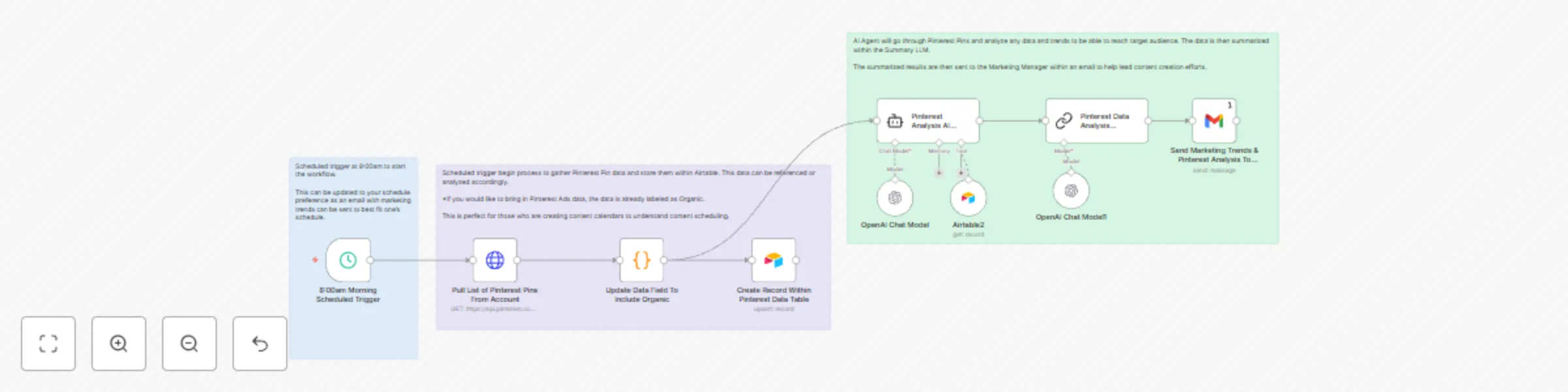
Workflow preview: Automate Pinterest analysis & AI-powered content suggestions with Pinterest API
Free intermediate

Automate Pinterest analysis & AI-powered content suggestions with Pinterest API

# **Automate Pinterest Analysis & AI-Powered Content Suggestions With Pinterest API** This workflow automates the collection, analysis, and summarization of Pinterest Pin data to help marketers optimize content strategy. It gathers Pinterest Pin performance data, analyzes trends using an AI agent, and delivers actionable insights to the Marketing Manager via email. This setup is ideal for content creators and marketing teams who need **weekly insights** on Pinterest trends to refine their content calendar and audience engagement strategy. --- ## **Prerequisites** Before setting up this workflow, ensure you have the following: ### **Pinterest API Access & Developer Account** - Sign up at [Pinterest Developers](https://developers.pinterest.com/) and obtain API credentials. - Ensure you have access to both **Organic and Paid** Pin data. ### **Airtable Account & API Key** - Create an account at [Airtable](https://airtable.com/) and set up a database. - Obtain an API key from **Account Settings**. ### **AI Agent for Trend Analysis** - An AI-powered agent (such as OpenAI's GPT or a custom ML model) is required to analyze Pinterest trends. - Ensure integration with your workflow automation tool (e.g., **Zapier, Make, or a custom Python script**). ### **Email Automation Setup** - Configure an SMTP email service (e.g., **Gmail, Outlook, SendGrid**) to send the summarized results to the Marketing Manager. --- ## **Step-by-Step Guide to Automating Pinterest Pin Analysis** ### **1. Scheduled Trigger for Data Collection** - At **8:00 AM (or your preferred time)**, an automated trigger starts the workflow. - Adjust the timing based on your marketing schedule to optimize trend tracking. ### **2. Fetch Data from Pinterest API** - Retrieve recent Pinterest Pin performance data, including **impressions, clicks, saves, and engagement rate**. - Ensure both **Organic and Paid Ads data** are labeled correctly for clarity. ### **3. Store Data in Airtable** - Pins are **logged and categorized** in an Airtable database for further analysis. #### **Sample Airtable Template for Pinterest Pins** | Column Name | Description | |---------------|---------------------------------------| | **pin_id** | Unique identifier for each Pin | | **created_at** | Timestamp of when the Pin was created | | **title** | Title of the Pin | | **description**| Short description of the Pin | | **link** | URL linking to the Pin | | **type** | Type of Pin (e.g., organic, ad) | ### **4. AI Agent Analyzes Pinterest Trends** The AI model reviews the latest Pinterest data and identifies: - **Trending Topics & Keywords** - **Engagement Patterns** - **Audience Interests & Behavior Changes** - **Optimal Posting Times & Formats** ### **5. Generate Content Suggestions with AI** - The AI Agent recommends **new Pin ideas** and **content calendar updates** to maximize engagement. - Suggestions include **creative formats, hashtags, and timing adjustments** for better performance. ### **6. Summary & Insights Generated by AI** - A **concise report** is created, summarizing Pinterest trends and actionable insights for content strategy. ### **7. Email Report Sent to the Marketing Manager** - The summary is emailed to the Marketing Manager to assist with content planning and execution. - The report includes: - **Performance Overview of Recent Pins** - **Trending Content Ideas** - **Best Performing Pin Formats** - **AI-Generated Recommendations** --- This workflow enables marketing teams to **automate Pinterest analysis** and optimize their content strategy through AI-driven insights. 🚀

M
Marketing Canopy
Market Research
8 Feb 2025
5037
0

Workflow preview: Automate sports betting data with the Odds API
Free intermediate

Automate sports betting data with the Odds API

# **Automate Sports Betting Data with TheOddsAPI** This workflow enables you to create and update a table using TheOddsAPI for sports betting data. It automatically pulls upcoming Ice Hockey games at the start of the day and updates the table with results at the end of the day. You can modify it to retrieve odds and game data for any sport. This setup is particularly useful for sports betting applications, such as tracking the results of a predictive model. It leverages scheduled triggers to activate HTTP requests, which then create or update fields in Airtable by matching on the game ID. --- ## **Prerequisites** Before implementing this workflow, ensure you have the following: 1. **TheOddsAPI Account & API Key** - Sign up at [TheOddsAPI](https://theoddsapi.com/) and obtain an API key. - Ensure you have the correct API permissions to access sports odds and results. 2. **Airtable Account & API Key** - Create an account at [Airtable](https://airtable.com/) and set up a database. - Obtain an API key from the **Account Settings** page. 3. **API Access & Rate Limits** - Review **TheOddsAPI’s rate limits** and ensure your account tier allows for scheduled API calls. - Confirm that **Airtable API limits** align with your expected data retrieval frequency. --- ## **Step-by-Step Guide to Integrating TheOddsAPI** ### **1. Schedule API Requests** Set up a trigger to automatically pull upcoming Ice Hockey games at the start of each day. ### **2. Fetch Data from TheOddsAPI** Retrieve the latest sports betting data, including game details and odds, using TheOddsAPI. ### **3. Store Data in Airtable** Insert or update records in Airtable by matching game IDs, ensuring data accuracy. #### **Sample Airtable Template Column Setup for Ice Hockey** *(Table can adjust depending on sport and data needs. Reference [TheOddsAPI](https://theoddsapi.com/) for more documentation.)* - **Game ID** - **Sport** - **League** - **Game Date (UTC)** - **Home Team** - **Away Team** - **Completed** (Boolean: `TRUE`/`FALSE` for game completion status) - **Scores** (JSON or String for final scores) - **Last Update** (Timestamp of the latest update) ### **4. Schedule an End-of-Day Update** Configure another trigger to fetch final game results at the end of the day. ### **5. Update Records in Airtable** Modify existing Airtable records with final scores and game outcomes for complete tracking. ### **6. Customize for Other Sports** Adjust API parameters to retrieve data for different sports and betting odds, making the system flexible for multiple use cases. --- This structured workflow automates sports betting data collection and updates, ensuring accurate and real-time tracking of odds and game results. By integrating TheOddsAPI with Airtable, you can build scalable applications for predictive sports analytics and betting insights.

M
Marketing Canopy
Miscellaneous
4 Feb 2025
5668
0