J

Jonathan

2
Workflows

Workflows by Jonathan
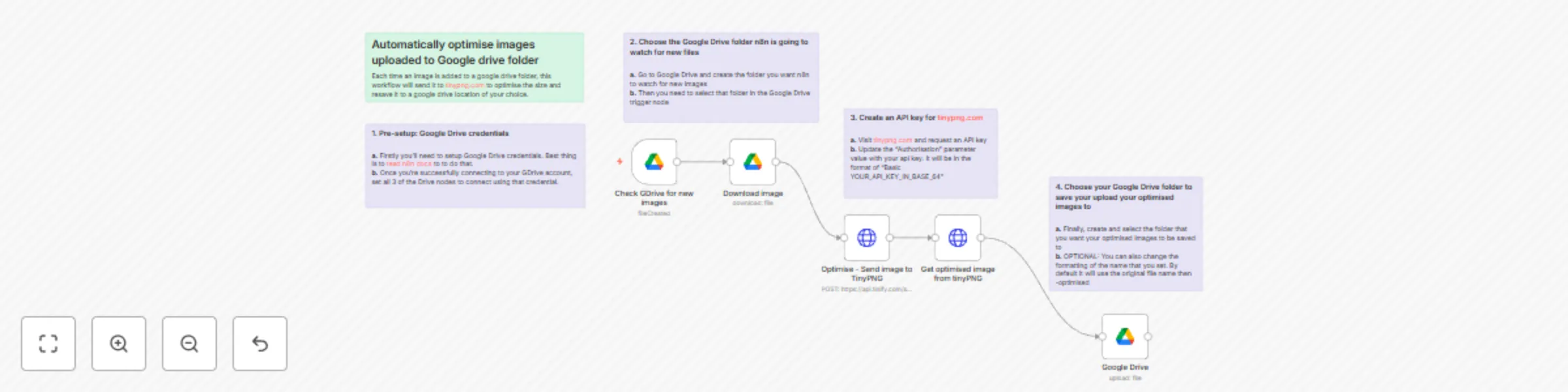
Workflow preview: Automatically optimise images added to a Google drive folder
Free intermediate

Automatically optimise images added to a Google drive folder

**How it works** - This workflow watches a selected Google Drive folder for any images added to it. - It then takes that image, sends it the the tinypng.com service which optimises and reduces its size (where possible) - Tinypng then returns the updated image which is then automatically saved in your chose Google Drive folder **Setting things up** - It's pretty simple to configure and should only take around 5-10mins. - You only need to set up credentials for Google Drive and Tinypng.com - For Tinypng.com you can sign up for their free tier API access which gives you 500 optimisations per month - Once you have those two things, you just need choose your 'input' folder to watch for images and your 'output' folder for where these images should be stored - There are a few more optional things you can do such as the naming of your final image and also lots more you could do with the Tinypng API for more advanced image optimisation

J
Jonathan
File Management
20 Mar 2024
2029
0

Workflow preview: Generate instant google meet links with a slack command
Free intermediate

Generate instant google meet links with a slack command

### How it works This template uses a slack app to connect with your google calendar, generate an instant google meet link and post it as a message in a slack channel ![slackmeetcommand.png](fileId:763) #### Setup steps 1. Firstly, you'll need to create a slack app 2. Authenticate and connect your slack account 3. Connect and choose the Google calendar you want to generate Google meet links for 4. Customize your slack message 5. Then using a `/meet` command in slack, you can instantly generate and post your Google meet links

J
Jonathan
Personal Productivity
1 Mar 2024
3960
0