J

Jacob

5
Workflows

Workflows by Jacob

Workflow preview: Facebook ads reporting automation with Facebook Graph API and Google Sheets
Free advanced

Facebook ads reporting automation with Facebook Graph API and Google Sheets

## Facebook Ads Reporting Automation — Automatically Fetch & Sync Campaign Statistics This automation enables you to automatically fetch daily campaign data from Facebook Ads without manual exports. It requires connection to the Facebook Graph API and a Google Sheets account where all data is stored and updated in real time. ## How does it work? The workflow connects to your Facebook Ads account via the Facebook Graph API to retrieve the latest campaign data, including campaign status, spend, results, reach, and other key performance metrics. Retrieved data is automatically synced to a Google Sheets spreadsheet, making it easy to analyze, report, and share with your team or clients. The automation runs daily at a scheduled time, ensuring your campaign stats are always up-to-date. ## What can you use it for? Efficiently track Facebook Ads performance without manual data handling. Generate real-time reports for marketing teams or clients. Quickly identify trends and optimize ad spend based on fresh data. Centralize data from multiple campaigns for better decision-making. ## Requirements: Active Facebook Ads account with access to Facebook Graph API credentials. Facebook App with ads_read permissions and a valid access token Google account with permission to use Google Sheets. Basic setup of API credentials and Google Sheets integration. Create a new spreadsheet and name it (e.g., Facebook Campaign Stats). In the first row, create the following column headers (exact order required): | Id Campaign | Campaign name | Campaign status | Statistic | Impressions | Clicks | CPC | CTR | Conversions | Cost per conversion | Spend money | From | To | Make sure the sheet is editable by the automation and accessible via Google Sheets API (OAuth2 or service account). contact: [email protected]

J
Jacob
Market Research
24 Jul 2025
476
0

Workflow preview: Automated WooCommerce abandoned cart recovery with Google Sheets email reminders
Free intermediate

Automated WooCommerce abandoned cart recovery with Google Sheets email reminders

## Recover lost revenue on autopilot with this powerful WooCommerce Abandoned Cart Automation. This workflow connects directly to your WooCommerce store using the REST API to fetch all recent orders. It logs them in Google Sheets for easy tracking and visibility. Every day at a scheduled time, it checks for orders with the "pending" status that haven't received a reminder email yet — and sends a personalized follow-up email to the customer. ## Use it to: Automatically remind customers about unpaid orders Recover abandoned carts without any manual effort Keep clean logs of all orders and reminders via Google Sheets Boost conversion rates and revenue with timely, helpful emails ## Requirements: To use this workflow, you need: A WooCommerce store with REST API access A connected Google Sheets account No external plugins are required in WooCommerce. Just make sure the REST API is enabled and credentials are added to n8n. ### Google Sheets Configuration Create a Google Sheet with the following column headers (first row): Order ID | Buyer | E-mail | Products | Price | Status | Order date | Payment url | Reminder sent ### Customize Mail: Customize the reminder message to match your brand voice and offer incentives like a discount or free shipping to encourage payment. Set it once and let your abandoned cart recovery run in the background — 24/7. contact: [email protected]

J
Jacob
Social Media
23 Jul 2025
76
0
Workflow preview: Summarize YouTube videos with transcription, DeepSeek AI and Google Sheets
Free intermediate

Summarize YouTube videos with transcription, DeepSeek AI and Google Sheets

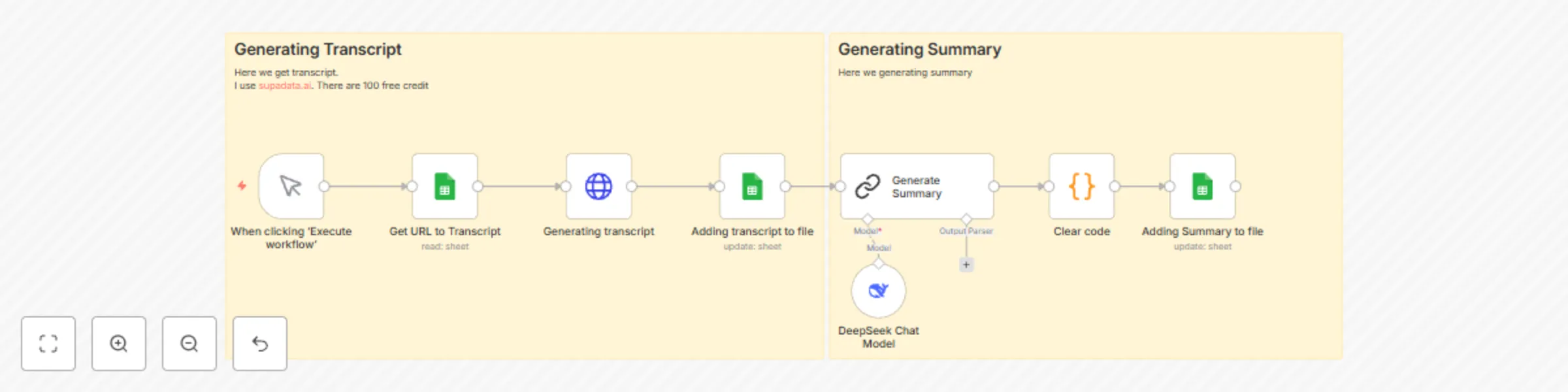
Tired of manually watching long YouTube videos just to extract the main points? With our YouTube Transcript & Summary Automation, you can instantly turn any video into an actionable, AI-generated summary — all from a simple Google Sheet. What this automation does: Reads video URLs from Google Sheets (just add your links!) Generates accurate transcripts using Supadata.ai — with 100 free uses/month Creates a smart summary using DeepSeek AI: 🔹 Short summary of the video 🔹 Key points 🔹 Main topics Youtube tutorial: https://www.youtube.com/watch?v=uj7KaFSh95Y Automatically updates your Google Sheet with the transcript and the AI-generated summary How to set it up: Create a simple Google Sheet with these columns: Url – link to the YouTube video Status – set to pending to trigger the automation, updated to done after completion Transcript – filled automatically Summary – filled automatically Once your sheet is ready, the automation takes care of the rest — no technical skills needed. Why you'll love it: This is the perfect tool for content creators, researchers, marketers, and educators who want to save time, extract insights faster, and never miss key ideas from long videos. Want something custom? Got feedback or want to build your own custom automation or workflow? We’d love to hear from you! Reach out to us at [email protected] — let’s bring your idea to life.

J
Jacob
Document Extraction
27 Jun 2025
2048
0
Workflow preview: YouTube optimization automation: Google Sheets + DeepSeek integration
Free intermediate

YouTube optimization automation: Google Sheets + DeepSeek integration

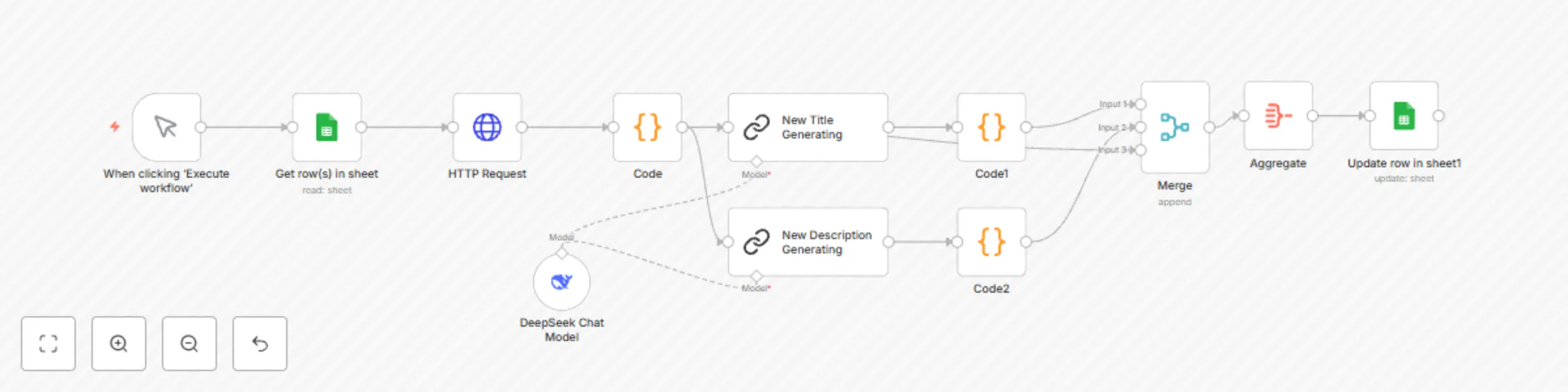
Unlock the full potential of your YouTube channel with our powerful integration that connects Google Sheets and DeepSeek AI — designed to skyrocket your video visibility and engagement without manual hassle. What this integration does for you: Automates video data management by pulling your YouTube URLs straight from Google Sheets — no more copy-pasting or manual tracking. Extracts your current titles and descriptions directly from YouTube, giving you a clear starting point. Generates 3 high-impact, SEO-optimized titles plus 1 compelling, conversion-focused description — crafted by DeepSeek’s AI to grab attention and rank higher. Updates your Google Sheet automatically with new optimized titles and descriptions — keeping all your video info in one place, ready to publish. Why it matters: In the crowded world of YouTube, having the right title and description can make all the difference between millions of views or being lost in the noise. This integration takes the guesswork out of optimization, saving you time and boosting your channel’s growth with proven AI-driven content. You need to Sheet with columns: Url Keyword Status Old Title New Title Old Description New Description My contact: [email protected]

J
Jacob
Content Creation
25 Jun 2025
2304
0

Workflow preview: SEO On-site Audit
Free advanced

SEO On-site Audit

Automated SEO Audit in n8n – Your All-in-One Website Optimization Tool! Looking for a powerful, fully automated solution to analyze your website’s SEO? Our custom n8n workflow is designed just for you! What does this workflow do? Our advanced SEO audit collects all the essential data that impact your site’s search engine rankings, including: Analysis of meta tags (title, description) with actionable optimization recommendations Verification of H1 and H2 headings, presented in clear, organized tables Checking internal, external, and broken links for full link health insights Detection of key technical files: robots.txt and sitemap.xml Identification of Google Analytics and social media links implementation Evaluation of URL friendliness and mobile responsiveness SSL certificate and noindex meta tag presence checks Integration with Google PageSpeed API for website speed and performance metrics DeepSeek API support for in-depth content and keyword analysis Generation of clean, user-friendly HTML reports ready to share with clients or teams Why choose this workflow? Easy integration – just connect your Google PageSpeed and DeepSeek API keys, and the workflow automatically gathers and analyzes all data. Fully automated – run the workflow and get a comprehensive SEO report with zero manual work. Scalable – audit single pages or entire website portfolios effortlessly. Customizable – pre-built functions and templates ready for extension or integration with your systems. Professional HTML report – visually appealing and packed with actionable insights for your team or clients. How to get started? Set up your Google PageSpeed and DeepSeek API keys. Connect them within n8n – no extra steps needed! Run the workflow and receive a detailed SEO audit report that will help you improve rankings and boost traffic. Automate your SEO audits with n8n – faster, easier, and more effective than ever before! I recorded video: [https://www.youtube.com/watch?v=solB17pXYbc](https://www.youtube.com/watch?v=solB17pXYbc) If you want, I can also prepare a shorter marketing snippet or social media posts. Just let me know: [email protected]

J
Jacob
Market Research
22 Jun 2025
3002
0