Nazmy
Workflows by Nazmy
OAuth token management system with Airtable storage
*This workflow contains community nodes that are only compatible with the self-hosted version of n8n.* ## OAuth Token Generator and Validator This **n8n template** helps you generate, validate, and store tokens for your customers securely using: - **n8n** as your backend automation engine - **Airtable** as your lightweight client and token store --- ### 🚀 What It Does - Accepts `client_id` and `client_secret` via **POST webhook**. - Validates client credentials against Airtable. - Generates a **long token** on success. - Stores the generated token in Airtable with metadata. - Responds with a JSON containing the token, expiry, and type. - Returns clear error messages if validation fails. --- ### How It Works 1. **Webhook node** receives `client_id` and `client_secret`. 2. **Validator (Code node)** checks: - Body contains only `client_id` and `client_secret`. - Rejects missing or extra fields. 3. **Airtable search**: - Looks up the `client_id`. - Rejects if not found. 4. **Secret validation (If node)**: - Compares provided `client_secret` with stored value. - Rejects if incorrect. 5. **Token generation (Code node)**: - Generates a 128-character secure token. 6. **Airtable create**: - Stores token, client ID, creation date, and type. 7. **Webhook response**: - Returns JSON `{ access_token, expires_in, token_type }` on success. - Returns appropriate JSON error messages on failure. --- ### Related Workflow You can also use it with the published **Bearer Token Validation** workflow: 👉 [Validate API Requests with Bearer Token Authentication and Airtable](https://n8n.io/workflows/6184-validate-api-requests-with-bearer-token-authentication-and-airtable) to securely validate tokens you generate with this workflow across your protected endpoints. --- ### Why Use This - Provides **OAuth-like flows** without a complex backend. - Uses **n8n + Airtable** for client management and token storage. - Clean, modular, and ready for your SaaS or internal API automations. - Extendable for token expiry, refresh, and rotation handling. --- Enjoy building secure token-based APIs using **n8n + Airtable**! 🚀 ### Built by: [Nazmy](https://n8n.io/creators/islamnazmi/)
Validate API requests with Bearer Token Authentication and Airtable
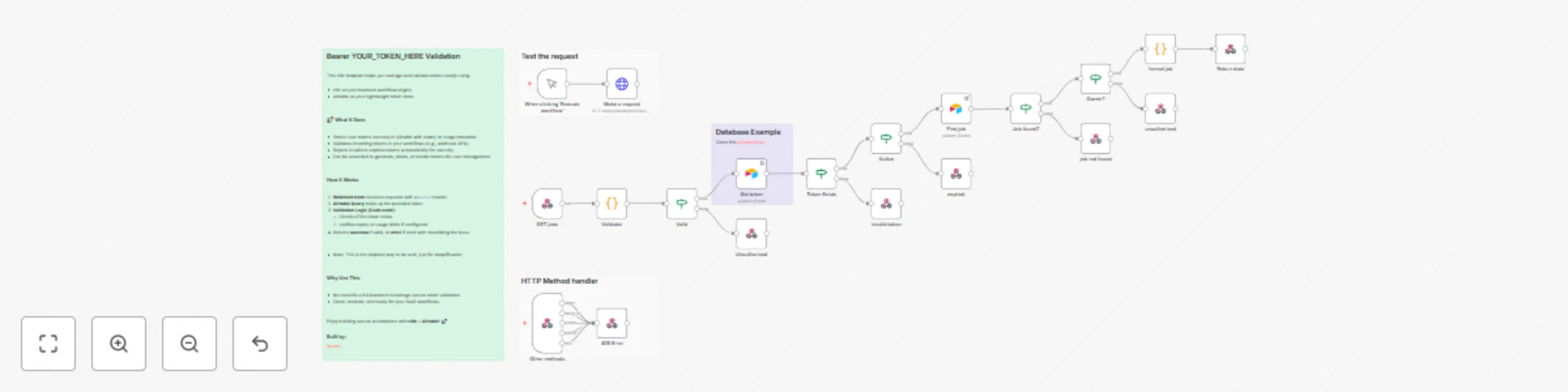
## Bearer Token Validation This n8n template helps you manage and validate tokens easily using: - n8n as your backend workflow engine - Airtable as your lightweight token store --- ### 🚀 What It Does - Stores user tokens securely in Airtable with expiry or usage metadata. - Validates incoming tokens in your workflows (e.g., webhook APIs). - Rejects invalid or expired tokens automatically for security. - Can be extended to generate, rotate, or revoke tokens for user management. --- ### How It Works 1. **Webhook node** receives requests with a `Bearer` header. 2. **Airtable Query** looks up the provided token. 3. **Validation Logic (Code node)**: - Checks if the token exists. - Verifies expiry or usage limits if configured. 4. Returns **success** if valid, or **error** if error with describing the issue. --- - Note: This is the simplest way to do auth, just for simplification --- ### Why Use This - No need for a full backend to manage secure token validation. - Clean, modular, and ready for your SaaS workflows. --- Enjoy building secure automations with **n8n + Airtable**! 🚀 ### Built by: [Nazmy](https://n8n.io/creators/islamnazmi/)
Backup your workflows to GitHub -- in (subfolders)
Based on [Jonathan](https://n8n.io/creators/jon-n8n) & [Solomon](https://n8n.io/creators/solomon) work. > The only addition I've made is a Set node. This node organizes workflows into subfolders within the GitHub repository based on their respective tags. #### How it works This workflow will backup your workflows to GitHub. It uses the n8n API node to export all workflows. It then loops over the data, checks in GitHub to see if a file exists that uses the credential's ID. Once checked it will: - update the file on GitHub if it exists; - create a new file if it doesn't exist; - ignore if it's the same. #### Who is this for? People wanting to backup their workflows outside the server for safety purposes or to migrate to another server.