I

irfan saeed

1
Workflow

Workflows by irfan saeed

Workflow preview: Auto-generate YouTube chapters with Gemini AI & YouTube Data API v3
Free intermediate

Auto-generate YouTube chapters with Gemini AI & YouTube Data API v3

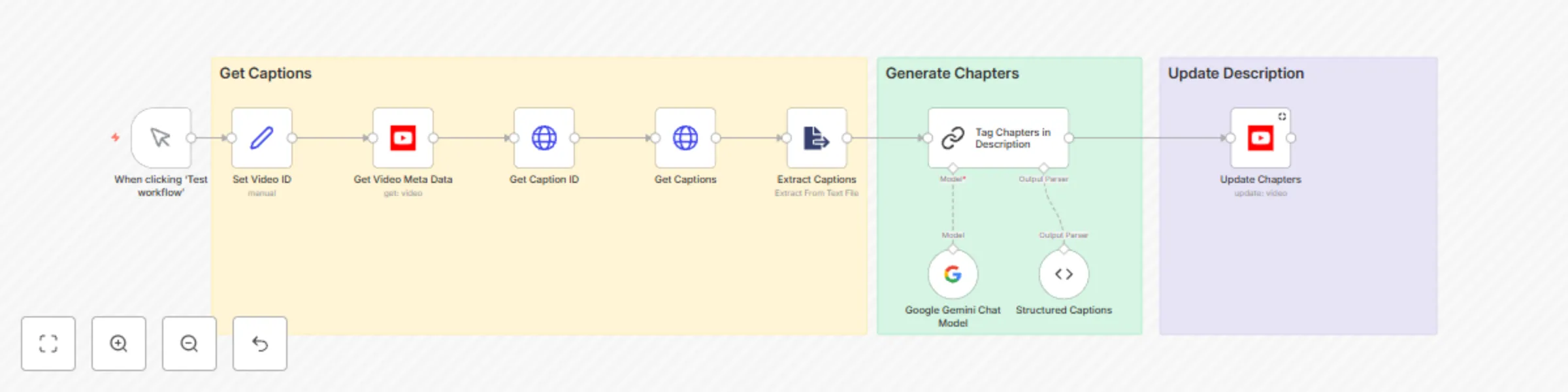
## **Auto-Generate YouTube Chapters with AI-Powered Transcript Analysis** ### **Overview** This workflow uses **YouTube Data API v3** and **Google Gemini 1.5 Flash AI** to automatically generate timestamped chapters for videos by analyzing SRT captions. It enhances viewer navigation, improves SEO , and saves creators time by automating manual tasks. --- ### **Prerequisites** #### **YouTube API Setup** 1. **Create a Google Cloud Project** - Go to the [Google Cloud Console](https://console.cloud.google.com/). - Click **Select a project** > **New Project** and name it (e.g., "YouTube Chapters Automation") . 2. **Enable YouTube Data API v3** - Navigate to **APIs & Services > Library**. - Search for "YouTube Data API v3" and click **Enable** . 3. **Configure OAuth Consent Screen** - Go to **APIs & Services > OAuth consent screen**. - Select **External** (public) or **Internal** (testing), then add required details (app name, support email) . 4. **Generate OAuth 2.0 Credentials** - Under **Credentials**, click **Create Credentials** > **OAuth client ID**. - Choose **Web app**, then download the JSON key file . 5. **Add Credentials to n8n** #### **Other Requirements** - **Google Gemini API**: Configure access for the `gemini-1.5-flash-8b-exp-0924` model by getting the api key. --- ### **Workflow Steps** 1. **Set Video ID** - Input the target video ID (e.g., `r1wqsrW2vmE`) using the `Set Video ID` node. 2. **Fetch Video Metadata** - Use the **YouTube API** node to retrieve the video’s title, category, and existing description . 3. **Download SRT Captions** - **Get Caption ID**: Call `https://www.googleapis.com/youtube/v3/captions` to fetch the caption track ID . - **Download Transcript**: Use the ID to retrieve SRT data via `https://www.googleapis.com/youtube/v3/captions/{{ID}}?tfmt=srt` . 4. **Analyze Transcript with Gemini AI** - Process the SRT file with **Google Gemini AI** to identify chapters using a prompt like: ```plaintext "Classify this transcript into timestamped chapters (e.g., 00:00 - Introduction)." ``` - Validate output with a structured parser (e.g., `Structured Captions` node) . 5. **Update Video Description** - Append chapters to the description using the YouTube API’s `videos.update` method . --- ### **Value Proposition** - **Viewer Experience**: Chapters improve navigation and reduce drop-off rates . - **SEO Benefits**: Structured descriptions enhance search visibility . - **Time Savings**: Eliminates manual chapter creation .

i
irfan saeed
Content Creation
7 Apr 2025
4659
0