Ilyass Kanissi
Workflows by Ilyass Kanissi
Automatically categorize Gmail messages with GPT-4 mini classification
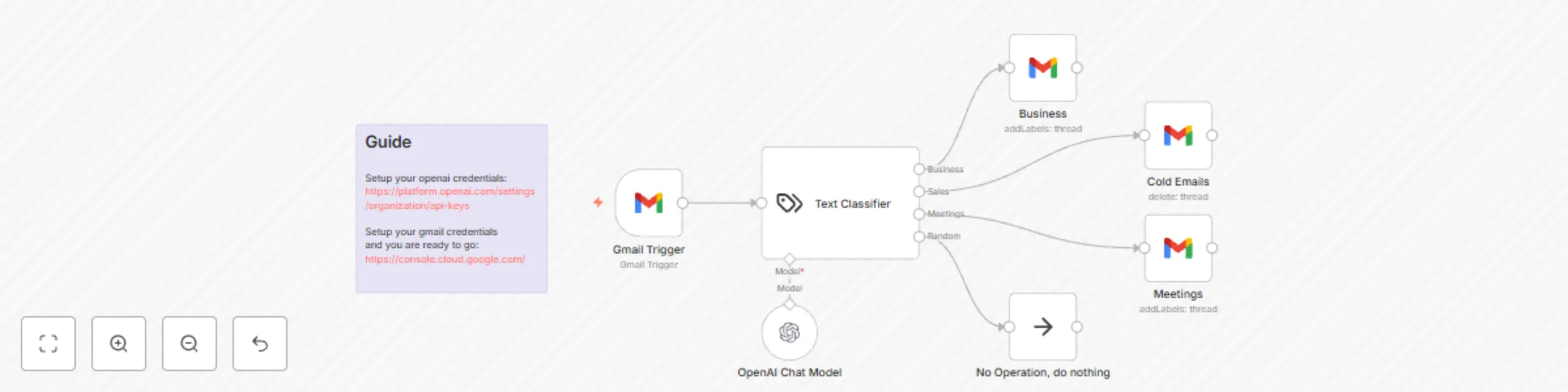
# 🛠️ Smart Email Classifier Workflow Intelligent AI-powered email classification system that automatically sorts incoming Gmail messages into Business, Meetings, Cold Emails, and other categories using OpenAI. ## **⚡ Quick Setup** 1. Import this workflow into your n8n instance 2. Setup your OpenAI credentials at: [OpenAI api key](https://platform.openai.com/settings/organization/api-keys) 3. Configure your Gmail credentials and you're ready to go: [Google Cloud Console](https://console.cloud.google.com/) 4. Activate the workflow to start automatic email classification ## 🔧 How it Works 1. Gmail Trigger: Monitors incoming emails in real-time 2. Text Classifier: AI-powered categorization using OpenAI Chat Model 3. Smart Routing: Automatically sorts emails into predefined categories 4. Gmail Integration: Adds appropriate labels and organizes emails automatically 5. Fallback Handling: "No Operation" path for unclassifiable emails Every email gets intelligently sorted into: ## **🏢 Business** 1. Work-related correspondence 2. Client communications 3. Project updates ## 📅 Meetings 1. Meeting invitations and requests 2. Calendar-related emails 3. Scheduling communications ## ❄️ Cold Emails 1. Sales outreach and pitches 2. Unsolicited business proposals 3. Marketing communications ## 🔀 Random 1. Personal emails 2. Newsletters 3. Miscellaneous content
Customer support chatbot with RAG using OpenAI and Pinecone
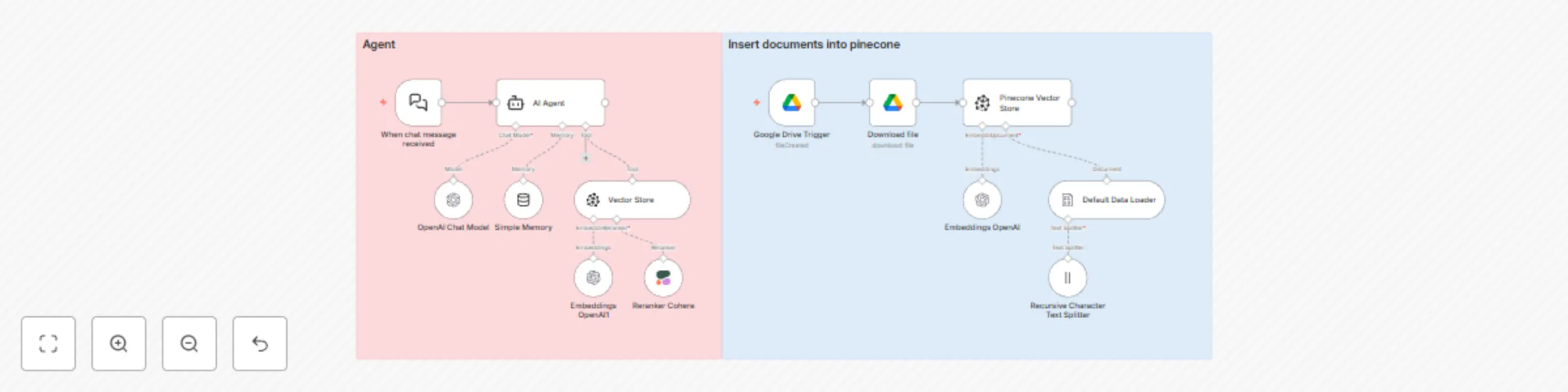
# 🤖 Simple RAG Customer Support Chatbot ## 📋 Overview This intelligent customer support chatbot leverages Retrieval-Augmented Generation (RAG) to provide accurate, contextual responses by combining your knowledge base with AI capabilities. The system automatically retrieves relevant documents from your Pinecone vector store and uses them to generate informed responses through OpenAI's language models. ## ⚡ Quick Setup 1. Import Workflow Import this workflow template into your n8n instance 2. Configure Credentials Add the following API credentials: - OpenAI API Key: For chat completions and embeddings - Pinecone API Key: For vector database operations - Google Drive: For document auto ingestion 3. Initialize Vector Store Use the "Insert documents into Pinecone" workflow to populate your knowledge base 5. Activate Workflow Enable the main chat workflow to start receiving requests ## 🔧 How it Works **Main Chat Flow (Agent Workflow)** User Message → Memory Retrieval → Vector Search → Context Assembly → AI Response → Memory Update → Response **Process Flow:** Message Reception: Webhook receives user chat messages with session management Memory Retrieval: Loads conversation history for context continuity Semantic Search: Queries Pinecone vector store for relevant documents Context Assembly: Combines retrieved documents with conversation history AI Generation: OpenAI generates contextual response using assembled context Memory Storage: Updates conversation memory for future interactions Response Delivery: Returns formatted response to user interface **Document Ingestion Flow** Document Source → Text Extraction → Chunking → Embedding → Vector Storage **Process Flow:** Document Trigger: Google Drive or manual file upload detection Content Extraction: Extracts text from various file formats (PDF, DOC, TXT) Text Chunking: Splits documents into optimal chunks for embedding Embedding Generation: Creates vector embeddings using OpenAI Vector Storage: Stores embeddings in Pinecone with metadata Index Update: Updates search index for immediate availability
Generate client proposals from call transcripts with AI, Google Slides and Airtable
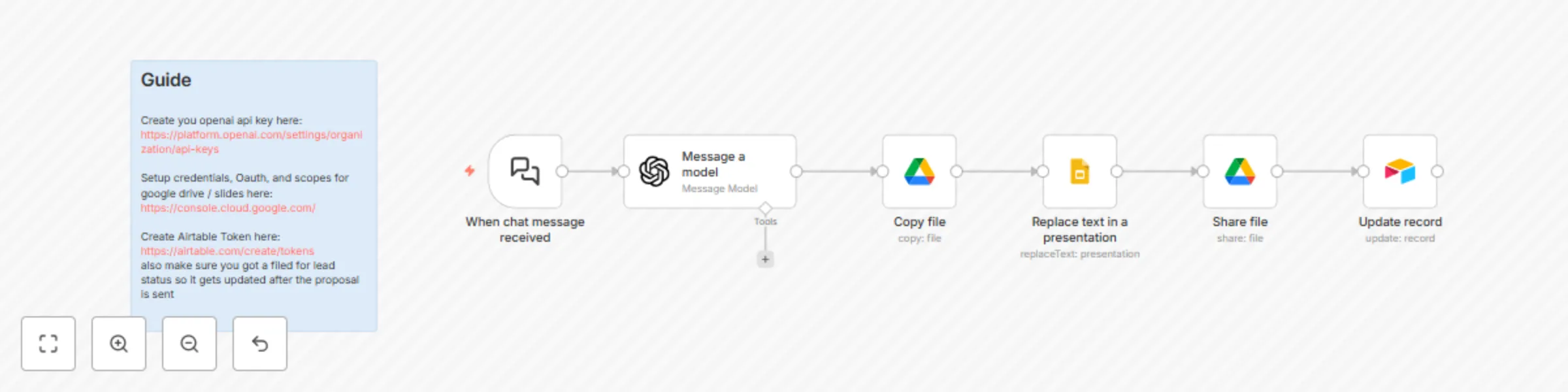
# **📋Instant Proposal Generator** Automatically convert sales call transcripts into professional client proposals by extracting key details with AI, dynamically populating Google Slides templates, and tracking progress in Airtable, all in one seamless workflow. ## **🎯 What does this workflow do?** This end-to-end automation creates client-ready proposals by: 1. Taking call transcripts via chat interface 2. The AI analyzes the transcript to extract key details like company name, goals, budget, and requirements, then structures this data as JSON for seamless workflow integration. 3. Generating customized documents using Google Slides template with dynamic variables, Auto populating {Company_Name}, {Budget}, etc. from extracted data. 4. Delivering finished proposals: Sharing final document with client, and Updating CRM status automatically. ## **⚙️ How it works** 1. User input: Paste call transcript in chat trigger node 2. AI analysis: OpenAI node processes text to extract structured JSON, Identifies company name, goals, budget, requirements, etc. 3. Document copy: it copies the file from Google Drive, and name it {company name} proposal. 4. Variables replacement: Replaces all template variables ({Company_Name}, {Budget}, etc.) with extracted data from ChatGPT. 4. Delivery & tracking: Shares finalized proposal with client via email, an Updates Airtable "Lead Status" to "Proposal Sent". ## **🔑 Required setup** 1. OpenAI API Key: [Create a key from here](https://platform.openai.com/settings/organization/api-keys) 2. Google Cloud Credentials: [Setup here ](https://console.cloud.google.com/) 3. Required scopes: Google Slides edit + file creation 4. Airtable Access Token: [Create one from here ](https://console.cloud.google.com/)
Generate AI Twitter posts with web research using GPT, Tavily and image generation
*This workflow contains community nodes that are only compatible with the self-hosted version of n8n.* # **🤖 AI-Powered Twitter Content Generator** Transform topic ideas into ready to post Twitter drafts (text + image) using fresh web data and AI agents ## **🎯 What does this workflow do?** This end to end automation creates complete Twitter posts by: Taking your topic input (e.g., "Agentic AI") via chat interface Generating fresh, research-backed content using AI agents: First agent uses GPT-4.1-MINI + Tavily to bypass LLM knowledge limits with real-time web data Second agent creates optimized prompt for image generation Producing custom visuals through OpenAI's gpt-image-1 Delivering polished drafts (text + image) via Gmail for review ## **⚙️ How it works** User input: You provide a topic through chat node Content research: Agent 1 (GPT-4.1-mini + Tavily) researches current web data Generates factually fresh tweet content Visual creation: Agent 2 optimizes prompt for image generation HTTP request node calls OpenAI's gpt-image-1 model to generate the image Convert to file node converst the base64 string to a file so we can send it as an attachment Delivery: Gmail node sends compiled draft with text body + image attachment ## **🔑 Required setup** Have a verified organization: [OpenAI Org Settings](https://platform.openai.com/account/org-settings) OpenAI API Key: [Create a Key Here](https://platform.openai.com/settings/organization/api-keys) Tavily API Key: [Get it Here](https://app.tavily.com/home) Gmail credentials: [Google Cloud Console](https://console.cloud.google.com)