H

Hugo

1
Workflow

Workflows by Hugo

Workflow preview: Automated daily workflow backup to GitHub
Free intermediate

Automated daily workflow backup to GitHub

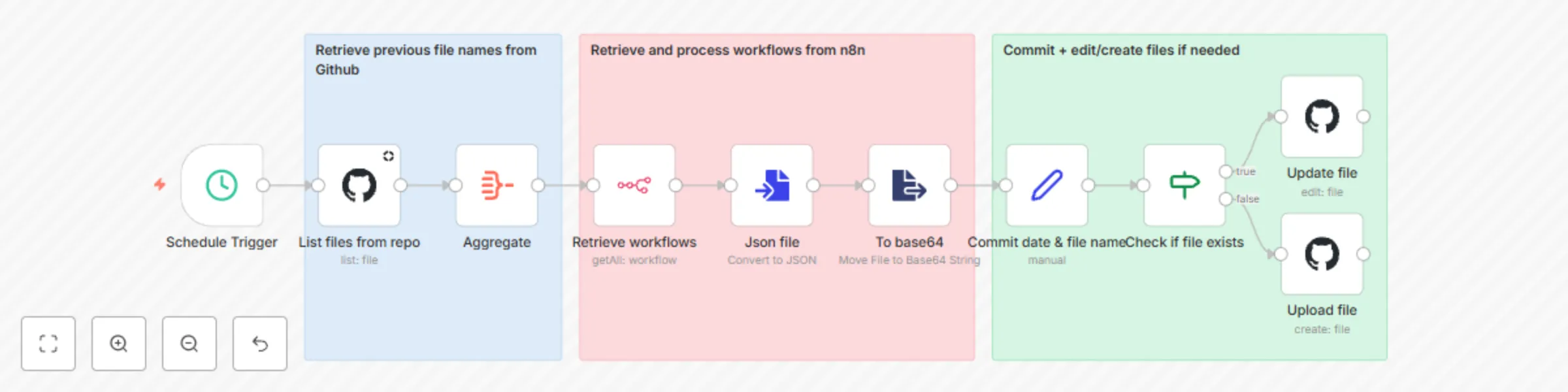
This workflow provides a robust solution for automatically backing up all your n8n workflows to a designated GitHub repository on a daily basis. By leveraging the n8n API and GitHub API, it ensures your workflows are version-controlled and securely stored, safeguarding against data loss and facilitating disaster recovery. ### How it works The automation follows these key steps: 1. **Scheduled trigger**: The workflow is initiated automatically every day at a pre-configured time. 2. **List existing backups**: It first connects to your GitHub repository to retrieve a list of already backed-up workflow files. This helps in determining whether a workflow's backup file needs to be created or updated. 3. **Retrieve n8n workflows**: The workflow then fetches all current workflows directly from your n8n instance using the n8n REST API. 4. **Process and prepare**: Each retrieved workflow is individually processed. Its data is converted into JSON format. This JSON content is then encoded to base64, a format suitable for GitHub API file operations. 5. **Commit to GitHub**: For each n8n workflow: * A standardized filename is generated (e.g., `workflow-name-tag.json`). * The workflow checks if a file with this name already exists in the GitHub repository (based on the list fetched in step 2). * **If the file exists**: It updates the existing file with the latest version of the workflow. * **If it's a new workflow (file doesn't exist)**: A new file is created in the repository. * Each commit is timestamped for clarity. This process ensures that you always have an up-to-date version of all your n8n workflows stored securely in your GitHub version control system, providing peace of mind and a reliable backup history. ### Pre-requisites Before you can use this template, please ensure you have the following: * An active n8n instance (self-hosted or cloud). * A GitHub account. * A GitHub repository created where you want to store the workflow backups. * A GitHub Personal Access Token with `repo` scope (or fine-grained token with read/write access to the specific backup repository). This token will be used for GitHub API authentication. * n8n API credentials (API key) for your n8n instance. ### Set up steps Setting up this workflow should take approximately 10-15 minutes if you have your credentials ready. 1. **Import the template**: Import this workflow into your n8n instance. 2. **Configure n8n API credentials**: * Locate the "Retrieve workflows" node. * In the "Credentials" section for "n8n API", create new credentials (or select existing ones). * Enter your n8n instance URL and your n8n API Key (you can create your n8n api key in the settings of your n8n instance) 3. **Configure GitHub credentials**: * Locate the "List files from repo" node (and subsequently "Update file" / "Upload file" nodes which will use the same credential). * In the "Credentials" section for "GitHub API", create new credentials. * Select OAuth2/Personal Access Token authentication method. * Enter the GitHub Personal Access Token you generated as per the pre-requisites. 4. **Specify repository details**: * In the "List files from repo", "Update file", and "Upload file" GitHub nodes: * Set the `Owner`: Your GitHub username or organization name. * Set the `Repository`: The name of your GitHub repository dedicated to backups. * Set the `Branch` (e.g., `main` or `master`) where backups should be stored. * (Optional) Specify a `Path` within the repository if you want backups in a specific folder (e.g., `n8n_backups/`). Leave blank to store in the root. 5. **Adjust schedule (Optional)**: * Select the "Schedule Trigger" node. * Modify the trigger interval (e.g., change the time of day or frequency) as needed. By default, it's set for a daily run. 6. **Activate the workflow**: Save and activate the workflow. ### Explanation of nodes Here's a detailed breakdown of each node used in this workflow: * **Schedule trigger** * **Type**: `n8n-nodes-base.scheduleTrigger` * **Purpose**: This node automatically starts the workflow based on a defined schedule (e.g., daily at midnight). * **List files from repo** * **Type**: `n8n-nodes-base.github` * **Purpose**: Connects to your specified GitHub repository and lists all files, primarily to check for existing workflow backups. * **Aggregate** * **Type**: `n8n-nodes-base.aggregate` * **Purpose**: Consolidates the list of file names obtained from the "List files from repo" node into a single item for easier lookup later in the "Check if file exists" node. * **Retrieve workflows** * **Type**: `n8n-nodes-base.n8n` * **Purpose**: Uses the n8n API to fetch a list of all workflows currently present in your n8n instance. * **Json file** * **Type**: `n8n-nodes-base.convertToFile` * **Purpose**: Takes the data of each workflow (retrieved by the "Retrieve workflows" node) and converts it into a structured JSON file format. * **To base64** * **Type**: `n8n-nodes-base.extractFromFile` * **Purpose**: Converts the binary content of the JSON file (from the "Json file" node) into a base64 encoded string. This encoding is required by the GitHub API for file content. * **Commit date & file name** * **Type**: `n8n-nodes-base.set` * **Purpose**: Prepares metadata for the GitHub commit. It generates: * `commitDate`: The current date and time for the commit message. * `fileName`: A standardized file name for the workflow backup (e.g., `my-workflow-vps-backups.json`), typically using the workflow's name and its first tag. * **Check if file exists** * **Type**: `n8n-nodes-base.if` * **Purpose**: A conditional node. It checks if the `fileName` (generated by "Commit date & file name") is present in the list of files aggregated by the "Aggregate" node. This determines if the workflow backup already exists in GitHub. * **Update file** * **Type**: `n8n-nodes-base.github` * **Purpose**: If the "Check if file exists" node determines the file *does* exist, this node updates that existing file in your GitHub repository with the latest workflow content (base64 encoded) and a commit message. * **Upload file** * **Type**: `n8n-nodes-base.github` * **Purpose**: If the "Check if file exists" node determines the file *does not* exist, this node creates and uploads a new file to your GitHub repository with the workflow content and a commit message. ### Customization Here are a few ways you can customize this template to better fit your needs: * **Backup path**: In the GitHub nodes ("List files from repo", "Update file", "Upload file"), you can specify a `Path` parameter to store backups in a specific folder within your repository (e.g., `workflows/` or `daily_backups/`). * **Filename convention**: Modify the "Commit date & file name" node (specifically the expression for `fileName`) to change how backup files are named. For example, you might want to include the workflow ID or a different date format. * **Commit messages**: Customize the commit messages in the "Update file" and "Upload file" GitHub nodes to include more specific information if needed. * **Error handling**: Consider adding error handling branches (e.g., using the "Error Trigger" node or checking for node execution failures) to notify you if a backup fails for any reason. * **Filtering workflows**: If you only want to back up specific workflows (e.g., those with a particular tag or name pattern), you can add a "Filter" node after "Retrieve workflows" to include only the desired workflows in the backup process. * **Backup frequency**: Adjust the "Schedule Trigger" node to change how often the backup runs (e.g., hourly, weekly, or on specific days). Template was created in n8n `v1.92.2`

H
Hugo
DevOps
15 May 2025
8595
0