H

Hugues Stock

3
Workflows

Workflows by Hugues Stock

Workflow preview: Prevent concurrent workflow runs using Redis
Free advanced

Prevent concurrent workflow runs using Redis

## What does this template do? This workflow sets a small "lock" value in Redis so that only one copy of a long job can run at the same time. If another trigger fires while the job is still busy, the workflow sees the lock, stops early, and throws a clear error. This protects your data and keeps you from hitting rate limits. Because the workflow also stores simple progress flags ("working", "loading", "finishing"), you can poll the current status and show live progress for very long jobs. ## Use Case Great when the same workflow can be called many times in parallel (for example by webhooks, cron jobs, or nested Execute Workflow calls) and you need an "only run once at a time" guarantee without building a full queue system. ## What the Workflow Does - ⚡ Starts through **Execute Workflow Trigger** called by another workflow - 🔄 A **Switch** sends the run to **Get**, **Set**, or **Unset** actions - 💾 **Redis** reads or writes a key named `process_status_<key>` with a time‑to‑live (default 600 s) - 🚦 **If** nodes check the key and decide to continue or stop - ⏱️ **Wait** nodes stand in for the slow part of your job (replace these with your real work) - 📈 Updates the key with human‑readable progress values that another workflow can fetch with `action = get` - 🏁 When done, the lock is removed so the next run can start ## Apps & Services Used - Redis - Core n8n nodes (Switch, If, Set, Wait, Stop and Error) ## Pre‑requisites - A Redis server that n8n can reach - Redis credentials stored in n8n - A second workflow that calls this one and sends: - `action` set to `get`, `set`, or `unset` - `key` set to a unique name for the job - Optional `timeout` in seconds ## Customization Tips - Increase or decrease the TTL in the **Set Timeout** node to match how long your job usually runs - Add or rename status values ("working", "loading", "finishing", and so on) to show finer progress - Replace **Stop and Error** with a Slack or email alert, or even push the extra trigger into a queue if you prefer waiting instead of failing - Use different Redis keys if you need separate locks for different tasks - Build a small "status endpoint" workflow that calls this one with `action = get` to display real‑time progress to users ## Additional Use Cases ### 🛑 Telegram callback spam filter If a Telegram bot sends many identical callbacks in a burst, call this workflow first to place a lock. Only the first callback will proceed; the rest will exit cleanly until the lock clears. This keeps your bot from flooding downstream APIs. ### 🧩 External API rate‑limit protection Run heavy API syncs one after the other so parallel calls do not break vendor rate limits. ### 🔔 Maintenance window lock Block scheduled maintenance tasks from overlapping, making sure each window finishes before the next starts.

H
Hugues Stock
Engineering
11 May 2025
853
0
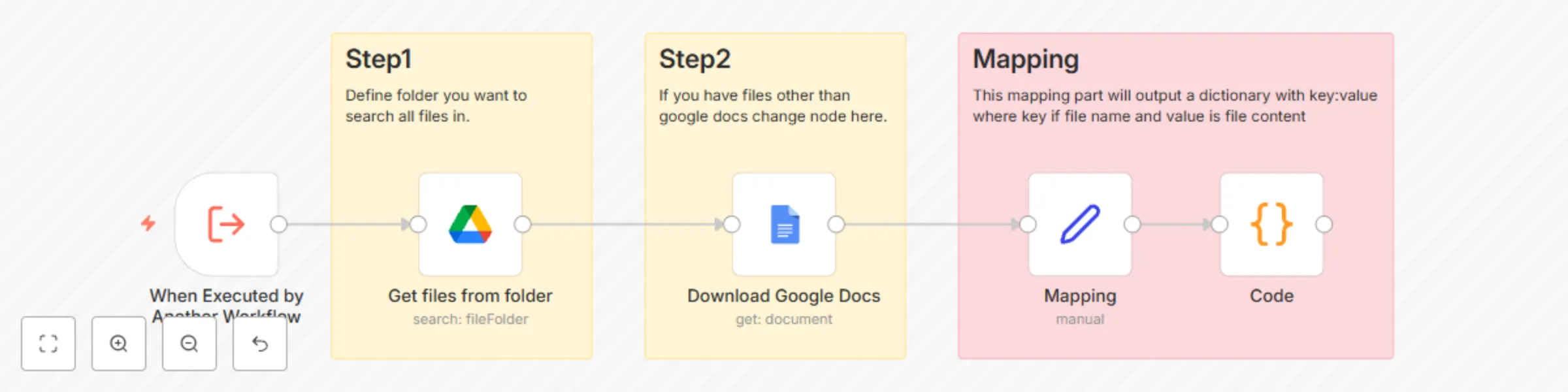
Workflow preview: Load and aggregate files from a Google Drive folder into a key-value dictionary
Free intermediate

Load and aggregate files from a Google Drive folder into a key-value dictionary

## What does this template do? This workflow automates the process of retrieving all Google Docs from a specified Google Drive folder, extracting their content, and structuring the data into a unified key-value dictionary, where: - Key = The file name - Value = The content of the document (with normalized newlines) This is ideal for use cases such as knowledge ingestion, prompt context preparation, or populating a RAG (Retrieval-Augmented Generation) system with reference documents. ## Use Case Perfect for teams or individuals who maintain prompts, content, or reference material in Google Docs and want to integrate that data dynamically into automation or AI workflows. ## What the Workflow Does - ⚡ Triggered via Execute Workflow Trigger from another workflow - 📁 Retrieves all files from a specified Google Drive folder - 📄 Downloads the full content of each Google Docs file - 🧩 Maps each file name to its content using a Set node - 🧠 Aggregates all entries into a single dictionary with Code node - 🧾 Outputs a JSON object like: ```json { "Doc1": "content of doc 1", "Doc2": "content of doc 2" } ``` ## Apps & Services Used - Google Drive - Google Docs - n8n Code node ## Pre-requisites - A connected Google account with access to the target Drive folder - OAuth2 credentials for both: - Google Drive - Google Docs ## Customization Tips - Change Folder: Update the Google Drive node to select a specific folder rather than root - Support Other File Types: Replace or complement the Google Docs node to handle other formats (e.g., PDFs or text files) - Data Cleaning: Modify the Code node to adjust text normalization to your needs ## Additional Use Cases #### 🧠 Prompt Management for AI Workflows - Centralize your GPT prompt templates in Google Docs instead of hardcoding them in n8n - Easily manage prompt versions and edits directly from Google Drive - Dynamically load prompts into downstream nodes (like OpenAI or Hugging Face) without redeploying workflows #### 📚 Knowledge Base Loader for RAG Systems - Aggregate internal knowledge, FAQs, SOPs, or policy docs from Google Docs into a structured dictionary - Use the resulting object as the context source for Retrieval-Augmented Generation models #### 🎛️ Dynamic Form Inputs or Question Sets - Maintain forms, surveys, or interview questions in Google Docs - Load the content into n8n for form generation, chatbot interaction, or customer intake flows #### 📄 Client-Specific Config or Script Templates - For client onboarding workflows, load client-specific scripts or prompts from individual docs named after each client - Helps automate client-facing document generation or AI interactions #### 📋 Content Ingestion for Translation, Summarization, or Sentiment Analysis - Batch process internal documentation or user-submitted Google Docs - Trigger summarization, translation, or classification pipelines using the document contents #### 🔄 Document-to-Database Import - Automatically fetch and normalize Google Docs contents, ready to push into a database (e.g., Notion, Airtable, PostgreSQL)

H
Hugues Stock
Document Extraction
3 Apr 2025
1668
0

Workflow preview: Health check websites with Google Sheets & Telegram alerts
Free intermediate

Health check websites with Google Sheets & Telegram alerts

## What does this template do ? This workflow performs scheduled health checks on a list of URLs stored in a Google Sheet. Every X minutes, it retrieves the URLs, sends HTTP requests to check their availability, and notifies a Telegram chat if any request fails. You can easily replace Telegram with any other notification service supported by n8n, such as Slack, Discord, Email, or Microsoft Teams. ## Use Case Ideal for monitoring internal or external services, ensuring uptime and responsiveness. Integrate with your preferred messaging platform for real-time failure notifications—without setting up complex infrastructure. ## What the Workflow Does - ⏰ Triggers at regular intervals using **Schedule Trigger** - 📄 Reads URLs from a **Google Sheet** - 🌐 Sends HTTP requests to check URL health - 🚨 Sends failure alerts (including error code and URL) to **Telegram (or any service of your choice)** ## Apps & Services Used - Google Sheets - Telegram (or alternative notification service) - HTTP Request ## Pre-requisites - Telegram bot and chat ID (if using Telegram) - Connected Google Sheet with a `URLS` column ([template](https://docs.google.com/spreadsheets/d/17-tY9_wn-D2FV627Sx3-Z3abqFYvz794edej7es5J6w/edit?usp=sharing)) ## Customization Tips - Adjust the schedule interval in the trigger node - Replace Telegram with Slack, Email, Discord, or any other notification node - Customize alert messages with more context or formatting - Add filters, retries, or logging as needed

H
Hugues Stock
DevOps
29 Mar 2025
3560
0