F

Femi Ad

6
Workflows

Workflows by Femi Ad

Workflow preview: Daily business ideas from IdeaBrowser to Telegram
Free intermediate

Daily business ideas from IdeaBrowser to Telegram

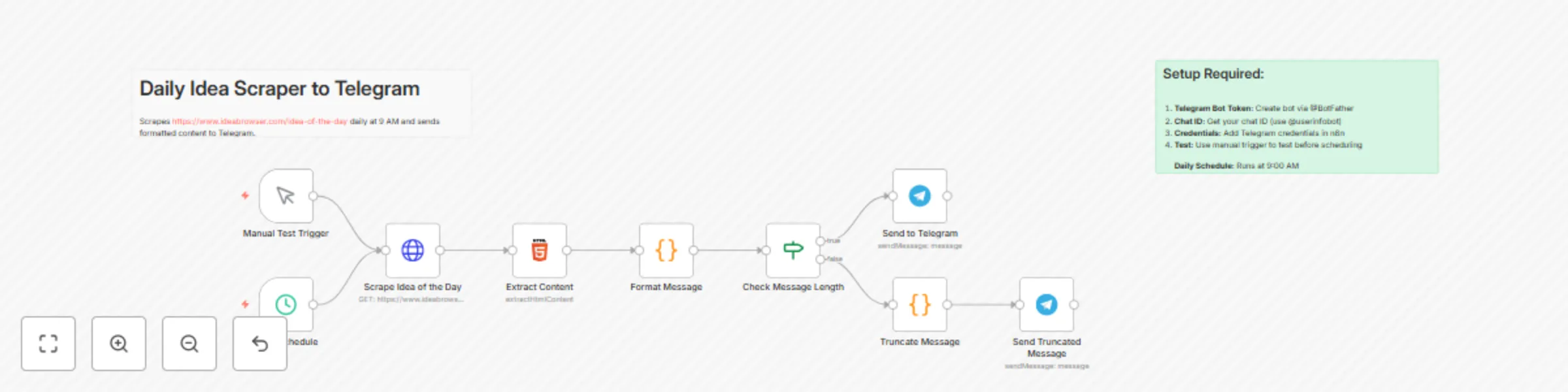
Transform your daily business inspiration routine by automatically receiving curated business ideas from IdeaBrowser directly in Telegram. This workflow scrapes the "Idea of the Day" content and delivers it to your Telegram chat with beautiful formatting and smart content handling. ## Description This n8n workflow template automates the process of fetching and delivering daily business ideas from IdeaBrowser's "Idea of the Day" page to your Telegram chat. Perfect for entrepreneurs, business analysts, and innovation teams who want to stay updated with fresh business concepts without manual checking. ## Key Features: Automated Daily Delivery: Runs every day at 9:00 AM to fetch the latest business idea Smart Content Extraction: Uses advanced HTML parsing to extract title, description, pricing model, target market, and key features Intelligent Message Formatting: Creates beautifully formatted Telegram messages with emojis and structured content Message Length Handling: Automatically truncates long content to fit Telegram's character limits Manual Testing: Includes a manual trigger for testing before scheduling Error Resilience: Built-in error handling to ensure reliable operation What Gets Delivered: 🚀 Daily business idea title with date 💡 Business description and concept 💰 Revenue model and pricing strategy 🎯 Target market analysis ⚡ Key features and benefits ## 🔗 Direct link to full details ## Prerequisites Before using this template, ensure you have: Telegram Bot: Create a bot using @BotFather on Telegram Chat ID: Obtain your Telegram chat ID (use @userinfobot) n8n Instance: Running n8n installation (cloud or self-hosted) ## Setup Instructions Import the Workflow: Copy the JSON below and import it into your n8n instance Configure Telegram Credentials: Add your Telegram bot token in n8n credentials Update the chat ID in both Telegram nodes Test the Workflow: Use the "Manual Test Trigger" to verify everything works Activate: Enable the workflow to start receiving daily ideas at 9:00 AM

F
Femi Ad
Market Research
25 Sep 2025
640
0
Workflow preview: Generate business ideas & social media content from Reddit with AI analysis to Telegram
Free advanced

Generate business ideas & social media content from Reddit with AI analysis to Telegram

Description AI-Powered Business Idea Generation & Social Media Content Strategy Workflow This intelligent content discovery and strategy system features 15 nodes that automatically monitor Reddit communities, analyze business opportunities, and generate targeted social media content for AI automation agencies and entrepreneurs. It leverages AI classification, structured analysis, and automated content creation to transform community discussions into actionable business insights and marketing materials. Core Components Reddit Intelligence: Multi-subreddit monitoring across AI automation, n8n, and entrepreneur communities with keyword-based filtering. AI Classification Engine: Intelligent categorization of posts into "Questions" vs "Requests" using LangChain text classification. Dual Analysis System: Specialized AI agents for educational content (questions) and sales-focused content (service requests). Content Strategy Generator: Automated creation of LinkedIn and Twitter content tailored to different audience engagement strategies. Telegram Integration: Real-time delivery of formatted content strategies and business insights. Structured Output Processing: JSON-formatted analysis with relevancy scores, feasibility assessments, and actionable content recommendations. Target Users • AI Automation Agency Owners seeking consistent lead generation and thought leadership content • Entrepreneurs wanting to identify market opportunities and position themselves as industry experts • Content Creators in the automation/AI space needing data-driven content strategies • Business Development Professionals looking for systematic opportunity identification • Digital Marketing Agencies serving tech and automation clients Setup Requirements To get started, you'll need: Reddit API Access: OAuth2 credentials for accessing Reddit's API and monitoring multiple subreddits. Required APIs: • OpenRouter (for AI model access - supports GPT-4, Claude, and other models) • Reddit OAuth2 API (for community monitoring and data extraction) n8n Prerequisites: • Version 1.7+ with LangChain nodes enabled • Webhook configuration for Telegram integration • Proper credential storage and management setup Telegram Bot: Create via @BotFather for receiving formatted content strategies and business insights. Disclaimer: This template uses LangChain nodes and Reddit API integration. Ensure your n8n instance supports these features and verify API rate limits for production use. Step-by-Step Setup Guide 1. Install n8n: Ensure you're running n8n version 1.7 or higher with LangChain node support enabled. 2. Set Up API Credentials: • Create Reddit OAuth2 application at reddit.com/prefs/apps • Set up OpenRouter account and obtain API key • Store credentials securely in n8n credential manager 3. Create Telegram Bot: • Go to Telegram, search for @BotFather • Create new bot and note the token • Configure webhook pointing to your n8n instance 4. Import the Workflow: • Copy the workflow JSON from the template submission • Import into your n8n dashboard • Verify all nodes are properly connected 5. Configure Monitoring Settings: • Adjust subreddit targets (currently: ArtificialIntelligence, n8n, entrepreneur) • Set keyword filters for relevant topics • Configure post limits and sorting preferences 6. Customize AI Analysis: • Update system prompts to match your business expertise • Adjust relevancy and feasibility scoring criteria • Modify content generation templates for your brand voice 7. Test the Workflow: • Run manual execution to verify Reddit data collection • Check AI classification and analysis outputs • Confirm Telegram delivery of formatted content 8. Schedule Automation: • Set up daily trigger (currently configured for 12 PM) • Monitor execution logs for any API rate limit issues • Adjust frequency based on content volume needs Usage Instructions Automated Discovery: The workflow runs daily at 12 PM, scanning three key subreddits for relevant posts about AI automation, business opportunities, and n8n workflows. Intelligent Classification: Posts are automatically categorized as either "Questions" (educational opportunities) or "Requests" (potential service leads) using AI text classification. Dual Analysis Approach: • Questions → Educational content strategy with relevancy and detail scoring • Requests → Sales-focused content with relevancy and feasibility scoring Content Strategy Generation: Each analyzed post generates: • 3 LinkedIn posts (thought leadership, case studies, educational frameworks) • 3 Twitter posts (quick insights, engagement questions, thread starters) Telegram Delivery: Receive formatted content strategies with: • Post summaries and business context • Relevancy/feasibility scores • Ready-to-use social media content • Strategic recommendations Content Customization: Adapt generated content for different tones (business, educational, technical) and posting schedules. Workflow Features Multi-Platform Monitoring: Simultaneous tracking of 3 key Reddit communities with customizable keyword filters. AI-Powered Classification: Automatic categorization of posts into actionable content types. Dual Scoring System: • Relevancy scores (0.05-0.95) for business alignment • Detail/Feasibility scores (0.05-0.95) for content quality assessment Content Variety: Generates both educational and sales-focused social media strategies. Structured Output: JSON-formatted analysis for easy integration with other systems. Real-time Delivery: Instant Telegram notifications with formatted content strategies. Scalable Monitoring: Easy addition of new subreddits and keyword filters. Error Handling: Comprehensive validation with graceful failure management. Performance Specifications • Monitoring Frequency: Daily automated execution with manual trigger capability • Post Analysis: 5 posts per subreddit (15 total daily) • Content Generation: 6 social media posts per analyzed opportunity • Classification Accuracy: AI-powered with structured output validation • Delivery Method: Real-time Telegram integration • Scoring Range: 0.05-0.95 scale for relevancy and feasibility assessment Why This Workflow? Systematic Opportunity Identification: Never miss potential business opportunities or content ideas from key communities. AI-Enhanced Analysis: Leverage advanced language models for intelligent content categorization and strategy generation. Time-Efficient Content Creation: Transform community discussions into ready-to-use social media content. Data-Driven Insights: Quantified scoring helps prioritize opportunities and content strategies. Automated Lead Intelligence: Identify potential service requests and educational content opportunities automatically. Workflow Image ![image.png](fileId:2177) Need help customizing this workflow for your specific use case? As a fellow entrepreneur passionate about automation and business development, I'd be happy to consult. Connect with me on LinkedIn: https://www.linkedin.com/in/femi-adedayo-h44/ or email for support. Let's make your AI automation agency even more efficient!

F
Femi Ad
Content Creation
22 Aug 2025
1221
0
Workflow preview: Auto-import contacts from Google Sheets to MailChimp subscriber lists
Free intermediate

Auto-import contacts from Google Sheets to MailChimp subscriber lists

# Google Sheets to MailChimp Auto-Importer ## Overview This n8n workflow automatically imports contacts from Google Sheets into your MailChimp mailing list. Perfect for businesses collecting leads through Google Forms, event registrations, or maintaining contact lists in spreadsheets. ## Key Features - 📊 **Bulk Import**: Process entire Google Sheets at once - 🔄 **Smart Name Parsing**: Automatically splits full names into first and last names - 📱 **Phone Number Support**: Includes phone numbers as merge fields - ⚡ **Error Resilience**: Continues processing even if individual contacts fail - 📝 **Import Summary**: Generates a summary of processed contacts ## Prerequisites Before using this workflow, ensure you have: 1. An active n8n instance (self-hosted or cloud) 2. A Google account with access to Google Sheets 3. A MailChimp account with at least one audience/list created 4. Basic understanding of n8n workflows ## Initial Setup ### Step 1: Import the Workflow 1. Copy the workflow JSON 2. In n8n, click "Import from File" or paste the JSON 3. Save the workflow with a meaningful name ### Step 2: Configure Google Sheets Connection 1. Click on the "Get Google Sheet Data" node 2. Click on "Credential to connect with" 3. Select "Create New" and choose "Google Sheets OAuth2" 4. Follow the OAuth flow to authenticate your Google account 5. Save the credentials ### Step 3: Configure MailChimp Connection 1. Click on the "Add to MailChimp" node 2. Click on "Credential to connect with" 3. Select "Create New" and choose "MailChimp OAuth2" or "MailChimp API" 4. For API method: - Log into MailChimp - Go to Account → Extras → API keys - Generate a new API key - Copy and paste it into n8n 5. Save the credentials ### Step 4: Configure Your Specific Settings #### Google Sheets Settings: 1. Open the "Get Google Sheet Data" node 2. Replace `YOUR_GOOGLE_SHEET_ID` with your actual sheet ID - Find this in your Google Sheets URL: `https://docs.google.com/spreadsheets/d/[SHEET_ID]/edit` 3. Replace `YOUR_SHEET_NAME` with your worksheet name (e.g., "Sheet1" or "Form Responses 1") #### MailChimp Settings: 1. Open the "Add to MailChimp" node 2. Replace `YOUR_MAILCHIMP_LIST_ID` with your audience ID - Find this in MailChimp: Audience → Settings → Audience name and defaults 3. Verify the status is set to "subscribed" ## Google Sheets Format Requirements Your Google Sheet must have the following columns (exact names): - **Names**: Full name of the contact (e.g., "John Doe") - **Email address**: Valid email address - **Phone Number**: Contact phone number (optional) Example: | Names | Email address | Phone Number | |-------|--------------|--------------| | John Doe | [email protected] | +1234567890 | | Jane Smith | [email protected] | +0987654321 | ## How to Use ### Manual Execution: 1. Open the workflow in n8n 2. Click "Execute Workflow" 3. Monitor the execution progress 4. Check the output of "Create Import Summary" for results ### Scheduling (Optional): To run this automatically: 1. Replace the "Manual Trigger" node with a "Schedule Trigger" node 2. Set your desired schedule (e.g., daily at 9 AM) 3. Activate the workflow ## Customization Options ### Adding More Fields: To include additional fields like company name or address: 1. Add columns to your Google Sheet 2. Modify the "Edit Fields" node to include new fields 3. Update the "Format Subscriber Data" code to map new fields 4. Add corresponding merge fields in the MailChimp node ### Handling Duplicates: The workflow uses "continueRegularOutput" error handling, which means: - Existing subscribers will be skipped - New subscribers will be added - The workflow continues processing ### Adding Email Notifications: To receive import summaries via email: 1. Add a Gmail or Email node after "Create Import Summary" 2. Configure with your email settings 3. Use the import summary data in the email body ## Troubleshooting ### Common Issues: 1. **"Invalid API Key" (MailChimp)** - Verify your API key is correct - Check that your MailChimp account is active 2. **"Sheet not found" (Google Sheets)** - Verify the sheet ID is correct - Ensure the service account has access to the sheet 3. **"Email already exists" errors** - This is normal for existing subscribers - The workflow will continue processing other contacts 4. **Missing data in MailChimp** - Check that column names match exactly (case-sensitive) - Verify data exists in the Google Sheet ## Best Practices 1. **Test First**: Always test with a small dataset first 2. **Backup Data**: Export your MailChimp list before large imports 3. **Clean Data**: Ensure email addresses are valid before importing 4. **Monitor Regularly**: Check import summaries for any issues 5. **Respect Privacy**: Only import contacts who have consented to receive emails ## Support For issues specific to: - n8n platform: Visit [n8n Community Forum](https://community.n8n.io) - Google Sheets API: Check [Google Developers Documentation](https://developers.google.com/sheets/api) - MailChimp API: See [MailChimp API Documentation](https://mailchimp.com/developer/) - Need help customizing? [Contact me](Contact me) for consulting and support or add me on LinkedIn - https://www.linkedin.com/in/femi-adedayo-h44/ ## License This workflow template is provided free for personal and commercial use. Feel free to modify and share!

F
Femi Ad
Social Media
9 Jul 2025
519
0
Workflow preview: Generate & schedule social media posts with GPT-4 and Telegram approval workflow
Free advanced

Generate & schedule social media posts with GPT-4 and Telegram approval workflow

Generate & Schedule Social Media Posts with GPT-4 and Telegram Approval Workflow This comprehensive content automation system features 23 nodes that seamlessly orchestrate AI-powered content creation, validation, and multi-platform publishing through Telegram interaction. It supports posting to major platforms like Twitter, LinkedIn, Facebook, Instagram, and more via the Upload-Post API. Core Components Telegram Integration: Bidirectional messaging with approval workflows and real-time notifications. AI Content Engine: Configurable language models (GPT-4, Claude, etc.) via OpenRouter with structured output parsing. Content Validation: Character count enforcement (240-265), format checking, and quality threshold monitoring. Multi-Platform Publishing: Post on any social media platform with Upload-Post API - better and easier to use than Blotato, with a dedicated n8n community node. Approval System: Preview and approve/reject functionality before content goes live. Web Research: Optional Tavily integration for real-time information gathering. Target Users Content creators seeking consistent social media presence. Digital marketers managing multiple brand accounts. Entrepreneurs wanting automated thought leadership. Agencies needing scalable content solutions. Small businesses without dedicated social media teams. Setup Requirements To get started, you'll need: Telegram Bot: Create via @BotFather and configure webhook. Required APIs: OpenRouter (for AI model access). Upload-Post API (superior alternative to Blotato with community node support). Tavily API (optional for research). n8n Prerequisites: Version 1.7+ with Langchain nodes. Webhook configuration enabled. Proper credential storage setup. Disclaimer: This template uses community-supported nodes, such as the Upload-Post API node. These may require additional setup and could change with n8n updates. Always verify compatibility and test in a safe environment. Step-by-Step Setup Guide Install n8n: Ensure you're running n8n version 1.7 or higher. Enable webhook configurations in your settings. Set Up Credentials: In n8n, add credentials for OpenRouter, Upload-Post API, and optionally Tavily. Store them securely. Create Telegram Bot: Go to Telegram, search for @BotFather, and create a new bot. Note the token and set up a webhook pointing to your n8n instance. Import the Workflow: Copy the workflow JSON (available in the template submission) and import it into your n8n dashboard. Configure Nodes: Set your AI model preferences in the OpenRouter node. Link your social media accounts via the Upload-Post API node. Adjust validation settings (e.g., character limits, retry attempts) as needed. Test the Workflow: Trigger a test run via Telegram by sending a content request. Approve or reject the preview, and monitor the output. Schedule or Automate: Use n8n's scheduling features for automated triggers, or run manually for on-demand posts. Usage Instructions Initiate via Telegram: Send a message to your bot with a topic or prompt (e.g., "Create a post about AI automation for entrepreneurs"). AI Generation: The system generates content using your chosen model, with optional web research. Validation Check: Content is automatically validated for length, quality (70% pass threshold), and format. Approval Workflow: Receive a preview in Telegram. Reply with "approve" to post, or "reject" to retry (up to 3 attempts). Publishing: Approved content posts to your selected platforms. Get notifications on success or errors. Customization: Adapt for single posts, 3-6 post threads, or different tones (business, creative, educational, personal, technical). Use scheduling for consistent posting. Workflow Features Universal Platform Support: Post to any social media platform via Upload-Post API. Scheduling Flexibility: Automated triggers or manual execution. Content Types: Single posts or multi-post threads. Quality Control: 30% error tolerance with detailed validation reporting. Character Optimization: Enforced 240-265 character range for maximum engagement. Topic Versatility: Adapts tone and style based on content type. Error Handling: Comprehensive validation with helpful user feedback. Performance Specifications: AI retry attempts: 3 for reliability. Validation threshold: 70% pass rate. Format support: Single posts and 3-6 post threads. Platform coverage: Any social media platform through Upload-Post API. Research capability: Optional web search for trending topics. Why Upload-Post API? Community-supported n8n node for easier integration. More reliable and feature-rich than Blotato. Supports all major social platforms. Active development and support. Workflow Image ![n8n_AutomatedContent.png](fileId:1752) Need help customizing this workflow for your specific use case, Femi? As a fellow entrepreneur passionate about automation and business development, I'd be happy to consult. Connect with me on LinkedIn: https://www.linkedin.com/in/femi-adedayo-h44/ or email for support. Let's make your AI automation agency even more efficient!

F
Femi Ad
Social Media
8 Jul 2025
2289
0
Workflow preview: AI-powered stock analysis assistant with Telegram, Claude & GPT-4O Vision
Free advanced

AI-powered stock analysis assistant with Telegram, Claude & GPT-4O Vision

"Ade Technical Analyst" is a dual-workflow AI system combining conversational intelligence with visual chart analysis through Telegram. The system features 11 primary nodes for conversation management and 8 secondary nodes for chart generation and analysis. Core Components: Telegram Integration: Message handling with dynamic typing indicators AI Personality: "Ade" - a financial analyst with 50+ years NYSE/LSE experience using Claude 3.5 Sonnet Chart Generation: TradingView integration via Chart-IMG API with MACD and volume indicators Visual Analysis: GPT-4O vision for technical pattern recognition Memory System: Session-based conversation context retention Target Users Individual traders seeking professional-grade analysis without subscription costs Financial advisors wanting 24/7 AI-powered client support Investment educators needing interactive learning tools Fintech companies requiring white-label analysis solutions Setup Requirements Critical Security Fix Needed: Remove hardcoded API key from Chart-IMG node immediately Store all credentials securely in n8n credential manager Required APIs: OpenRouter (Claude 3.5 Sonnet) OpenAI (GPT-4O vision) Chart-IMG API Telegram Bot Token Technical Prerequisites: n8n version 1.7+ with Langchain nodes Webhook configuration for Telegram Dual-workflow setup with proper ID referencing Workflow Requirements Security Compliance: Never hardcode API keys in workflow JSON files Use n8n credential manager for all sensitive data Implement proper session isolation for user data Include mandatory financial disclaimers Performance Specifications: Model temperature: 0.8 for balanced responses Token limit: 500 for optimized performance Dark theme charts with professional indicators Session-based memory management Need help customizing? [Contact](Contact) me for consulting and support or add me on [LinkedIn](LinkedIn)

F
Femi Ad
Crypto Trading
24 Jun 2025
47182
0
Workflow preview: Ai-powered restaurant newsletter creator with Mailchimp and Telegram approval
Free advanced

Ai-powered restaurant newsletter creator with Mailchimp and Telegram approval

This workflow contains community nodes that are only compatible with the self-hosted version of n8n. Who is this for? This workflow is for restaurant owners, marketing managers, and any business owner who wants to automate the creation of high-quality, research-driven email newsletters. It's designed to save hours of manual work by leveraging AI to handle content generation, from initial idea to final send. If you want to consistently engage your customers with fresh, relevant content but lack the time for research and writing, this template is your all-in-one solution. What does this workflow do? This is a comprehensive, multi-agent system that automates the entire email marketing process. It begins with a simple prompt from you and ends with a polished newsletter sent to your Mailchimp subscribers. Initiates on a Schedule: A fully customizable Cron trigger starts the process by sending you a message on Telegram. Asks for Your Input: The Telegram bot asks you for a single topic for the upcoming newsletter (e.g., "healthy eating," "weekend specials," or "new cocktail menu"). Conducts AI-Powered Research: Once you reply, an AI agent researches your topic using Tavily, focusing on current industry trends, food culture, and customer interests to ensure your content is fresh and relevant. Plans the Content: The AI generates a complete table of contents for the newsletter, structuring it into engaging sections. Writes Each Section: A dedicated AI research team then writes detailed, engaging content for each section of the newsletter, weaving in your restaurant's unique brand voice. Assembles the Final Draft: The workflow aggregates all the generated sections into a complete newsletter draft, including a compelling subject line and a full body of text. Requests Final Approval: It sends the complete draft to you via Telegram for a final "Approved" or "Denied" confirmation. If you provide feedback, an AI editor will revise the draft. Sends to Mailchimp: Once approved, the workflow automatically creates a new campaign in Mailchimp and sends the final, polished email to your subscriber list. Setup To get this workflow running, you will need to configure a few credentials and settings. Set Up Credentials: In your n8n instance, add credentials for the following services: Telegram OpenAI Tavily Anthropic Mailchimp (using HTTP Basic Auth with any_string as the username and your Mailchimp API key as the password). Configure the Telegram Bot: Create a Telegram bot using BotFather and obtain its API token. Find your personal Chat ID by messaging a bot like @get_id_bot. In the HITL (Human in the Loop) Telegram node, insert your Chat ID. Configure Mailchimp: In the Create_Campaign HTTP Request node, find the recipients section and replace the placeholder list_id with your actual Mailchimp Audience ID. Customize the System Prompts: This is the most important step for personalization. Go into the AI Agent and OpenAI nodes (e.g., "Restaurant Newsletter Expert," "Newsletter Section Planner," "Restaurant Content Research Team"). In the system prompts, replace all instances of (insert restaurant name), (insert cuisine type), etc., with your own business details. This is where you inject your unique brand, menu, and voice into the AI. How to customize this workflow This template is powerful out of the box but is also designed to be highly flexible. Change the Schedule: Modify the Cron trigger to run at any interval you prefer (e.g., weekly, bi-weekly, or on specific days). Adjust the AI Models: You can easily swap the OpenAI or Anthropic models used in the workflow to different ones (e.g., change from GPT-4o-mini to GPT-4 Turbo) to balance cost and performance. Use a Different Notification Service: Replace the Telegram nodes with Slack, email, or another service for the approval process. Integrate a Different Email Platform: Adapt the final HTTP Request nodes to work with another email marketing provider like SendGrid, ConvertKit, or Brevo by changing the API endpoints and authentication. Refine the AI's Personality: The core of the workflow is in the system prompts. By editing the prompts in the AI nodes, you can completely change the tone, style, and output of the generated content to perfectly match your brand.

F
Femi Ad
Social Media
13 Jun 2025
456
0