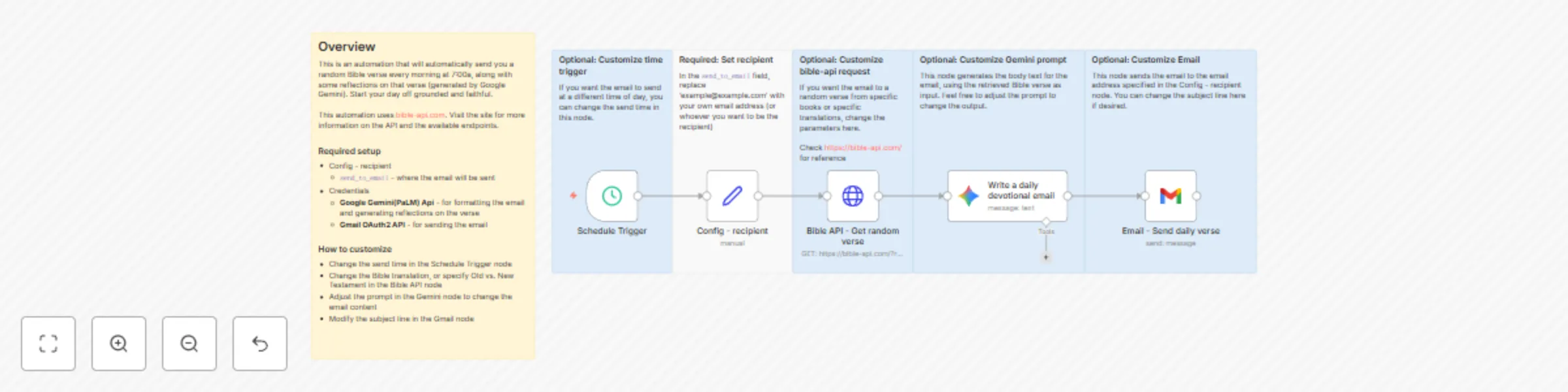
Daily Bible verse & reflection email with bible.api, Google Gemini, and Gmail
## What this does
This automation automatically sends an email with a random Bible verse to a specified recipient every morning, as well as some reflections on the meaning of that verse. Start your day off grounded and faithful.
## Requirements
- n8n
- Gmail account with OAuth2 credentials enabled
- Google Gemini(PaLM) API credentials enabled
## How this works
- Runs every morning at 7:00a.
- Reads the config value `send_to_email`
- Calls [bible.api](https://bible-api.com/) for a random verse
- Uses Gemini to analyze the random verse and create the body text for the email
- Sends an Email to the recipient specified by `send_to_email`
- Subject reads "Daily Bible Verse: Inspiration for Today (`book #:#`)"
## How to set up
1. In the "Config - recipient" node, in the `send_to_email` field, replace "[email protected]" with the desired recipient email
2. Add your Google Gemini(PaLM) API credentials
3. Add your Gmail OAuth2 credentials
4. (optional) In the "Schedule trigger" node, keep the default schedule at 7:00a or change the hour as desired
5. Test the flow by running it to verify the subject and body content.
## How to customize the workflow
- Change the send time in the Schedule Trigger node
- Change the Bible translation, or specify Old vs. New Testament in the Bible API node
- Adjust the prompt in the Gemini node to change the email content
- Modify the subject line in the Gmail node