H

Hashir Bin Waseem

2
Workflows

Workflows by Hashir Bin Waseem

Workflow preview: Automate email management with Gemini AI and Gmail for smart responses
Free advanced

Automate email management with Gemini AI and Gmail for smart responses

Managing your inbox can feel like a full-time job. Some emails deserve an instant response, others need thoughtful handling, and many don’t need a reply at all. This workflow takes that weight off your shoulders by combining **AI intelligence** with **human oversight**, so you spend less time sorting and more time focusing on what matters. --- ## Why This Workflow Matters Think about how much energy gets drained just deciding: - Should I reply to this now? - Is this too sensitive for an automatic response? - Or is this just noise I can safely ignore? This workflow does that decision-making for you. With the help of Google Gemini, it reads each incoming email, categorizes it, and then either: - Replies instantly with a warm, professional message, - Prepares a draft reply for you to review, - Or does nothing if the message is irrelevant. It’s like having a personal assistant who knows when to step in and when to leave things for you. --- ## Benefits You’ll Notice - **Clarity in your inbox**: No more second-guessing which emails need your attention. - **Faster replies**: Routine messages get answered automatically in seconds. - **Peace of mind**: Sensitive or complex topics are flagged for your review, you’re always in control. - **Less mental clutter**: By ignoring noise (marketing blasts, spam, automated notifications), you can focus on meaningful conversations. - **Consistency**: Every reply feels polite, professional, and human, without you lifting a finger. Over time, you’ll notice your inbox feels lighter, your response times improve, and your focus shifts back to real work rather than inbox triage. --- ## How It Works 1. **Gmail Trigger** catches every new incoming email. 2. **AI Categorizer** decides whether the message should be: - **Reply** (safe to answer immediately), - **Draft** (needs your review), - **Nothing** (ignore). 3. **AI Writer** generates either a ready-to-send reply or a draft that feels natural and professional. 4. **Gmail Integration** then either sends, drafts, or ignores, based on the AI’s decision. --- ## Use Cases - **Customer support**: Quick replies for common questions, while important issues get drafted for your review. - **Freelancers & solopreneurs**: Keep clients happy with fast replies, but stay safe on sensitive topics. - **Personal inbox management**: Lighten the load of newsletters, promotions, and low-value emails. --- ## Requirements - An **n8n instance** (self-hosted or cloud). - A **Gmail account** connected via OAuth2 in n8n. - **Google Gemini API access** for AI categorization and drafting. - Basic familiarity with n8n workflows and how to connect credentials. --- ## FAQ **Q: Will this replace my judgment entirely?** No. It only automates what’s safe. Complex or sensitive emails are always drafted for you to review. **Q: Can I customize how the AI writes replies?** Yes. You can adjust the prompt inside the workflow to match your own style and tone. **Q: What happens if the AI misclassifies an email?** At worst, you’ll get a draft instead of an auto-reply. You’ll never lose control over sensitive communication. **Q: Does this cost extra to run?** Using Gmail via n8n is free, but you’ll need Google Gemini API access, which may come with its own usage limits or costs. --- ⚠️ **Important Note**: This workflow comes with **no support**. You need to be comfortable working with n8n, credentials, and AI nodes on your own. It’s provided as-is for the community to experiment with and adapt. --- Start using it, and you’ll quickly see how much lighter your inbox feels.

H
Hashir Bin Waseem
Ticket Management
17 Sep 2025
989
0
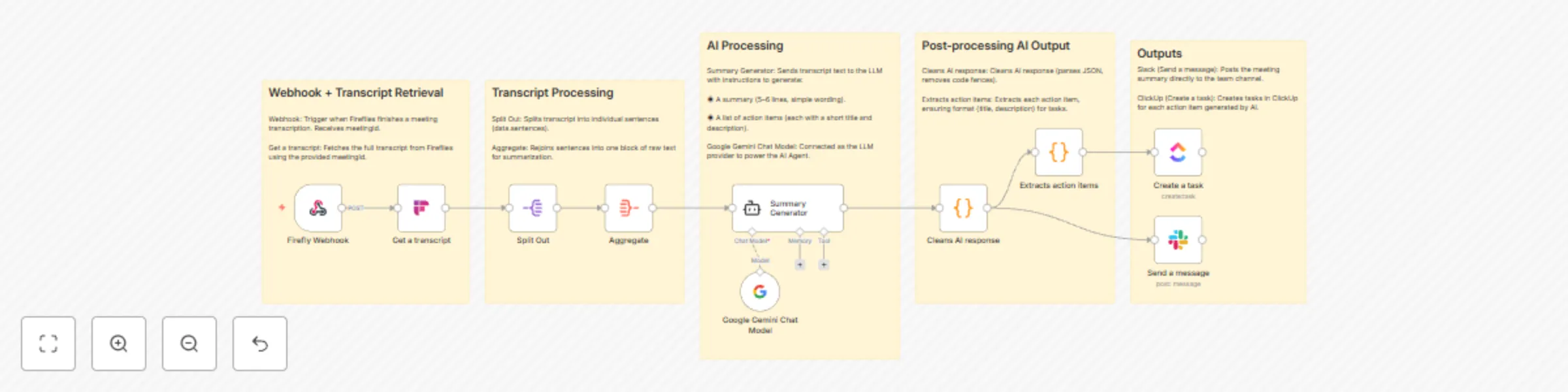
Workflow preview: Fireflies transcripts to meeting summaries & task extractor to Slack & ClickUp
Free advanced

Fireflies transcripts to meeting summaries & task extractor to Slack & ClickUp

# AI-powered Meeting Summaries and Action Items to Slack and ClickUp ## How it Works 1. **Webhook Trigger**: The workflow starts when Fireflies notifies that a transcription has finished. 2. **Transcript Retrieval**: The transcript is pulled from Fireflies based on the meeting ID. 3. **Pre-processing**: The transcript is split into sentences and then aggregated into a raw text block. 4. **AI Summarization**: The aggregated transcript is sent to Google Gemini, which generates a short summary and a structured list of action items. 5. **Post-processing**: The AI response is cleaned and formatted into JSON. Action items are mapped to titles and descriptions. 6. **Distribution**: - The meeting summary is posted to Slack. - Action items are created as tasks in ClickUp. --- ## Use Case This workflow is designed for teams that want to reduce the manual effort of writing meeting notes and extracting action items. - Automatically generate a clear and concise meeting summary - Share the summary instantly with your team on Slack - Ensure action items are not lost by automatically creating tasks in ClickUp - Ideal for distributed teams, project managers, and product teams managing recurring meetings --- ## Requirements - **n8n instance** set up and running - **Fireflies.ai account** with API access to meeting transcripts - **Google Gemini API (via PaLM credentials)** for AI-powered summarization - **Slack account** with OAuth2 credentials connected in n8n - **ClickUp account** with OAuth2 credentials connected in n8n

H
Hashir Bin Waseem
AI Summarization
15 Sep 2025
936
0