Harvex AI
Workflows by Harvex AI
Qualify insurance leads using Vapi, GPT-4 proposals and Airtable
## Overview This workflow automates the "speed-to-lead" process for insurance agencies. It instantly triggers an AI voice call when a new lead comes in, qualifies their needs via conversation, and automatically generates and emails a personalized insurance proposal (Blueprint) using GPT-4. ## Who’s it for -Insurance Brokers & Agencies who want to automate the initial outreach and qualification of inbound leads. -Applicable to any type of Insurance (Life, Health, Home, Auto or bundling ) -Sales Teams who want to filter out unqualified leads and receive detailed call summaries for qualified prospects. -Any business willing to have a 24/7 virtual assistant that want to qualify potential customers intent and draft proposals. ## How it works Lead Ingestion: The workflow starts when a potential client submits an n8n web form (Name, Email, Phone Number). CRM Logging: The lead is immediately created in Airtable . AI Voice Call: The workflow triggers Vapi.ai to call the lead immediately. The AI agent acts as a representative to gather requirements. Analysis & Logic: Once the call ends, Vapi sends the call analysis and transcript back to n8n via a webhook. The workflow checks the "Success Evaluation" and ensures a "Type of Insurance" was identified. Path A: Qualified Lead gets a an insurance blueprint: OpenAI (GPT-4) generates a professional "Insurance Blueprint" email based on the call transcript and client needs (type of insurance the client is seeking). Email Dispatch: The proposal is sent directly to the client via Gmail. CRM Update: The Airtable record is updated to "Qualify" with the call summary. Error Handling: If the email fails to send, a Slack alert is sent to the team with the proposal text for manual follow-up. Path B: Unqualified Lead Notification: The team is alerted via Slack with the reason for disqualification. CRM Update: The Airtable record is updated to "Unqualified." with the call summary. ## Requirements Vapi.ai Account: For the AI voice telephony (requires a configured Assistant and Phone Number). OpenAI Account: For GPT-4 or any LLM model of your choice analysis used for proposals writing. Make sure to have enough tokens. Airtable Account: For lead management. Gmail Account: To send the proposals. Slack Account: For internal team notifications. ## How to set up 1. Configure External Services Airtable: Create a base with a table with a name of your choice. Ensure it has the following columns: Name (Single text), Email (Email), Phone number (Phone/Text), Status (Single Select: Qualify, Unqualified), Type of Insurance (Text), and Call summary (Long Text). Vapi: Create an Assistant in Vapi. Give the assistant a system prompt according to what you want it to say during the call. Ensure you enable the "Server URL" in the Vapi dashboard to point to the Production URL of the Post call Webhook node in this workflow. 2. Configure Credentials in n8n Add credentials for Airtable, OpenAI, Gmail, and Slack. In the Vapi call node, use your credentials or add your Vapi Private API Key to the header (Authorization: Bearer <YOUR_KEY>). 3. Update Node Parameters Airtable Nodes: Select your specific Base and Table in both the "Create a record" and "Update record" nodes. Vapi Call Node: Input your assistantId, phoneNumberId in the JSON body with the actual IDs from your Vapi dashboard and change the international dialing code. Slack Nodes: Select the channel where you want notifications sent. ## How to customize the workflow Change the Persona: Open the Prepare Blueprint (OpenAI) node. Edit the System Message to change the agent's name and Insurance or agency name, tone, or the formatting of the email proposal. Adjust Qualification Logic: Open the Is Qualified? (If) node. You can modify the data Collection by adding more fields to the Form Trigger (e.g., "State," "Age") and map them through to the Airtable nodes and the Vapi assistant prompt context. Switch Communication Channels: Replace the Slack and Gmail nodes with other nodes (e.g., Microsoft Teams, Outlook) depending on your tech stack preferences.
Automate lead enrichment with web scraping, GPT-4o, Airtable and Slack notifications
## AI Lead Enrichment & Notification System ### This n8n template automates the lead enrichment process for your business. Once a lead fills out a form, the workflow scrapes their website, provides a summary of their business, and logs everything into a CRM before notifying your team on Slack. **Some use cases:** "Speed-to-Lead" optimization, lead enrichment, automated prospect research. ### How it works 1. **Ingestion:** A lead submits their details (Name, Email, Website) via a form. 2. **Intelligent scraping:** The workflow scrapes the provided URL. 3. **AI Analysis:** OpenAI's model (GPT-4o) analyzes the extracted data and determines whether there is enough info or if the workflow needs to scrape the "About Us" page. 4. **CRM Sync:** The CRM (Airtable) is updated with the enriched data. 5. **Notification:** An instant Slack notification is sent to the team channel. ### How to use the workflow 1. **Configure the form:** Open the trigger form and input the required fields. 2. **Setup OpenAI:** Ensure that your credentials are connected. 3. **Database mapping:** Ensure your Airtable base has the following columns: *Name*, *Website*, *AI Insight*, *Email*, and *Date*. 4. **Slack setup:** Specify the desired Slack channel for notifications. 5. **Test it out!** Open the form, enter sample data (with a real website), and watch the system enrich the lead for you. ### Requirements * **OpenAI API Key** (For analyzing website content and generating summaries) * **Airtable** (For CRM and logging) * **Slack** (For team notifications)
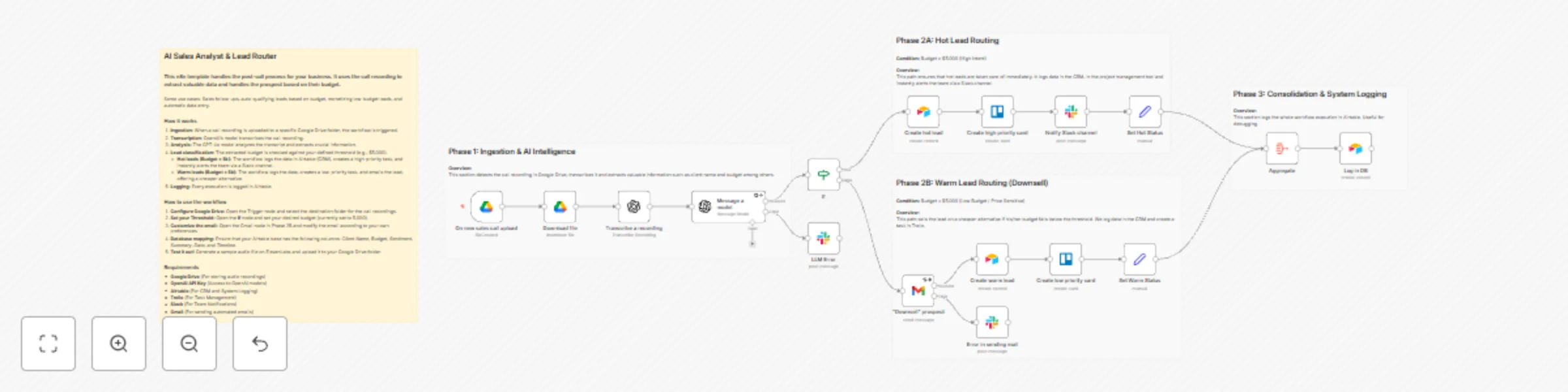
Analyze sales calls & route leads with GPT-4o, Airtable and Trello
## AI Sales Analyst & Lead Router ### This n8n template handles the post-call process for your business. It uses the call recording to extract valuable data and handles the prospect based on their budget. Some use cases: Sales follow-ups, auto-qualifying leads based on budget, monetizing low-budget leads, and automatic data entry. ### How it works 1. **Ingestion:** When a call recording is uploaded to a specific Google Drive folder, the workflow is triggered. 2. **Transcription:** OpenAI's model transcribes the call recording. 3. **Analysis:** The GPT-4o model analyzes the transcript and extracts crucial information. 4. **Lead classification:** The extracted budget is checked against your defined threshold (e.g., $5,000). * **Hot leads (Budget > 5k):** The workflow logs the data in Airtable (CRM), creates a high-priority task, and instantly alerts the team via a Slack channel. * **Warm leads (Budget < 5k):** The workflow logs the data, creates a low-priority task, and emails the lead, offering a cheaper alternative. 5. **Logging:** Every execution is logged in Airtable. ### How to use the workflow 1. **Configure Google Drive:** Open the Trigger node and select the destination folder for the call recordings. 2. **Set your Threshold:** Open the **If** node and set your desired budget (currently set to 5,000). 3. **Customize the email:** Open the Gmail node in Phase 2B and modify the email according to your own preferences. 4. **Database mapping:** Ensure that your Airtable base has the following columns: *Client Name*, *Budget*, *Sentiment*, *Summary*, *Date*, and *Timeline*. 5. **Test it out!** Generate a sample audio file on ElevenLabs and upload it to your Google Drive folder. ### Requirements * **Google Drive** (For storing audio recordings) * **OpenAI API Key** (Access to OpenAI models) * **Airtable** (For CRM and System Logging) * **Trello** (For Task Management) * **Slack** (For Team Notifications) * **Gmail** (For sending automated emails)