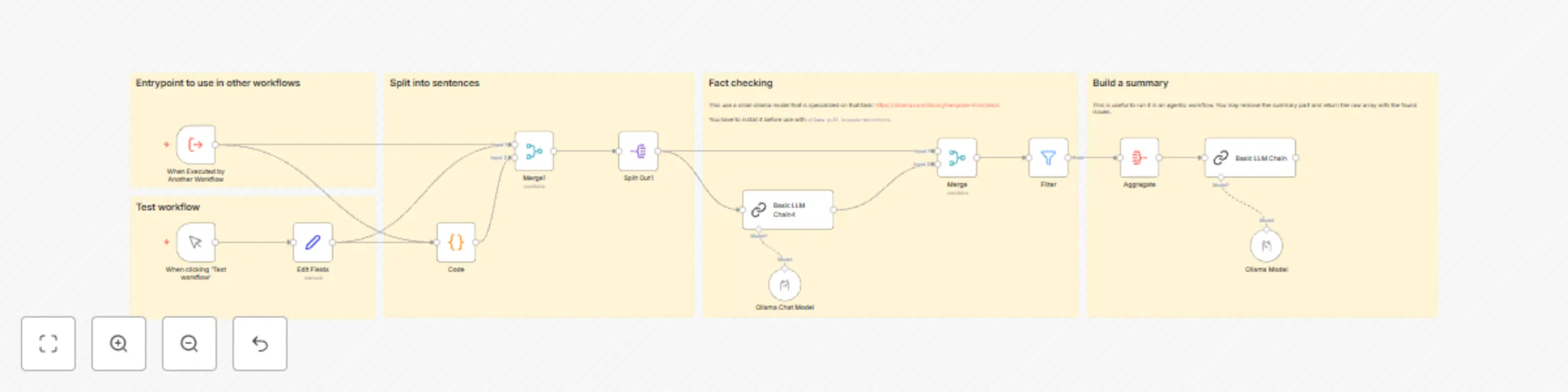
# Fact-Checking Workflow Documentation ## Overview This workflow is designed for automated fact-checking of texts. It uses AI models to compare a given text with a list of facts and identify potential discrepancies or hallucinations. ## Components ### 1. Input - The workflow can be initiated in two ways: a) Manually via the "When clicking 'Test workflow'" trigger b) By calling from another workflow via the "When Executed by Another Workflow" trigger - Required inputs: - `facts`: A list of verified facts - `text`: The text to be checked ### 2. Text Preparation - The "Code" node splits the input text into individual sentences - Takes into account date specifications and list elements ### 3. Fact Checking - Each sentence is individually compared with the given facts - Uses the "bespoke-minicheck" Ollama model for verification - The model responds with "Yes" or "No" for each sentence ### 4. Filtering and Aggregation - Sentences marked as "No" (not fact-based) are filtered - The filtered results are aggregated ### 5. Summary - A larger language model (Qwen2.5) creates a summary of the results - The summary contains: - Number of incorrect factual statements - List of incorrect statements - Final assessment of the article's accuracy ## Usage 1. Ensure the "bespoke-minicheck" model is installed in Ollama (`ollama pull bespoke-minicheck`) 2. Prepare a list of verified facts 3. Enter the text to be checked 4. Start the workflow 5. The results are output as a structured summary ## Notes - The workflow ignores small talk and focuses on verifiable factual statements - Accuracy depends on the quality of the provided facts and the performance of the AI models ## Customization Options - The summarization function can be adjusted or removed to return only the raw data of the issues found - The AI models used can be exchanged if needed This workflow provides an efficient method for automated fact-checking and can be easily integrated into larger systems or editorial workflows.