G

Gareth B. Davies

3
Workflows

Workflows by Gareth B. Davies
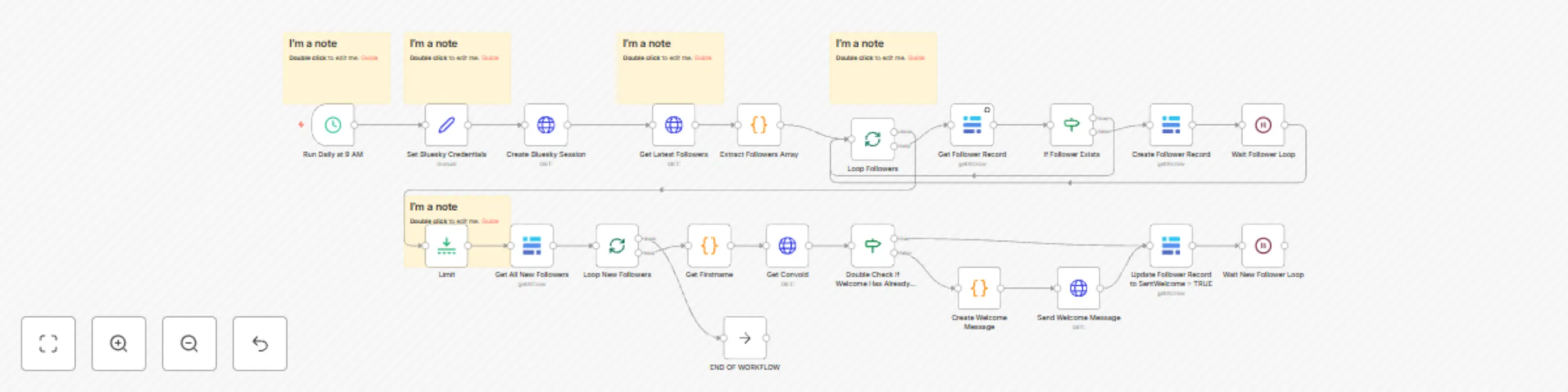
Workflow preview: Automatically send a direct message (DM) to new followers on Bluesky using Baserow
Free advanced

Automatically send a direct message (DM) to new followers on Bluesky using Baserow

Send **personalized welcome messages** to your new Bluesky followers automatically, helping you maintain engagement while saving time. This workflow monitors your follower list and sends customized direct messages, creating a **warm welcome for new connections** without manual intervention. ## How it works * Checks your Bluesky followers list **daily at 9 AM** * Identifies new followers by comparing against a database * **Extracts the follower's first name** when available * Sends a personalized welcome message with optional link * **Prevents duplicate messages** through double-verification * Maintains a record of sent messages to avoid repetition ## Set up steps (10-15 minutes) 1. Create a Bluesky account if you haven't already 2. Generate an app password in your Bluesky settings 3. Enter your **Bluesky handle** and **app password** in the "Set Bluesky Credentials" node 4. Set up your database (Baserow, or adapt for Airtable/Google Sheets) 5. Customize your welcome message in the "Create Welcome Message" node 6. Optional: Adjust the regular check time (default: 9 AM) ## Features * **Personalized messaging** using follower's first name when available * **Database tracking** to prevent duplicate messages * **Basic rate limiting protection** to stay within API limits * Customizable welcome message with clickable links * Ability to handle up to **100 new followers per check** ## Perfect for creators who want to * Welcome new followers **consistently** * **Save time** on manual messaging * Build **early engagement** with followers * Share important links or resources * Maintain a **professional presence** * **Scale** their community management ## Suggested enhancements * Add **message templates** for different follower types * Include email/Slack notifications for errors * Add **analytics tracking** for message success rates * Implement **dynamic timing** based on follower activity * Create **A/B testing** for different welcome messages * Add follower segmentation based on profile data

G
Gareth B. Davies
Social Media
31 Jan 2025
778
0

Workflow preview: Create threads on Bluesky
Free advanced

Create threads on Bluesky

Create engaging, structured threads on Bluesky with **precise control over post timing and visibility**. This workflow helps content creators and social media managers schedule and publish threaded posts that maintain **proper connections and formatting**, ensuring your content appears exactly as intended. ## How it works * Creates an **initial visible post** that starts your thread * Adds a series of **hidden reply posts** that form the body of your thread * Maintains proper **parent-child relationships** between posts to ensure correct threading * Enforces **timing delays** between posts to prevent rate limiting * Concludes with **two visible posts** at the end of your thread The result is a clean, professional-looking thread where **only the first and last two posts are immediately visible** to your followers, encouraging engagement while maintaining a clean profile view. ## Set up steps (10-30 minutes) 1. Create a Bluesky account 2. Enter your **Bluesky handle** and **app password** in the "Set Bluesky Credentials" node 3. Customize the post text in the Code nodes to match your content: - Initial visible post - Hidden reply posts - Final visible posts 4. Adjust the scheduling in the "Run Daily at 9 AM" node to match your preferred posting time ## Suggested enhancements * Add error handling with retry logic for API failures * Add input validation for post length and credential format * Include error notifications via email or Slack * Add data persistence to track successful posts and resume failed threads * Make timing delays configurable with exponential backoff * Add monitoring for rate limits and API quotas --- ### For Social Media Managers who want: * Control over post visibility and timing * Automated posting of long-form content * Professional-looking content presentation

G
Gareth B. Davies
Social Media
25 Jan 2025
1675
0
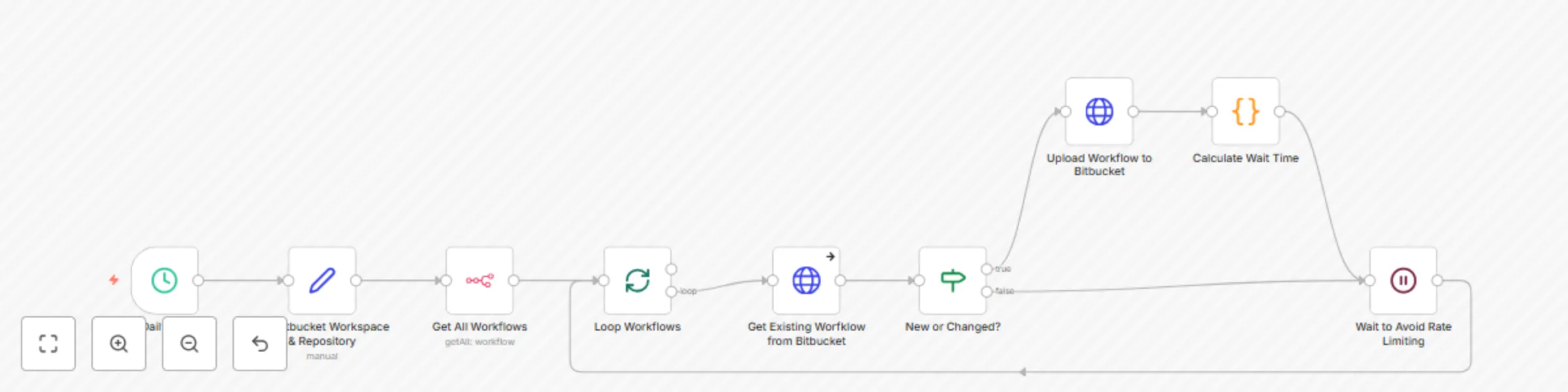
Workflow preview: Backup n8n workflows to Bitbucket
Free intermediate

Backup n8n workflows to Bitbucket

An automated backup solution designed for self-hosted n8n users to automatically backup their workflows to Bitbucket, leveraging Bitbucket's free private repository offering. Perfect for maintaining version control of your n8n workflows without additional costs. ## How it works: * Runs on a regular schedule to check all workflows in your n8n instance * Compares each workflow with its version in Bitbucket * Only uploads workflows that are new or have changed * Uses basic rate limiting to stay within Bitbucket's API limits * Formats filenames for easy tracking and includes timestamps in commit messages * Handles errors gracefully with automatic retries ## Set up steps (10-15 minutes): 1. Create a free Bitbucket account and private repository 2. Create a Bitbucket App Password with repository write access 3. Add Bitbucket credentials to n8n (using your username and app password) 4. Set up n8n API access (generate API key in your n8n instance) 5. Configure your Bitbucket workspace and repository names in the Set node 6. Optional: Adjust the backup schedule (default: 2 AM daily) ### Perfect for n8n self-hosters who want: * Version control for their workflows * Automated daily backups * Free private repository storage * Easy workflow recovery * Change tracking over time The workflow includes basic error handling and rate limiting to ensure reliable backups even with larger numbers of workflows. Adjust your timing based on https://support.atlassian.com/bitbucket-cloud/docs/api-request-limits/.

G
Gareth B. Davies
DevOps
24 Jan 2025
1495
0