G

Giulio

2
Workflows

Workflows by Giulio

Workflow preview: Build an endpoint to perform CRUD operations with multiple HTTP methods
Free advanced

Build an endpoint to perform CRUD operations with multiple HTTP methods

This n8n workflow template allows you to create a CRUD endpoint that performs the following actions: - Create a new record - Get a record - Get many records - Update a record - Delete a record This template is connected with Airtable but you can replace the Airtable nodes with anything you need to interact with (e.g. Postgres, MySQL, Notion, Coda...). The template uses the n8n Webhook node setting 'Allow Multiple HTTP Methods' to enable multiple HTTP methods on the same node. # Features - Just two nodes to create 5 endpoints - Use it with Airtable or replace the Airtable nodes for your own customization - Add your custom logic exploiting all n8n's possibilities # Workflow Steps - **Webhook node**: exposes the endpoints to get many records and create a new record - **Webhook (with ID) node**: exposes the endpoints to get, update, and delete a record. Due to a n8n limitation, this endpoint will have an additional code in the path (e.g. https://my.app.n8n.cloud/webhook/580ccc56-f308-4b64-961d-38323501a170/customers/:id). Keep this in mind when using these endpoints in your application - **Various Airtable nodes**: execute various specific operations to interact with Airtable records # Getting Started To deploy and use this template: 1. Import the workflow into your n8n workspace 2. Customize the endpoint paths by tweaking the 'Path' parameters in the 'Webhook' and 'Webhook (with ID)' nodes (currently *customers*) 3. Set up your Airtable credentials by following [this guide](https://docs.n8n.io/integrations/builtin/credentials/airtable/) and customize the Airtable nodes by selecting your base, table, and the correct fields to update. *...or...* replace the Airtable nodes and connect the endpoint to any other service (e.g. Postgres, MySQL, Notion, Coda) # How to use the workflow 1. Activate the workflow 2. Connect your app to the endpoints (production URLs) to perform the various operations allowed by the workflow Note that the Webhook nodes have two URLs, one for testing and one for production. The testing URL is activated when you click on 'Test workflow' button and can't be used for production. The production URL is available after you activate the workflow. More info [here](https://docs.n8n.io/integrations/builtin/core-nodes/n8n-nodes-base.webhook/#webhook-urls). Feel free to get in touch with me if you have questions about this workflow.

G
Giulio
Engineering
24 Oct 2024
4566
0
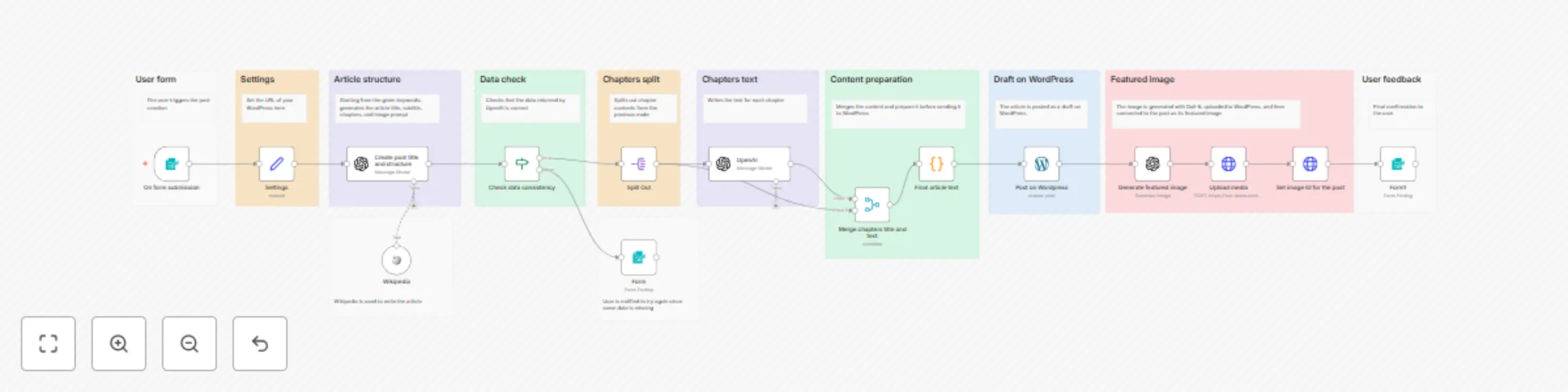
Workflow preview: Write a WordPress post with AI (starting from a few keywords)
Free advanced

Write a WordPress post with AI (starting from a few keywords)

This n8n workflow template allows you to write WordPress posts by just providing a few keywords. It uses AI technology to write the text and to create the post's featured image. The text includes an introduction, chapters, and conclusions. Each chapter is written independently and this allows you to create also very long articles. The workflow uses technologies provided by Open AI: Chat GPT for the text and Dall-E for the image. I suggest reviewing the created posts before publishing them on your WordPress website. The article generation might take some minutes as each chapter is created independently. ### Features - **Easy to use:** Easy web interface to start the generation of the WordPress post - **AI-powered:** Text and image generation is done by artificial intelligence - **Long-text ready:** Possibility to create very long articles - **Configurable:** Possibility to provide as many keywords as you want, to choose the number of chapters and the length of the article - **Plugs into your WordPress:** Easily integrates with your WordPress website - **Tweak it as you want:** Fine-tune the Open AI prompts and the workflow as you want ### Workflow Steps - **User form:** An n8n form is used to trigger the post creation - **Settings:** This node is used to set your WordPress URL (which is used later in the workflow) - **Article structure:** First AI action that writes the introduction, the conclusions, and the chapter structure. - **Data check:** Check that the data provided by the AI is valid - **Chapters split/Chapters text:** Splits the data for each chapter in a separate item and generates each chapter's text with AI - **Content preparation:** Prepares the text for posting merging the introduction, the chapters, and the conclusions. Adds some basic HTML formatting - **Draft on WordPress:** Creates the draft post on WordPress - **Featured image:** Creates a featured image and adds it to the post on WordPress - **User feedback:** Sends a feedback to the user on the n8n form ### Getting Started To deploy and use this template: 1. Import the workflow into your n8n workspace 2. Set your WordPress URL in the `wordpress_url` field in the "Settings" node. Include the slash (`/`) at the end of the URL 3. Set up your Open AI n8n credentials by following [this guide](https://docs.n8n.io/integrations/builtin/credentials/openai/). The Open AI credentials are used by the Open AI nodes ("Create post title and structure", "Create chapters text", and "Generate featured image") 4. Set up your WordPress n8n credentials by following [this guide](https://docs.n8n.io/integrations/builtin/credentials/wordpress/). The WordPress credentials are used by the WordPress and HTTP Request nodes ("Post on Wordpress", "Upload media", and "Set image ID for the post"). Pay attention that the "Password" in the WordPress credentials is not the user's password by the Application Password ### How use the workflow to create a WordPress post 1. Activate the workflow 2. Open the "Form" node and copy the "Production URL". This is the public URL of the form to AI-write the post 3. Open the URL in a browser and fill in the form 4. Wait a few minutes till you get the feedback in the form that the post was created 5. Go to WordPress and check the newly created draft post. Review and publish your post!

G
Giulio
Content Creation
22 Mar 2024
83269
0