F

FlyCode

1
Workflow

Workflows by FlyCode

Workflow preview: Recover failed Stripe payments with AI emails (by FlyCode)
Free advanced

Recover failed Stripe payments with AI emails (by FlyCode)

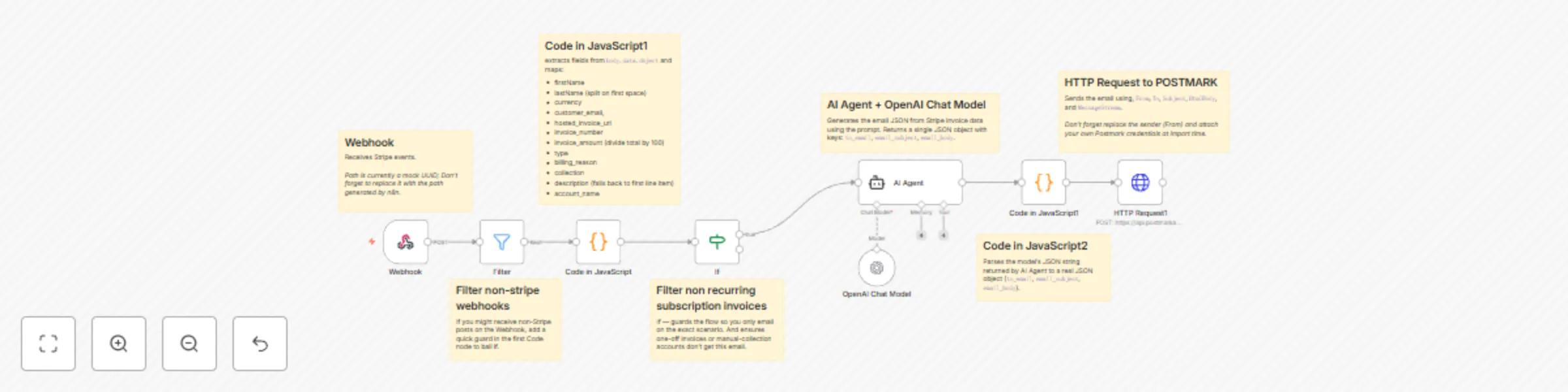
# ⚙️ Automated Stripe Failed Payment Recovery (with Postmark + AI Email Generator) #### Recover failed Stripe subscription payments with AI-personalized emails sent via Postmark. ## 📝 Template Description Recover failed subscription payments automatically with Stripe, Postmark, and AI. This workflow listens for Stripe **`invoice.payment_failed`** webhooks, checks that the event is related to an auto-charged subscription, and then automatically sends a **personalized email** (generated with AI) to the customer. The email is polite, branded, but also urgent — encouraging the customer to pay quickly and avoid service cancellation. --- ## 🛠️ How it works 1. **📣 Webhook** Listens for Stripe webhook events. Make sure to connect it in your Stripe dashboard (see setup below). 2. **🧹 Filter (Guard)** Ensures the event is indeed an **invoice** event and filters out unrelated webhooks. 3. **💡 Code Node** Extracts useful fields (firstName, lastName, customer email, amount, currency, invoice number, hosted invoice URL, subscription description, account name). 4. **✅ If Node** Verifies that: - Event type = `invoice.payment_failed` - Billing reason = `subscription_cycle` - Collection method = `charge_automatically` 👉 This ensures only **recurring subscription invoices** with auto-payment are processed. 5. **🤖 AI Agent + OpenAI** Generates a **ready-to-send email JSON** (to, subject, HTML body) using the extracted Stripe data. ✍️ You can **customize the prompt** here to match your brand’s tone of voice and style. 6. **🧩 Code Parser** Parses the AI model’s JSON output into fields (`to_email`, `email_subject`, `email_body`). 7. **📧 HTTP Request (Postmark)** Sends the email using Postmark’s API. You’ll need your own **Postmark Server Token**, From address, and Message Stream. --- ## 🚀 Setup Instructions ### 1. Stripe Webhook - Go to [Stripe Dashboard → Developers → Webhooks](https://dashboard.stripe.com/test/webhooks). - Click **+ Add endpoint**. - Use your n8n Webhook URL (from the Webhook node) as the endpoint. - Select event type: **`invoice.payment_failed`**. - Save and deploy. 👉 Example docs: [Stripe: Listen to events with webhooks](https://stripe.com/docs/webhooks). ### 2. Disable Stripe’s Default Failed Payment Emails - In Stripe, go to **Billing → Settings → Customer emails → Manage failed payments**. - Turn off **“Failed payment”** emails under the **Revenue Recovery** section. - This prevents customers from receiving duplicate or conflicting emails. ### 3. Postmark Setup - Create a [Postmark account](https://postmarkapp.com). - Add a **Server** and copy the **Server API Token**. - In n8n, add **Postmark credentials** with this token. - Configure: - **From** = your verified sending email (must be verified in Postmark). - **MessageStream** = typically `"outbound"` (or any custom stream you set up). Docs: [Postmark API overview](https://postmarkapp.com/developer/api/overview). ### 4. OpenAI Setup - Add your OpenAI credentials in n8n. - Attach them to the OpenAI Chat Model node. - You can modify the prompt in the **AI Agent node** to fit your company’s style. --- ## ✨ Customization Tips - Update the **AI prompt** with your brand’s **tone of voice** (friendly, formal, playful, etc.). - Adjust the **HTML email design** inside the prompt (button colors, footer, etc.). - Add extra guard conditions (e.g., only trigger if `invoice_amount > 0`). - Change the sending service: replace Postmark with Gmail, SMTP, or another provider. - 💬 Or talk to our **Billing Recovery Experts** at [flycode.com](https://flycode.com) for hands-on help. --- ## ✅ Outcome Whenever a customer’s subscription payment fails, this workflow: - Detects it instantly via Stripe - Generates a polite but urgent recovery email - Sends it automatically via Postmark Result: **Fewer cancellations, higher recovered revenue, and a smoother customer experience.** 💸💌

F
FlyCode
Lead Nurturing
21 Sep 2025
23
0