felipe biava cataneo
Workflows by felipe biava cataneo
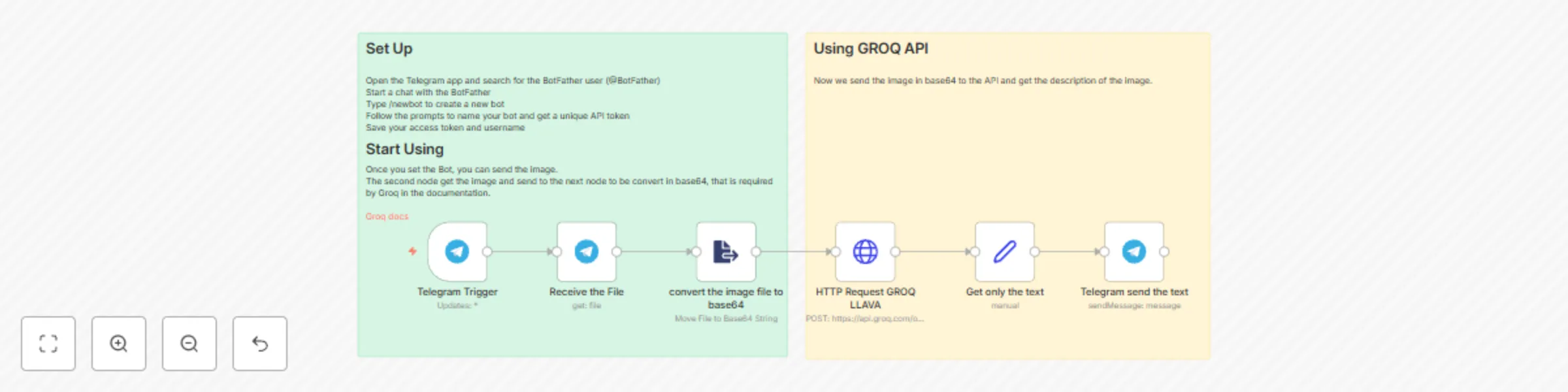
Convert image to text using GROQ LLaVA V1.5 7B
## What this template does This template uses GROQ LLAVA V1.5 7B API that offers fast inference for multimodal models with vision capabilities for understanding and interpreting visual data from images. . The users send a image and get a description of the image from the model. ## Setup - Open the Telegram app and search for the BotFather user (@BotFather) - Start a chat with the BotFather - Type /newbot to create a new bot - Follow the prompts to name your bot and get a unique API token - Save your access token and username - Once you set your bot, you can send the image, and get the descriptions.
Telegram chat with PDF
## What this template does This template serves as a Chatbot that enables you to ask questions about the content of a PDF directly in Telegream. It checks incoming Telegram messages if they contain a document. If they do, it stores the PDF in a Pinecone Vector store. If there's no document, it will search the Vector Store for information and try to answer your question. ## Setup 1. Open the Telegram app and search for the BotFather user (@BotFather) 2. Start a chat with the BotFather 3. Type /newbot to create a new bot 4. Follow the prompts to name your bot and get a unique API token 5. Save your access token and username Once you set your bot, you can send the pdf, and then ask questions about the content. ## How to adjust it to your needs - You can exchange the Groq chat model with any model that you like - Exchange Pinecone with any other vector store tool you like (e.g. Supabase, Postgres or QDrant) #Telegram, #Pinecone, #Openai, #GroQ